
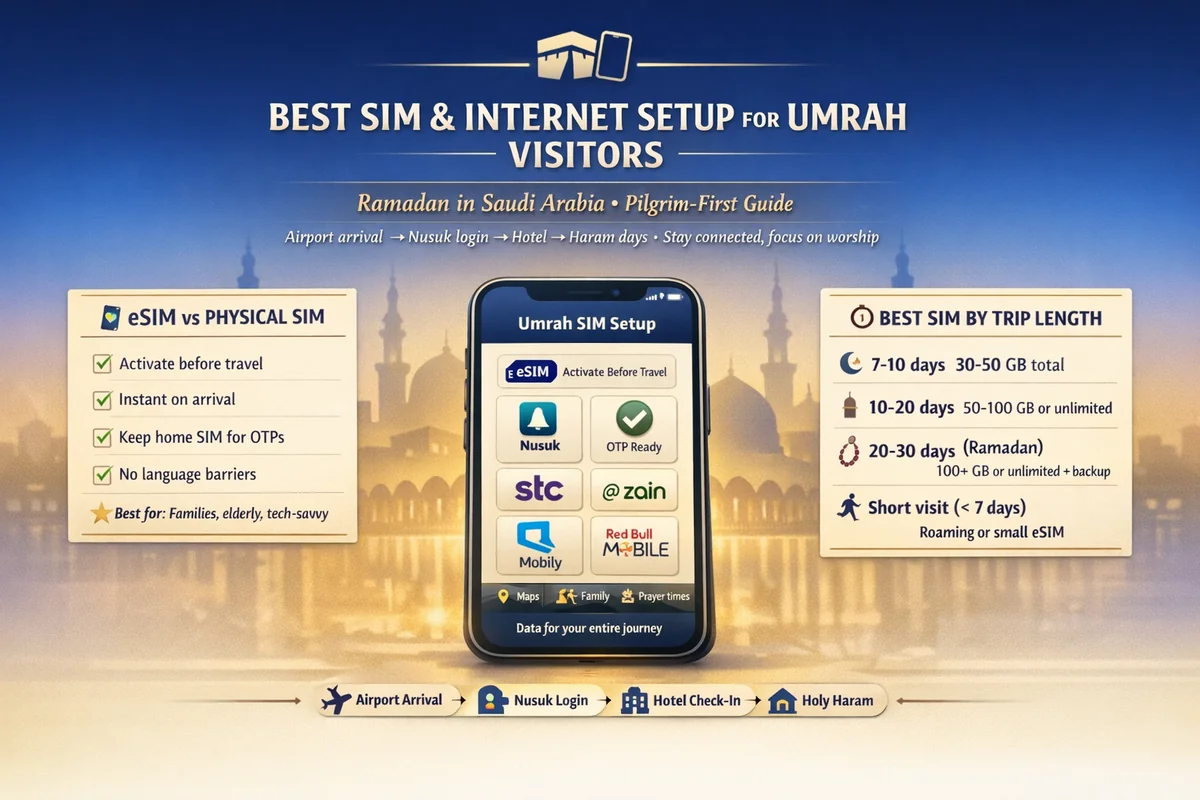
Best Sim For Umrah Visitors in ramadan saudi: a pilgrim-first phone setup guide
Landing for Umrah in Ramadan is beautiful.
It can also get messy fast if your phone setup is weak.
One minute you need the Nusuk app, the next minute you need maps, hotel contact, ride apps, and family calls. If your internet drops or your recharge fails, even a simple task starts feeling heavy.
This guide is built for real pilgrims, not tech people. It follows the actual flow: before flight, airport arrival, Nusuk login, hotel, Haram days, and return flight.
✅ TL;DR – best sim for umrah visitors in ramadan saudi
The best setup for Umrah in Ramadan is usually a local Saudi visitor plan (not roaming), plus a backup recharge method and offline maps. Pick eSIM if your phone supports it and you want speed, or a physical SIM if you want a simple plug-and-use option. Set up Nusuk and test OTP before you reach the Haram.
who this guide is for
Who this guide is for: This is for Umrah visitors coming to Saudi Arabia in Ramadan who need a simple, reliable phone setup for Makkah, Madinah, maps, ride apps, calls, and the Nusuk app. It also helps families traveling together, first-time pilgrims, and anyone worried about OTP or recharge problems.
If you’re staying 5–14 days, this guide is especially useful.
If you’re coming with parents, it matters even more. My students always ask about this part because one person’s phone usually becomes the “family control center” for everything.
You’ll see terms like umrah sim card saudi arabia, saudi visitor sim for pilgrims, and mobile network for umrah in travel groups. Most people mean the same thing: “I need a line that works the moment I need it.”
best sim choice by trip length
Best SIM choice by trip length: Short trips usually need a visitor plan with enough data for maps, messaging, ride apps, and video calls. Longer stays need a plan with more validity, easier recharge, and a backup method. The best plan is not only about price—it’s about whether it lasts your whole trip without stress.
Think of your SIM like your water bottle during Umrah. A tiny one is cheap, sure. But if you keep running out at the wrong time, you pay for that “cheap” choice with stress.
For 5–7 days: choose a solid visitor plan with enough data and at least one recharge option saved. Most pilgrims in this range do fine with moderate data if they use hotel Wi-Fi for uploads and calls.
For 8–14 days: focus on validity first, then data. Many people buy a plan with good data but short validity, then panic near the end.
For 15–30 days: get a visitor plan with longer validity or a line that is easy to top up. This matters for families and people moving between Makkah and Madinah.
Saudi operators commonly offer visitor packages in 14-day, 21-day, and 30-day durations, which matches the way most Umrah trips are planned in Ramadan. That’s why pilgrim internet package saudi searches usually mention days, not just GB.
A quick real-world note:
People often underestimate data usage because they forget video calling home, live location sharing, cloud photo backup, and streaming Qur’an audio all eat data quietly.
esim vs physical SIM for pilgrims
eSIM vs physical SIM for pilgrims: eSIM is usually faster to set up if your phone supports it, and it lets you keep your home number active on the same phone. A physical SIM is easier for beginners who want a simple, visible setup and don’t want to deal with QR activation screens.
Both can work well for tourist sim saudi ramadan use.
Choose eSIM if:
- Your phone supports eSIM
- You want to keep your home SIM active for bank messages
- You’re comfortable scanning a QR code and changing phone settings
- You want fewer tiny SIM-card handling problems at the airport counter
Choose physical SIM if:
- You’re not sure your phone supports eSIM
- You prefer a simple insert-and-use setup
- You’re helping an older parent and want fewer settings to manage
- You may switch phones during the trip
One common beginner mistake: choosing eSIM on the counter because it sounds modern, then learning their phone model doesn’t support it. I used to mix this up all the time when helping people with older dual-SIM phones.
Another common one: keeping home roaming data ON while using a Saudi SIM. Then the wrong line eats your money.
For many families, the best setup is mixed: one main phone on local Saudi data, one backup line (home SIM or second Saudi line), and hotel Wi-Fi for heavy uploads.
phone setup before flying to Saudi
Phone setup before flying to Saudi: Before departure, update your phone, check if it supports eSIM, install key apps, save offline maps, and make sure your important accounts can still receive codes. This step prevents the biggest travel headache: trying to fix everything while tired at the airport.
Do this before you leave home, not in the boarding line.
Here’s the simple setup order that works for most pilgrims:
- Check phone compatibility (especially for eSIM)
- Update your phone software
- Install and sign in to key apps (maps, ride app, messaging, Nusuk app)
- Download offline maps for Makkah and Madinah
- Turn off auto cloud backup on mobile data
- Save screenshots of hotel booking, visa docs, and important numbers
- Label your SIMs in phone settings (Home / Saudi)
This one step saves a lot of pain: in your phone settings, set the default line for mobile data and a separate default line for calls if you’re using dual SIM. If you skip this, your phone may switch lines at the worst time.
How much mobile data needed for umrah trip? There isn’t one perfect number, but many pilgrims use more than expected in Ramadan because of ride apps, maps, messaging, and video calls. If you stream a lot or share live video, choose more data than you think.
If you’re asking about umrah phone setup saudi, this pre-flight step is the real answer. The airport SIM is only one part.
airport arrival SIM checklist
Airport arrival SIM checklist: At the airport, buy from an official operator counter or authorized point, use your passport details for registration, and test the line before leaving the counter. Don’t walk away until calls, data, and the SIM number all work on your phone.
This is where many people rush.
Then they spend the next two hours fixing something tiny.
Use this pilgrim-safe airport checklist:
- Ask clearly: “Visitor SIM for Umrah” (or show the phrase saudi visitor sim for pilgrims)
- Choose eSIM or physical SIM based on your phone
- Confirm package validity (14 / 21 / 30 days matters)
- Confirm what is included (data, local minutes, international minutes, social apps if any)
- Ask how to recharge (app, voucher, code, store)
- Save the number and write it down
- Test data ON and open maps
- Test a call and one message
- Take a photo of the package screen/receipt
Small but important: ask the staff to show your actual Saudi number on your phone screen. A lot of recharge problems happen because people type the wrong number later.
If you’re deciding airport sim or city sim for umrah, airport is usually better for first-timers because you need internet immediately for transport, hotel contact, and Nusuk. City shops can be fine too, but only if you already have a working connection.
nusuk and OTP setup steps
Nusuk and OTP setup steps: Install or update the Nusuk app, sign in early, and test account access while your connection is stable. If you don’t receive an OTP, first check the phone number format, active data line, SMS access, and whether your home SIM is still the default for messages.
The app itself is official and widely used for Umrah services, so your setup should be calm and simple—not done while walking in a crowd.
Here’s a clean way to avoid the common nusuk otp sim issue:
- Open phone settings and confirm which line is active for data
- Make sure SMS can arrive on the line you’re expecting
- Use the correct country code if entering a number manually
- Turn off VPN if you use one
- Retry on stable Wi-Fi or stable mobile data
- Check app update status
- Use the official Nusuk help/support channels if needed
Micro-scenario: You arrive tired, your Saudi SIM works for data, but OTP still doesn’t come. Many times the issue is simple—the phone is still routing SMS or default line behavior through the home SIM settings. Check SIM labels and defaults first before panicking.
Another micro-scenario: A family member gets OTP on their phone, but your app is on another phone. Don’t keep switching numbers. Keep one account flow on one device until it works.
Nusuk otp not received on saudi sim is one of the most searched problems for a reason. The fix is often settings, line selection, or timing—not a “broken app.”
makkah and madinah data-use reality in Ramadan
Makkah and Madinah data-use reality in Ramadan: In Ramadan, your phone does more work than usual—maps, ride apps, family messages, live location, hotel contact, and the Nusuk app. In peak hours and crowded areas, mobile internet can feel slower, so plan a backup and don’t rely on one method only.
This is normal in busy pilgrimage periods.
It doesn’t always mean your SIM is bad.
People search makkah madinah mobile data because they expect the same internet speed everywhere. But your experience changes by crowd level, building layout, hotel location, and time of day.
Here’s the part most people miss: your hotel wifi is not a full backup if it only works well in the lobby. Test it in your room. If it’s weak, keep enough mobile data for rides and map use.
Hotel wifi vs mobile data makkah is not really “one is better.” It’s a teamwork setup: mobile data for movement, Wi-Fi for heavy uploads and long calls.
Micro-scenario: You’re leaving after Taraweeh and trying to call a car. Your data works, but slowly. If your map is already cached offline and your ride app is open, you still manage. If everything needs to load from zero, that’s when stress starts.
Families should also plan shared data behavior:
- Turn off auto video uploads
- Use lower video quality for calls
- Share one live location instead of constant calls
- Save hotel location in maps before leaving
That simple habit can save your ramadan umrah internet package from draining early.
recharge, validity, and backup plan
Recharge, validity, and backup plan: The best pilgrim setup is not just buying a SIM. It’s knowing how to top up, how long the line stays active, and what your backup is if recharge or data fails at night. Save at least two recharge methods before you need them.
This is where smart travelers stay calm.
Everyone else starts asking random people in the hotel lobby.
Use this simple backup plan for saudi telecom for umrah:
- Primary: local Saudi visitor SIM (data + calls)
- Backup 1: operator app or recharge code method saved
- Backup 2: hotel Wi-Fi + offline maps
- Backup 3: home SIM kept active for emergency OTP/calls (with roaming data off unless needed)
Important beginner point: validity is not the same as data balance. You can still have data left but lose smooth service if the package period ends.
What to do if recharge fails in saudi? First check the number, then check if you’re using the correct operator recharge method. A failed top-up is often a wrong number, wrong code, or app login issue—not a network collapse.
How to keep a Saudi SIM active until return flight? Keep an eye on package end date and line activity, especially if you bought the SIM early or used a short package. A small paid action or recharge can matter for line status on some operators.
If you face a serious unresolved telecom problem, you can first raise it with the operator, and if needed there is a telecom complaint escalation path in Saudi through CST. For pilgrims, this is more of a “good to know” safety valve than something you’ll usually need.
what to do if data stops working
What to do if data stops working: Don’t restart everything blindly. Check the simple things first: active SIM line, package validity, remaining balance, airplane mode reset, APN auto settings, and whether your phone switched data back to your home SIM.
Most fixes take two minutes.
People lose one hour because they guess.
Use this order when mobile network for umrah suddenly stops:
- Turn airplane mode on/off (10 seconds)
- Check which SIM is set for mobile data
- Confirm package validity is not expired
- Check if data limit is finished
- Restart the phone
- Test in another area (building congestion can affect signal feel)
- Try hotel Wi-Fi and open the operator app
- Contact operator support
Quirky beginner mistake #1: Data is “dead,” but mobile data is switched to the home SIM.
Quick fix: Set the Saudi line as the data line again.
Quirky beginner mistake #2: Package expired, but there is still balance.
Quick fix: Buy a new package, not just basic recharge.
Quirky beginner mistake #3: Auto-updates and cloud photo sync burned the data.
Quick fix: Turn them off on mobile data.
Quirky beginner mistake #4: Phone was set to eSIM but the eSIM was never fully installed.
Quick fix: Go back to cellular settings and confirm the line is active.
Quirky beginner mistake #5: Wrong number used for recharge.
Quick fix: Copy the number from phone settings, don’t type from memory.
quick checklist before your return flight
Quick checklist before your return flight: Before leaving Saudi, make sure your key apps still work, you have transport internet, and your important documents are available offline. If you want to keep the Saudi line for a future trip, check its status and validity rules before the SIM goes inactive.
This last step is easy to ignore.
It matters a lot on travel day.
Use this final ramadan umrah phone checklist:
- Check airport transport app works
- Save boarding pass and hotel checkout proof offline
- Confirm your home SIM is ready again for landing
- Turn roaming settings back on/off as needed
- Use remaining Saudi data for final uploads if helpful
- Save the Saudi number in notes (helpful if you return soon)
- Remove eSIM only if you’re sure you won’t need it
A short story from a beginner mistake: one pilgrim I helped had everything done right in Makkah, but on the day of departure he deleted his Saudi eSIM at the hotel because he thought the trip was “basically over.” Then his airport pickup message and ride app both needed internet before check-in. He ended up asking three strangers for hotspot. The fix was simple, and he laughed later: keep the line until you’re actually through the airport flow.
Best sim for makkah and madinah visitors is not one magic brand for everyone. The best setup is the one that matches your trip length, your phone type, and your backup plan.
Keep it simple. Keep it tested. Keep your worship time free from phone stress.
📊 best sim for umrah visitors in ramadan saudi: pilgrim setup table
Use this table to choose the safest setup by trip style. It’s built for real Umrah use: Nusuk app, maps, rides, family calls, and Ramadan crowd conditions in Makkah and Madinah.
📶 Show Umrah SIM & Internet Setup Table
| Trip type | Best SIM setup | What to focus on | Beginner-safe tip |
|---|---|---|---|
| 5–7 day Umrah | Saudi visitor SIM with enough data | Fast activation, maps, rides, Nusuk | Buy at airport and test before leaving counter |
| 8–14 day Ramadan trip | Visitor plan with 14-day/21-day validity | Validity + recharge method | Save package end date in your notes |
| Family Umrah | 1 main data line + backups | Shared location, calls, hotel contact | Turn off auto-upload on all phones |
| eSIM-friendly traveler | eSIM + home SIM kept for OTP | Dual-line setup and settings | Label SIMs: Home / Saudi in phone settings |
| Older phone / simple setup | Physical SIM | Basic calls + data + easy recharge | Take photo of package and SIM number |
| Heavy data user | Higher data plan + hotel Wi-Fi support | Video calls, uploads, maps | Use Wi-Fi for backups and uploads |
FAQs
📘 best sim for umrah visitors in ramadan saudi FAQs
which sim is best for umrah in ramadan?
Show Answer
For most pilgrims, a local Saudi visitor SIM is better than roaming because it’s simpler for Nusuk, maps, ride apps, and daily use in Makkah and Madinah. Pick based on trip length and your phone type (eSIM or physical SIM).
best internet package for 7 day umrah saudi?
Show Answer
For a 7-day Umrah trip, choose a visitor plan with enough data for maps, rides, calls, and the Nusuk app. Don’t only look at price—check package validity and recharge method too.
esim or physical sim for umrah pilgrims?
Show Answer
eSIM is great if your phone supports it and you want to keep your home SIM active. Physical SIM is easier if you want a simple setup or you’re helping older family members.
how to set up phone for umrah in saudi arabia?
Show Answer
Before flying: update your phone, install Nusuk, save offline maps, check eSIM support, and label your SIMs. At arrival: buy the SIM, test calls/data, and save recharge details.
nusuk otp not received on saudi sim?
Show Answer
First check the active data/SMS line, number format, app update, and whether your phone is still using the wrong SIM by default. Many nusuk otp sim issue cases are line-setting problems, not network failure.
how much mobile data needed for umrah trip?
Show Answer
It depends on your use. Light users (maps, messages, rides) need less. Families and frequent video callers need more. Ramadan trips often use extra data because people share photos, locations, and make more calls home.
airport sim or city sim for umrah?
Show Answer
For first-time pilgrims, airport SIM is usually safer because you need internet right away for transport, hotel contact, and app access. City SIM can work if you already have a reliable connection.
hotel wifi vs mobile data in makkah during ramadan?
Show Answer
Use both. Mobile data is better when moving around. Hotel Wi-Fi is better for uploads and long calls. Test the Wi-Fi in your room, not just the lobby.
what to do if recharge fails in saudi?
Show Answer
Check the number first, then check the operator and recharge method. Most failed top-ups happen because of wrong number entry, wrong voucher/operator, or package-vs-balance confusion.
can tourists get esim in saudi arabia?
Show Answer
Yes, eSIM is available from major Saudi operators for compatible devices. The main thing is your phone model support and setting it up correctly at purchase.
how to keep saudi sim active until return flight?
Show Answer
Watch your package validity, not just remaining data. If needed, do a small recharge or paid action before travel day so the line stays usable through airport pickup and boarding.
what is cst complaint for telecom issue saudi visitor?
Show Answer
CST is the Saudi telecom regulator. If a telecom issue is not solved by your operator, there is an official complaint escalation path. Most pilgrims won’t need it, but it’s useful to know.
best sim for makkah and madinah visitors with family?
Show Answer
Choose one strong main line with enough data and easy recharge, then use hotel Wi-Fi and offline maps as backup. Family trips usually fail from poor planning, not from the SIM brand itself.
You Can Also Read
- Stc Vs Zain Vs Mobily vs Red Bull for ramadan umrah
- Best Sim For Umrah Visitors in ramadan saudi
- eSIM vs Physical Sim for Umrah in Ramadan
- jeddah airport sim buying guide
- Madinah airport sim setup umrah arrivals
- Nusuk Otp Not coming
- Best 14 day data plans for ramadan
- Family sim strategy for umrah ramadan
- Keep Saudi Sim active until return flight umrah
- Recharge fails during umrah saudi all networks

Farrukh Farooqi has been living in Sharaya, Makkah, Saudi Arabia since 2010. With over 14 years of firsthand experience witnessing the sacred journey of millions of pilgrims, Farrukh specializes in providing practical, insider tips for Hajj and Umrah travelers. His work blends real-world observations, the latest Saudi updates, and essential crowd management strategies — helping pilgrims and worshippers plan smarter, stay safer, and experience a spiritually fulfilling journey across the Holy Cities.


