
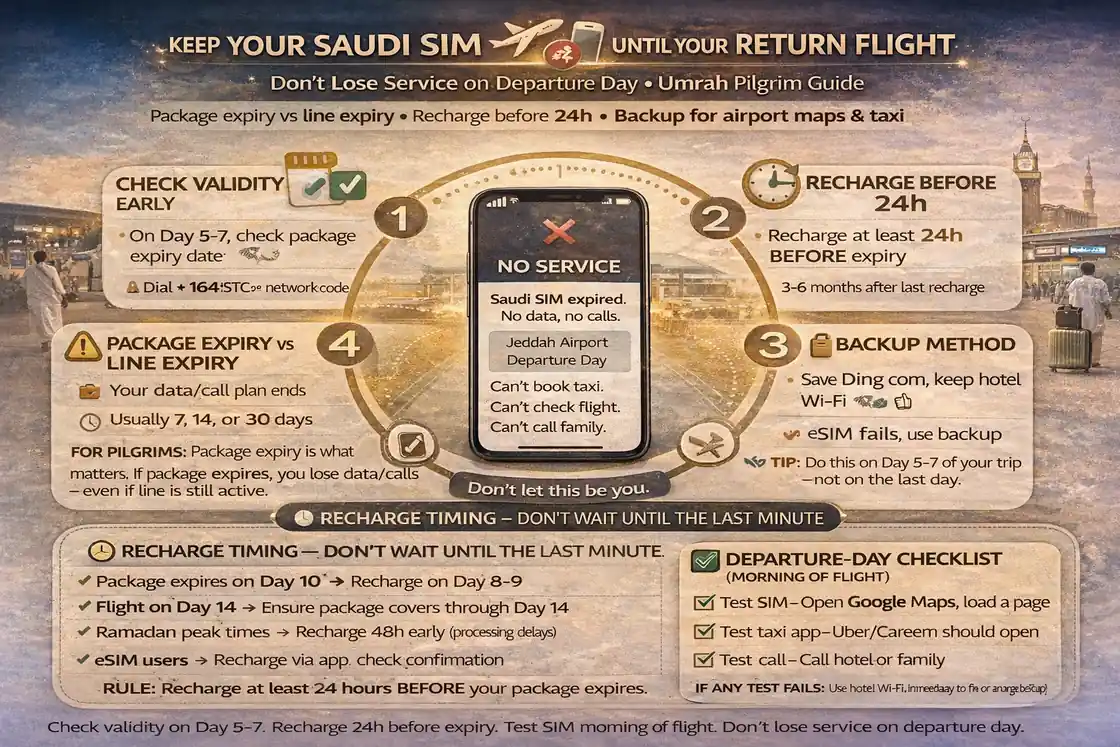
Keep Saudi Sim active until return flight umrah
The last day is where many pilgrims get stuck.
Not because they used too much data.
Because they forgot to check validity.
This guide on keep saudi sim active until return flight umrah is built for the exact problem people face after a long stay in Makkah or Madinah: the SIM looks fine, the phone shows signal, but the internet stops working right when they need airport directions, ride apps, or check-in messages.
A Saudi visitor SIM is a bit like a hotel key card. You can still hold it in your hand, but if the time runs out, it won’t open the door. That’s the difference between having a SIM and having an active package.
✅ TL;DR – keep saudi sim active until return flight umrah
Many pilgrims lose service on the final day because they track only data balance, not validity. To keep saudi sim active until return flight umrah, check package expiry early, recharge before the last 24 hours, and keep one backup method for airport maps, OTP, and transport apps.
why final-day SIM failure happens
Why final-day SIM failure happens: Most final-day failures are not network failures. They are planning failures. Pilgrims check remaining data, but forget to check the visitor sim expiry saudi date or the package end time.
That’s the whole issue.
On Umrah trips, phone use feels small each day: maps, WhatsApp, taxi apps, hotel messages, maybe OTP codes. So people assume, “I still have data, I’m fine.” But your data amount and your package validity are separate things.
Common reasons umrah return day sim data stops working:
- Package expiry ended, even though some data looked unused
- The line is active, but the package is not
- No top-up method was saved before departure day
- The family relied on one hotspot line that expired first
- People waited until the airport day to check everything
If you searched avoid no-data issue on departure day umrah, this is the fix: stop treating “signal bars” as proof your internet package is still active.
One small human mistake I used to see a lot with travelers: they screenshot the package size, but not the expiry date. Then on day 12 or 14, nobody remembers what was bought.
package expiry vs line expiry
Package expiry vs line expiry: This is the most important concept in this whole article. If you understand this, you’ll avoid most sim expiration saudi pilgrims problems.
They are not the same thing.
Package expiry means your active data/calls bundle has ended. Your SIM line may still exist, but the bundle is gone, so mobile internet may stop or become unusable unless you renew or add a new package.
Line expiry means the prepaid line itself becomes inactive after a period without paid activity. This is a separate timeline from package validity, and it usually matters more for longer use patterns, not just one short Umrah trip. But it still matters if you are stretching a trip or reusing the line later.
If you’re asking package expiry vs line expiry what is the difference saudi, think of it like this:
The line is the cup.
The package is the water inside the cup.
You can still have the cup and no water.
For saudi line validity visitor and saudi sim validity umrah planning, check both inside the telecom app or SMS balance/validity messages. Different operators show it a little differently, but the idea is the same: you need a live line and an active package.
This is also why some people say, “My SIM works for calls but no data,” or “I can receive SMS but can’t open maps.” In many cases, the line is alive, but the package expired.
how to check validity
How to check validity: The safest way to keep umrah sim active is to check validity early and check it twice. Don’t wait until the return transfer to the airport.
Make it a habit.
If you’re searching how to check package validity on saudi sim, use this simple routine on the main line and any backup line:
- Open the telecom app (the carrier app for your SIM)
- Check package status (data, minutes, and validity end date/time)
- Check line status or account status if shown
- Take a screenshot of the validity screen
- Set a reminder before expiry
If the app is slow or you’re not logged in, use the SMS/USSD method shown on your SIM card pack or official help page. The exact code differs by operator, so don’t guess. Use the carrier’s official app or instructions.
For families, check the family hotspot line validity planning umrah first. That line usually carries the most risk because everyone depends on it.
Micro-scenario: A family checks the father’s main line only. The mother’s backup line looks “fine” but the package expired two days earlier. On airport day, they split for luggage and transport, and the backup line is useless. One 30-second check would have fixed that.
🕒 Validity Check Box (Do This First)
Main line: check package expiry + data balance + screenshot it.
Backup line: confirm it has active data/calls, not just signal.
Reminder: set one alert before the last 24 hours.
best recharge timing before departure
Best recharge timing before departure: The best time to recharge is not when the package dies. It is before the last 24 hours of your trip, while you still have stable access and time to fix problems.
Timing saves stress.
If you searched when should i recharge before flight day in umrah or best top-up strategy for return travel day, use this simple rule:
Recharge or renew the package the day before departure (or earlier if validity is clearly ending). Don’t push this to airport morning unless you absolutely have to.
Why this works:
- You still have hotel time and wifi if payment fails
- You can confirm the package activated correctly
- You avoid “no internet” while booking the airport ride
- You keep data active for airport maps, OTP, and check-in messages
This is the smart move for recharge before expiry umrah planning.
If you’re wondering should i buy extra top-up on last day of umrah, usually you only need enough to safely cover your departure day and airport transfer. Don’t overbuy if you’re leaving soon, but don’t gamble on a nearly expired package either.
Another small tip: do the top-up while your phone battery is healthy. People always try to recharge at 8% battery in the middle of a transfer. That’s how mistakes happen.
family and hotspot line planning
Family and hotspot line planning: On the final day, the family’s main hotspot line becomes the weak point. If that one line expires, everyone feels “offline” at once, even if some other phones still have signal.
This is common.
If you’re traveling as a group, treat the organizer’s phone as the priority line for visitor sim active days saudi planning. That line should stay active through:
hotel checkout → ride booking → airport route → airport waiting time → final contact needs
For family hotspot line validity planning umrah, use this simple approach:
Main line: renew/recharge early enough to cover departure day fully.
Backup line: keep a basic active package for calls, WhatsApp, and maps.
Elder phone: make sure it can call and receive messages, even if it uses little data.
Quirky beginner mistake #1: the family buys extra data on a child’s phone, but the organizer phone (the one used for taxis and airport work) expires first. Quick fix: top up the organizer line first.
Quirky beginner mistake #2: everyone depends on one hotspot all trip, then the phone battery drains during transfer. Quick fix: keep one backup line with basic data.
Quirky beginner mistake #3: the family assumes “we’ll use airport wifi.” Quick fix: treat airport Wi-Fi as bonus, not your only plan.
A short story from a common travel situation: one group finished Umrah, packed late, and checked out in a rush. They had data balance on the main phone, but the package expired that morning. At the hotel entrance, they couldn’t book a car, and everyone started blaming the network. The real fix was simple—they should have renewed the main line the night before while on hotel wifi.
👨👩👧 Return-Day Family SIM Box
Main organizer line: active data package + full battery + ride apps ready.
Backup line: active calls/data for separation or delays.
Rule: don’t leave the hotel until both lines are tested.
emergency backup steps
Emergency backup steps: If your line stops working before the flight, don’t panic and don’t start changing ten settings at once. Use a calm order. Most what to do if line stops working before flight fixes are simple.
Start basic.
Use this order if you lose data on departure day:
1) Check package status
Open the carrier app and confirm if it is a package expiry issue.
2) Check line status / account balance
Make sure the line itself is active and there is enough balance if needed.
3) Recharge or renew package
Use your saved app/card method. This solves a lot of final-day issues.
4) Toggle mobile data / restart phone
After renewal, give the phone a minute and retry.
5) Use backup line or hotspot
This is why a backup line matters.
6) Move to hotel/airport wifi only as a temporary bridge
Useful for urgent app access, but don’t rely on it long-term.
7) Contact telecom support in the app if needed
Keep the request simple: line number, issue, and what time it started.
If you’re asking can i reactivate visitor sim quickly in saudi, in many cases the fast fix is not “reactivation” but simply renewing the expired package or adding a new one. That’s why checking status first matters.
And if you really get stuck, a second family line with maps and messaging is enough to get you to the airport calmly.
return-day checklist
Return-day checklist: This is the simple checklist that solves the “last day no internet” problem. Use it before hotel checkout, especially if you’re moving from Makkah or Madinah to the airport.
Don’t skip this part.
Main line (organizer phone): package active, validity checked, battery charged, taxi app opens, maps opens.
Backup line: call test done, WhatsApp works, basic data works.
Family setup: one person knows the hotspot password, one person knows the hotel contact, one person knows the airport route.
Payment/recharge: saved method ready in case you need a quick top-up.
Alerts: one reminder for package expiry if travel day is long or delayed.
If you came here searching keep data active for airport check-in and taxi apps saudi, this checklist is the answer. Most departure-day problems disappear when you check package expiry before leaving, not after the line stops.
Set it the night before, test it once, and your final day stays calm.
📊 keep saudi sim active until return flight umrah: final-day SIM table
Use this table to avoid visitor sim expiry saudi problems on departure day. It shows what to check, when to check it, and the safest action for umrah return day sim data.
📶 Show Final-Day SIM Validity Table
| What to check | When to check | Best action |
|---|---|---|
| Package validity | Night before departure | Renew/recharge if it may end before flight |
| Data balance | Night before + morning | Top up if low and you need maps/taxi use |
| Line status | Night before | Confirm line is active, not just showing signal |
| Main family hotspot line | Before hotel checkout | Test hotspot + keep backup line ready |
| Recharge method | During hotel stay | Save app/card method before departure rush |
| Backup connection | Before leaving hotel | Second line or hotel/airport Wi-Fi as fallback |
FAQs
📘 keep saudi sim active until return flight umrah FAQs
how to keep saudi visitor sim active until return flight?
Show Answer
Check package validity early, not just data balance. Recharge or renew before the last 24 hours, and keep one backup line or backup internet method ready.
does my saudi sim expire during umrah trip?
Show Answer
Your package can expire during the trip even if the SIM line still exists. Always check both package validity and line status.
package expiry vs line expiry what is the difference saudi?
Show Answer
Package expiry means your active data/calls bundle ended. Line expiry means the SIM line itself becomes inactive after a longer inactivity period.
when should i recharge before flight day in umrah?
Show Answer
Usually the safest time is the night before departure, while you still have hotel time and wifi to confirm everything works.
visitor sim validity tips for 14 day pilgrimage?
Show Answer
Check validity when you activate the SIM, screenshot the expiry date, set a reminder, and recheck 1 day before your return travel.
what happens if saudi sim expires before airport day?
Show Answer
Often the line still exists but the package ended. In many cases, the fix is renewing the package or adding a new bundle through the carrier app.
can i reactivate visitor sim quickly in saudi?
Show Answer
Many “reactivation” cases are really package-renewal issues. First check package status, then recharge or renew in the official telecom app.
best top-up strategy for return travel day?
Show Answer
Top up the main organizer line before departure day, then keep a backup line active for calls, maps, and delays.
keep data active for airport check-in and taxi apps saudi: what should i check?
Show Answer
Check package validity, data balance, battery level, and that your taxi/maps apps open before leaving the hotel.
how to check package validity on saudi sim?
Show Answer
Use the official telecom app first. If needed, use the carrier’s SMS/USSD balance-check method shown in the SIM pack or official support pages.
family hotspot line validity planning umrah: which line matters most?
Show Answer
The organizer’s main hotspot line matters most. Renew that one first, then confirm the backup line is also active.
should i buy extra top-up on last day of umrah?
Show Answer
Only buy enough to safely cover departure-day needs if your package is ending. Don’t overbuy, but don’t risk a dead line on airport day.
app reminders for package expiry during travel: worth it?
Show Answer
Yes. A simple reminder is one of the easiest ways to avoid final-day SIM failure, especially on 10–14 day trips.
what to do if line stops working before flight?
Show Answer
Check package status, check line status, recharge/renew if needed, restart mobile data, then use a backup line or Wi-Fi while you fix it.
You Can Also Read
- Stc Vs Zain Vs Mobily vs Red Bull for ramadan umrah
- Best Sim For Umrah Visitors in ramadan saudi
- eSIM vs Physical Sim for Umrah in Ramadan
- jeddah airport sim buying guide
- Madinah airport sim setup umrah arrivals
- Nusuk Otp Not coming
- Best 14 day data plans for ramadan
- Family sim strategy for umrah ramadan

Farrukh Farooqi has been living in Sharaya, Makkah, Saudi Arabia since 2010. With over 14 years of firsthand experience witnessing the sacred journey of millions of pilgrims, Farrukh specializes in providing practical, insider tips for Hajj and Umrah travelers. His work blends real-world observations, the latest Saudi updates, and essential crowd management strategies — helping pilgrims and worshippers plan smarter, stay safer, and experience a spiritually fulfilling journey across the Holy Cities.


