
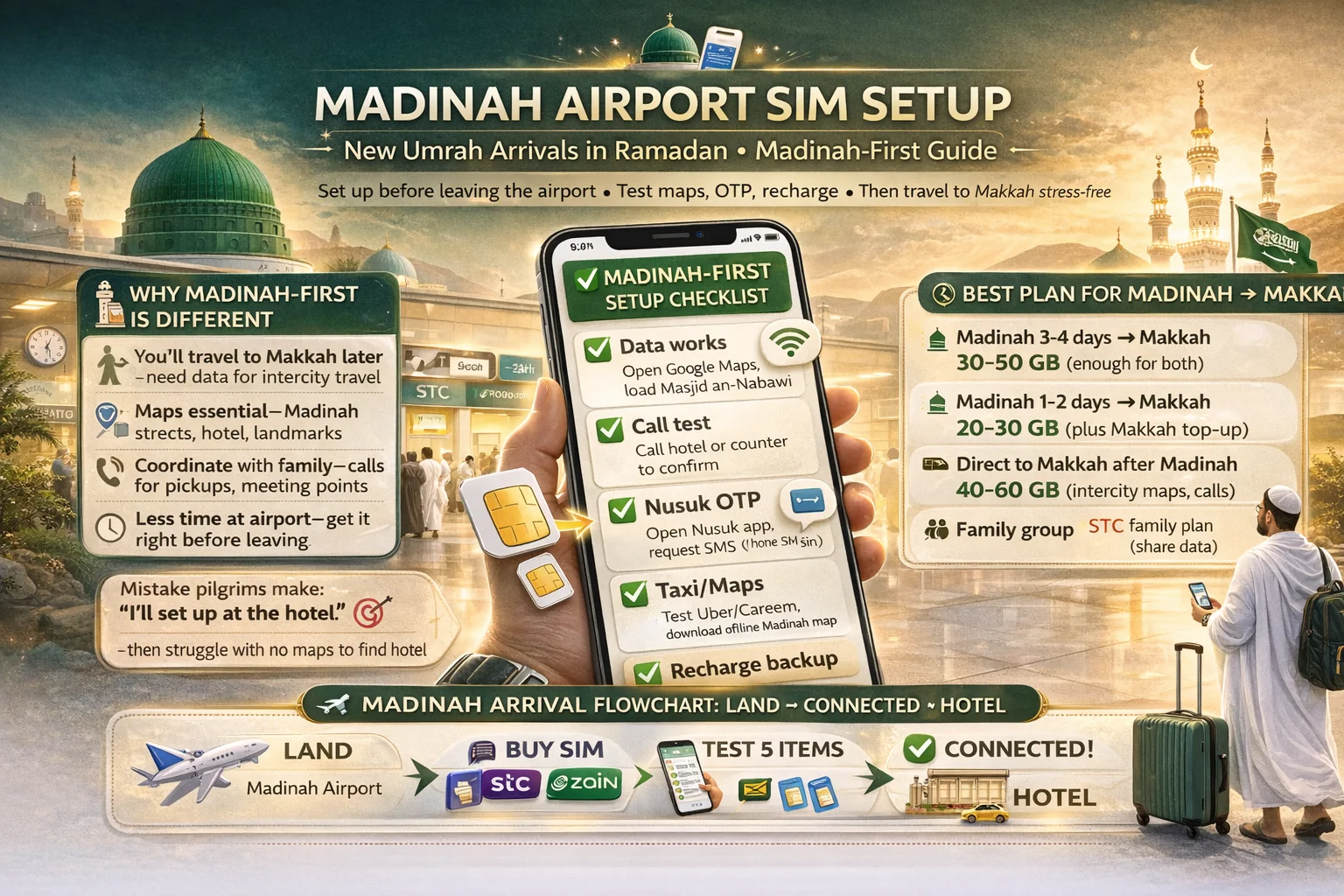
Madinah airport sim setup umrah arrivals ramadan
Landing in Madinah first feels calmer for many pilgrims.
Your phone setup should feel calm too.
This madinah airport sim setup umrah arrivals ramadan guide is built for that first hour after landing—when you’re tired, your family is waiting, and you still need maps, Nusuk, messages, and maybe a taxi app. Most people don’t fail because the network is bad. They fail because the setup order is messy.
Think of your phone like your hotel key. If it works early, the rest of the trip feels smoother. If it doesn’t, even small tasks become stressful.
✅ TL;DR – madinah airport sim setup umrah arrivals ramadan
If you arrive in Madinah first, set up your SIM before leaving the airport and test maps, OTP, and messaging. Pilgrims often delay this and struggle later at the hotel. A working SIM plus saved recharge method on day one removes most connectivity stress for the rest of the trip.
why madinah-first arrivals need a different setup
Why this is different: A Madinah-first itinerary changes your phone needs on day one. You’re not just getting internet for “later.” You need a clean setup now for hotel transfer, check-in messages, maps, and Nusuk access before you move on to Makkah.
Many generic guides miss this part.
They talk like every pilgrim lands, rests, and sets things up slowly. Real life in Ramadan is different. You may land, move quickly, coordinate with family, and travel between cities soon after.
That’s why this medina airport sim guide focuses on timing and order, not just package names.
If you’re doing a best sim for medina first then makkah trip plan, your first priority is not chasing the “perfect” package. It’s getting a stable line that works for:
- hotel coordination and check-in calls
- maps and route checking in a new city
- Nusuk login and app access
- basic messaging and OTP delivery
- easy recharge later without stress
That’s the pilgrim-first approach.
One small human thing I’ve seen often: people get emotional after landing in Madinah (which is beautiful and normal), and they skip the boring setup steps. Then the phone problem hits later when they’re already tired. Do the boring steps first. It saves the night.
airport counter checklist
Airport counter checklist: At Prince Mohammad bin Abdulaziz International Airport, the best saudi telecom airport guide move is simple: walk to an official telecom counter, tell them clearly what you need, and don’t leave until the line is tested. Most setup mistakes happen because people are shy or rushed.
This part should be almost scripted.
For a smooth umrah sim madinah arrival setup, keep your words short and clear. Counter staff can help much faster when you say the key details at the start.
Use this script at the counter:
- “I need a visitor SIM for Umrah.”
- “My stay is ___ days.”
- “I want eSIM / physical SIM.”
- “I need data and calls.” (or data-only if you truly want that)
- “Please test it before I leave.”
For visitor sim documents required saudi airport questions, keep your passport in hand and your entry details easy to show. Don’t bury them in luggage.
If you’re traveling with family, organize documents before you stand in line. A family setup becomes slow when one person is digging for every passport at the counter.
Micro-scenario: one family asks for “three lines,” but no one knows which phone needs eSIM. The queue moves, stress rises, and the wrong line type gets started. Better move: decide each phone’s SIM type before reaching the desk.
This is especially useful if you’re planning family sim setup after landing in madinah.
eSIM vs physical SIM at arrival
eSIM vs physical SIM at arrival: For visitor esim madinah or physical SIM, both can work. The better choice is the one you can finish correctly while tired. At airport arrival, “easy to set up” matters more than “sounds modern.”
Don’t overthink this.
eSIM is like a built-in SIM slot inside the phone. No plastic card, no tray pin, no tiny chip to lose. That’s great for many solo travelers. But if the phone isn’t compatible, or the user gets nervous with app screens and QR setup, it can feel harder than a normal SIM.
Choose eSIM at arrival if:
- your phone supports it
- you’re comfortable with activation steps and QR prompts
- you want dual-line use (home SIM + Saudi line)
- you want a cleaner airport phone setup saudi experience
Choose physical SIM at arrival if:
you want a familiar setup, you’re helping an elderly pilgrim, or you simply want a staff member to insert and test everything there. Honestly, this is often the easiest path for families.
If you’re searching esim setup for pilgrims arriving in madinah, the main rule is: confirm compatibility first, then ask staff to test data and message delivery before you leave.
For easy phone setup for elderly pilgrims madinah, a physical SIM usually wins because the process feels visible and simple.
I used to mix this up when explaining to beginners: I’d say “eSIM is easier,” and they’d hear “eSIM is always better.” It’s not. Easier depends on the person holding the phone.
data test and OTP test
Data test and OTP test: This is the heart of pilgrim internet setup madinah. Don’t leave the counter with an “activated” line unless you test real data, maps, and at least one message or OTP-style function. A SIM can be active but still not ready for your actual apps.
This is where most first-night problems start.
People see signal bars and assume everything works. Then at the hotel, no app login, no taxi booking, no map route, and everyone blames the network.
A longer story because it happens a lot: one pilgrim arrived in Madinah, bought a line, and felt proud for finishing quickly. He walked out, opened a taxi app, and nothing loaded. Then he got to the hotel on airport Wi-Fi and Nusuk still wouldn’t sign in. He thought the SIM was broken. It wasn’t. His phone was still using the home line for roaming data, and the Saudi line was active only for calls. We changed one setting, restarted the phone, and everything worked. The SIM wasn’t the problem. The test was skipped.
If you’re asking what to test after sim activation in madinah airport, use this exact order:
- Turn off airport Wi-Fi (very important)
- Open a website or app on mobile data
- Open maps and check your location
- Send/receive one message or test an OTP-based app step
- Make one short call (if your plan includes calls)
If your question is can i use airport wifi for nusuk login in madinah, yes, as a temporary helper. But your real goal is a working mobile line, because you won’t have airport Wi-Fi once you leave.
Also, if you need dual sim setup for umrah arrivals in madinah, check which line is selected for mobile data before you test anything.
recharge backup
Recharge backup: A good ramadan arrival sim setup includes a backup for recharge on day one. Don’t wait until your package ends in the middle of the trip. Ramadan schedules can be busy, and late-night top-up problems feel much worse when you’re already tired.
Please don’t skip this step.
The best habit is simple: save one working top-up method as soon as your line is active.
For how to recharge saudi sim on first day in madinah, do this before leaving the airport or as soon as you reach the hotel:
- install/open the carrier app
- save your Saudi number in notes
- take a screenshot of package details (data + validity)
- check where package renewal/top-up appears in the app
- keep one backup method (hotel Wi-Fi + app or support path)
If you’re using visitor esim madinah, the recharge steps usually happen in the same carrier app you used for activation, so keep that app installed and signed in.
For family groups, one smart trick is to save screenshots for each number with a clear label like “Father SIM,” “Mother SIM,” and so on. Sounds basic, but it saves confusion later.
hotel transfer and maps
Hotel transfer and maps: Your SIM setup is not finished until you can reach your hotel smoothly. In a madinah umrah connectivity setup, maps and a taxi app matter right away. Don’t treat them like “later tasks.” They are arrival tasks.
This part is practical, not technical.
When you leave the airport, you need three things working: your location, your driver contact, and your route. That means maps, messaging/calls, and mobile data must be tested before you walk out.
If you’re asking how much data is enough from madinah to makkah travel, the answer depends on your use, but route maps, messaging, and normal app use usually don’t need huge amounts on day one. The bigger risk is not “too little data” at first. The bigger risk is no working connection at all.
Micro-scenario: your driver calls, but your line only has data and no voice. If you planned for app messages only, that may be fine. If not, this becomes a delay. That’s why I tell pilgrims to decide clearly: data-only or data + calls.
For airport sim or city shop madinah for pilgrims, the airport often wins for one simple reason: you can fix issues before travel starts. A city shop may be fine later, but you still need a working phone to get there comfortably.
common activation problems
Common activation problems: Most no internet after sim activation madinah airport issues are setup mistakes, not major telecom failures. If your SIM looks active but apps don’t work, stay calm and check the basics in order.
Don’t panic and start changing ten settings at once.
Do one check, then the next.
Here are the common problems I see with saudi sim at madinah airport setups:
Problem 1: Wi-Fi is still on.
Fix: Turn off airport Wi-Fi and test with mobile data only.
Problem 2: Wrong line is selected for data.
Fix: On dual-SIM phones, set the Saudi line as the data line.
Problem 3: SIM line is active, but package is not.
Fix: Ask the counter staff to confirm package activation, not just SIM registration.
Problem 4: OTP goes to the wrong number.
Fix: Check which number you entered and which line is receiving messages.
Problem 5: eSIM setup was half-finished.
Fix: Reopen the app, check the QR flow, and ask for help before leaving.
And one more beginner mistake people don’t expect: they test only one phone in a family group and assume all others are fine. Test every phone, even if it’s just 20 seconds each.
If a problem still isn’t fixed at the counter, don’t walk away with “I’ll do it later.” In Ramadan, later usually means tired, hungry, and more confused.
quick checklist
Quick checklist: Use this before leaving Prince Mohammad bin Abdulaziz International Airport. It’s the short version of the full guide, and it works well for solo pilgrims, families, and elderly travelers.
Keep it simple. Follow the order.
- Passport ready before joining the line
- Choose eSIM or physical SIM before the counter
- Ask for a visitor plan based on your trip length
- Turn off Wi-Fi and test mobile data
- Open maps and confirm location works
- Test one message/OTP and one call if needed
- Save your line number + package screenshot
- Set a recharge backup in the app
- Book taxi / start hotel route only after testing
If you follow this medina airport sim guide, your first day in Madinah will feel much smoother.
And that’s the goal—less phone stress, more focus on your Umrah.
📊 madinah airport SIM setup: first-30-minutes table
Use this table for madinah airport visitor sim setup after landing. It helps with umrah sim madinah arrival, pilgrim internet setup madinah, and avoiding common activation mistakes.
📱 Show Madinah Airport SIM Setup Table
| Step | What to do | Why it matters |
|---|---|---|
| 1 | Show passport and ask for a visitor line | Speeds up registration and reduces confusion |
| 2 | Choose eSIM or physical SIM clearly | Prevents wrong setup type at the counter |
| 3 | Check package duration matches your stay | Avoids early expiry and mid-trip stress |
| 4 | Turn off Wi-Fi and test mobile data | Confirms the line works outside the airport |
| 5 | Open maps and test one message/OTP | Prepares for hotel transfer and app logins |
| 6 | Save line number + package screenshot | Makes support and recharge easier later |
| 7 | Set a recharge backup | Removes day-2 and day-3 data stress |
FAQs
📘 madinah airport sim setup umrah arrivals ramadan FAQs
how to set up sim at madinah airport for umrah?
Show Answer
Go to an official telecom counter, choose a visitor plan, show your passport, and ask them to test data, maps, and one message/call before you leave.
buy visitor sim at madinah airport guide: what’s the first step?
Show Answer
Decide first whether you want eSIM or physical SIM. That makes the counter process much faster and reduces setup mistakes.
what to test after sim activation in madinah airport?
Show Answer
Turn off Wi-Fi, test mobile data, open maps, test one message or OTP, and make one short call if your plan includes calls.
esim setup for pilgrims arriving in madinah: is it easy?
Show Answer
It can be very easy if your phone supports eSIM and you’re comfortable with QR setup. If not, a physical SIM is often easier at arrival.
best sim for medina first then makkah trip?
Show Answer
Choose a visitor plan that matches your total stay and is easy for you to recharge. The best choice is the one you can activate and test properly on day one.
can i use airport wifi for nusuk login in madinah?
Show Answer
Yes, temporarily. But don’t rely on it after leaving the airport. Your main goal should be a working mobile line for Nusuk, maps, and hotel travel.
madinah arrival data package for 7 day umrah: what should i choose?
Show Answer
Choose a visitor package with enough data for maps, messaging, Nusuk, and taxi use, and make sure the validity covers your full stay or has an easy recharge path.
family sim setup after landing in madinah: what’s the easiest way?
Show Answer
Prepare all passports in advance, decide each phone’s SIM type before the counter, and test every phone briefly before leaving. This avoids family-wide setup confusion later.
how to recharge saudi sim on first day in madinah?
Show Answer
Open the carrier app, save your line number, screenshot package details, and set one backup top-up method while you still have time and support nearby.
no internet after sim activation madinah airport: what should i do?
Show Answer
Turn off airport Wi-Fi, check the Saudi line is selected for mobile data, restart the phone, and confirm the package is active (not just the SIM line).
airport sim or city shop madinah for pilgrims?
Show Answer
Airport is usually better for first setup because you can test and fix issues before starting your hotel transfer. City shops can help later, but you still need a working phone to get there smoothly.
dual sim setup for umrah arrivals in madinah: what should i check?
Show Answer
Check which line handles mobile data, label both lines clearly, and test one message plus maps before leaving the airport.
easy phone setup for elderly pilgrims madinah: eSIM or physical SIM?
Show Answer
Physical SIM is usually easier for elderly pilgrims because it is familiar and staff can help with the full setup at the counter.
You Can Also Read
- Stc Vs Zain Vs Mobily vs Red Bull for ramadan umrah
- Best Sim For Umrah Visitors in ramadan saudi
- eSIM vs Physical Sim for Umrah in Ramadan
- jeddah airport sim buying guide

Farrukh Farooqi has been living in Sharaya, Makkah, Saudi Arabia since 2010. With over 14 years of firsthand experience witnessing the sacred journey of millions of pilgrims, Farrukh specializes in providing practical, insider tips for Hajj and Umrah travelers. His work blends real-world observations, the latest Saudi updates, and essential crowd management strategies — helping pilgrims and worshippers plan smarter, stay safer, and experience a spiritually fulfilling journey across the Holy Cities.


