
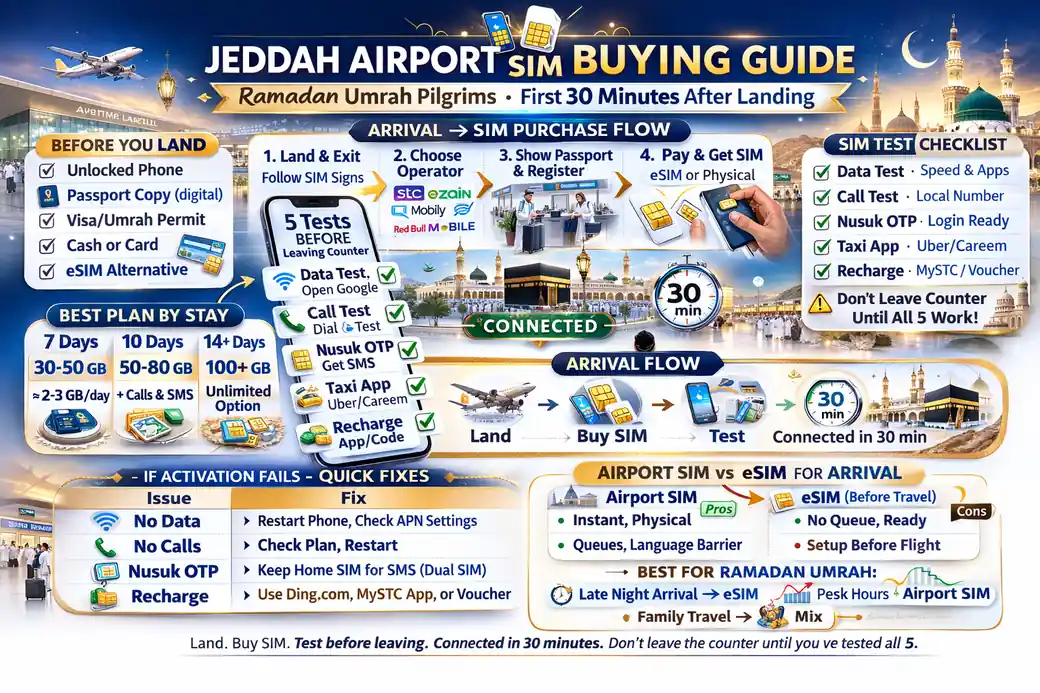
jeddah airport sim buying guide ramadan umrah pilgrims
You don’t need a perfect phone setup.
You need a calm one.
That’s the whole point of this jeddah airport sim buying guide ramadan umrah pilgrims page. After a long flight, most people are tired, rushing, and just trying to get to the hotel. That’s exactly when simple mistakes happen: wrong line for data, no OTP, no maps, or no idea how to recharge.
Think of your airport SIM setup like your first bottle of water after landing. It should be easy, quick, and ready before you walk away. Not a puzzle.
✅ TL;DR – jeddah airport sim buying guide ramadan umrah pilgrims
The best airport SIM strategy is simple: choose a visitor plan that matches your stay, confirm data works before leaving the counter, test OTP and maps, and save a recharge method immediately. This avoids the most common first-night problem for pilgrims—being “connected” but unable to use key apps.
before you land
Before you land: The easiest umrah arrival sim setup starts before the plane touches down in Jeddah. Most airport SIM stress comes from things you could have checked at home in two minutes: phone compatibility, battery, and where your passport is.
This part matters more than people think.
When you land at King Abdulaziz International Airport, you may be dealing with crowds, family calls, and hotel check-in pressure. If your phone is ready, buying a saudi airport visitor sim becomes much easier.
Do these checks before arrival:
- Charge your phone (and carry a power bank if you can)
- Keep your passport and visa details easy to reach
- Check if your phone supports eSIM (if you want eSIM)
- Know your trip length (7 days, 14 days, etc.)
- Install key apps early (like Nusuk, taxi app, and maps)
One small tip that saves a lot of pain: screenshot your hotel address and booking details before you land. If your internet setup takes longer than expected, you can still show the address to a driver.
Micro-scenario: A pilgrim lands with 8% battery and starts downloading apps at the airport. By the time the SIM is ready, the phone dies. Setup was fine. Timing was the problem.
airport SIM or eSIM choice
Airport SIM or eSIM choice: For jeddah airport sim umrah setup, both eSIM and physical SIM can work well. The better choice depends on your phone, your stress level, and whether you want a quick digital setup or a familiar counter setup.
Don’t turn this into a “tech war.”
This is really about what feels easier in the first 30 minutes after landing.
Choose eSIM if:
- Your phone is clearly compatible
- You’re comfortable with QR code activation and app steps
- You want to keep your home SIM active
- You like a cleaner jeddah arrival phone setup with less hardware handling
Choose physical SIM if:
- You want staff to help you at the counter
- You’re helping an elderly pilgrim
- Your phone is not eSIM-compatible
- You just want the most familiar setup
If you’re asking should i buy esim at airport or later, the beginner-safe answer is: do whichever option you can fully test before leaving. “Later” often sounds easy, but once you leave the airport, you may still need maps, OTP, and a taxi app right away.
I used to see people delay this step to “save time,” then lose much more time outside.
If you want the smoothest ramadan umrah airport connectivity, get your line working at the airport while help is nearby.
what to show at the counter
What to show at the counter: For a pilgrim sim at airport, keep your passport ready and have your entry details available. Staff usually need identity details to register and activate the line. If you want eSIM, tell them clearly before they start.
This is where many people create confusion without meaning to.
They say “I want internet,” but forget to say whether they need eSIM or physical SIM, or whether they want calls too.
Use a simple script at the counter:
- “I need a visitor SIM for Umrah.”
- “My stay is ___ days.”
- “I want eSIM / physical SIM.”
- “I need data + local calls.” (or data-only if that’s your plan)
- “Please test internet before I leave.”
That short script helps a lot in a busy jeddah airport telecom kiosks environment.
For families, keep all passport documents together if you are buying more than one line. A little organization here makes the whole process faster.
Micro-scenario: A family asks for “three SIMs,” but one phone only supports eSIM. They find out late and the line setup slows down. Better move: decide each phone’s SIM type before reaching the counter.
best plan choice by stay length
Best plan choice by stay length: The best saudi visitor sim airport guide advice is not “buy the biggest package.” It’s “buy the right duration.” Most first-week problems happen because the package looked good, but the validity did not match the trip.
This is the part most people miss.
They compare GB numbers and forget the number of days.
For buy sim at jeddah airport decisions, use this simple rule:
- Short Umrah trip (about 7 days): choose a visitor package with enough data for maps, messaging, Nusuk, and taxi apps
- Longer stay (10–14+ days): choose a package with matching validity or a clear recharge plan
- Family travel: don’t put all usage on one phone if possible
If you’re searching how much data to buy at airport for 1 week umrah, there is no single number for everyone. A light user (maps, chat, basic calls) uses much less than a family doing video calls and constant hotspot sharing.
A safer way to think about it:
Light use: maps, taxi app, Nusuk, messaging, short browsing
Medium use: plus video calls, uploads, social media
Heavy use: hotspot sharing, frequent video, large backups
If you’re not sure, pick a visitor plan with enough data for comfort and set a recharge backup. Don’t rely only on airport Wi-Fi for your first days.
Also, don’t assume “airport sim vs city sim saudi” always means cheaper later. Sometimes the better choice is the one that gets you online immediately and avoids first-night confusion.
5 things to test before leaving
5 things to test before leaving: This is the most important part of the whole jeddah airport sim buying guide ramadan umrah pilgrims. Do not leave the counter until you test your line. A line can look “activated” and still fail in the exact app you need.
Read this twice.
Don’t leave the counter until…
- 1) Mobile data works – open a website or app using mobile data (not airport Wi-Fi)
- 2) Maps opens and locates you – this confirms your phone is ready for hotel travel
- 3) OTP test works – test a message login if possible (or at least confirm SMS arrives)
- 4) You can place one call – especially important for family or elderly travelers
- 5) You know your package details – data amount, minutes, and how long it lasts
If you searched what to test before leaving sim counter, this is your checklist.
Quirky beginner mistake #1: Testing internet while still connected to airport Wi-Fi, then thinking the SIM works.
Quick fix: turn off Wi-Fi and test on mobile data.
Quirky beginner mistake #2: SIM works for internet, but the phone still uses the home line for data.
Quick fix: set the Saudi line as default data line.
Quirky beginner mistake #3: They never test maps until outside, then panic while booking a taxi.
Quick fix: open maps before leaving the counter area.
Quirky beginner mistake #4: They don’t note package validity, then think the network failed later.
Quick fix: ask the staff to show plan duration clearly.
Quirky beginner mistake #5: Family buys multiple lines but only tests one phone.
Quick fix: test every phone, even if only for 20 seconds each.
A short story from a beginner mistake: one pilgrim told me, “I bought the SIM, so I thought I was done.” He walked out, tried booking a taxi, and nothing loaded. The SIM was active, but his phone was still using the old roaming line for data. He had to return to the counter with luggage and family waiting. Next trip, he tested internet, maps, and one call before leaving. Zero stress.
first recharge setup
First recharge setup: The best jeddah arrival phone setup includes a recharge plan from day one. Don’t wait until your package ends. Ramadan travel days move fast, and you don’t want to figure out top-up steps late at night.
Set this up right away:
- Install the carrier app (or confirm it is installed)
- Save your line number in notes or screenshots
- Learn where package details appear (remaining data + validity)
- Save one recharge method (card/app/approved payment option)
If you’re asking can i use foreign card to recharge saudi sim at airport, it can depend on the app, bank, and payment setup. Don’t assume. The practical move is to test a small action in the app or ask the staff what the easiest top-up method is for visitors.
This step helps with saudi visitor sim airport guide planning because “recharge” problems usually happen later, not at purchase.
If you want a simple habit: take one screenshot showing your line number and package details. That tiny screenshot helps a lot if you need support later.
if activation fails
If activation fails: Don’t panic. Most activation problems are fixable at the airport. During Ramadan, counters can be crowded, but the fastest fix is usually to stay calm, explain the issue clearly, and test one thing at a time.
This is normal, by the way.
A failed setup does not always mean bad network coverage or a bad SIM.
For how to fix no data after airport sim activation, check in this order:
- Turn off airport Wi-Fi and test mobile data only
- Confirm the correct line is selected for data (especially on dual-SIM phones)
- Restart the phone
- Check if the package is active (not only the SIM line)
- Ask staff to retest the line
If the airport counter is very busy and you’re wondering what if airport counter is crowded ramadan, don’t leave half-set up. Even in a queue, it’s usually better to finish activation than to “fix it later” with luggage and no data.
Micro-scenario: A pilgrim gets an OTP on the home SIM, but tries signing in with the Saudi number. It looks like a network issue, but it’s just a line mix-up. This happens all the time.
If airport wifi vs sim for nusuk login is your question, use Wi-Fi only as a temporary helper. Your goal is to get your own mobile data working before you leave, because that’s what you’ll need for Nusuk, maps, and taxi apps on the way out.
quick arrival checklist
Quick arrival checklist: Use this before you walk out of the airport. It’s built for the first 30 minutes after landing, when people are tired and likely to miss small but important steps.
Keep this simple. Keep this strict.
- Passport ready
- Choose eSIM or physical SIM before the counter
- Buy a visitor plan that matches your stay length
- Turn off airport Wi-Fi and test mobile data
- Open maps and confirm location works
- Test one call or one message for OTP
- Save package validity and line number screenshot
- Set up a recharge method
- Book your first taxi only after testing internet
If you follow that list, your jeddah airport sim umrah setup will be smoother than most people’s first-night experience.
And that matters, because your mind should be on Umrah, not on phone settings.
📊 jeddah airport SIM setup: don’t-leave-the-counter table
Use this quick table at the airport counter. It helps with buy sim at jeddah airport, umrah arrival sim setup, and avoiding the most common first-night phone problems.
📱 Show Jeddah Airport SIM Checklist Table
| Step | What to do | Why it matters |
|---|---|---|
| 1 | Show passport and ask for a visitor plan | Speeds up registration and activation |
| 2 | Choose eSIM or physical SIM clearly | Avoids setup delays and wrong SIM type |
| 3 | Confirm package validity matches your stay | Stops mid-trip “network died” confusion |
| 4 | Turn off Wi-Fi and test mobile data | Confirms the SIM is really working |
| 5 | Open maps + test one OTP/SMS or call | Prepares for taxi, hotel, and app logins |
| 6 | Save line number + package screenshot | Helps later with support and recharge |
| 7 | Set up recharge method | Avoids late-night top-up stress |
FAQs
📘 jeddah airport sim buying guide ramadan umrah pilgrims FAQs
where to buy sim at jeddah airport for umrah?
Show Answer
Look for official telecom counters or kiosks in the arrival area at King Abdulaziz International Airport. Buy there if possible so you can test data, maps, and OTP before leaving.
is airport sim better for pilgrims in saudi?
Show Answer
For most pilgrims, yes. The main benefit is not price—it’s getting connected immediately and fixing any setup problem while staff are nearby.
what documents needed for visitor sim at jeddah airport?
Show Answer
Keep your passport ready and have your entry details available. For eSIM, tell the staff before they begin activation so they can guide the right setup.
should i buy esim at airport or later?
Show Answer
If possible, do it at the airport and test everything there. “Later” can become stressful if you need maps, taxi apps, or Nusuk access right away.
best first setup after landing in jeddah umrah?
Show Answer
Buy a visitor SIM, turn off airport Wi-Fi, test mobile data, open maps, test one call or message, and save your line number plus package validity before leaving.
how to get internet before leaving airport saudi?
Show Answer
Buy and activate a visitor SIM at the airport, then test mobile data with Wi-Fi turned off. Don’t leave with an “activated” line that you didn’t test.
jeddah airport sim for family pilgrims: what’s easier?
Show Answer
For families, a simple setup is best. Decide in advance which phones need eSIM and which need physical SIM, and test every phone before leaving the counter.
can i use foreign card to recharge saudi sim at airport?
Show Answer
It may work, but it depends on the carrier app and your bank/payment setup. The smart move is to set up and test your recharge method right away at the airport.
what to test before leaving sim counter?
Show Answer
Test mobile data (with Wi-Fi off), open maps, test one call or SMS/OTP, and confirm package details like validity and data amount.
how to fix no data after airport sim activation?
Show Answer
Turn off airport Wi-Fi, confirm the Saudi line is selected for data, restart the phone, and ask the counter staff to check whether the package (not just the line) is active.
which network to choose at jeddah airport for umrah?
Show Answer
Pick the official visitor plan that matches your stay and is easiest for you to manage. The best choice is usually the one you can activate, test, and recharge calmly before leaving the airport.
first taxi booking after landing sim setup: what should i do first?
Show Answer
Open maps first and confirm internet works on mobile data, then book your taxi. If the app fails, you’ll know it’s an app issue, not a SIM setup issue.
airport wifi vs sim for nusuk login?
Show Answer
Airport Wi-Fi can help for a moment, but your goal should be a working mobile line. A tested SIM is more reliable for Nusuk, taxi apps, and hotel travel after you leave the airport.
You Can Also Read
- Stc Vs Zain Vs Mobily vs Red Bull for ramadan umrah
- Best Sim For Umrah Visitors in ramadan saudi
- eSIM vs Physical Sim for Umrah in Ramadan

Farrukh Farooqi has been living in Sharaya, Makkah, Saudi Arabia since 2010. With over 14 years of firsthand experience witnessing the sacred journey of millions of pilgrims, Farrukh specializes in providing practical, insider tips for Hajj and Umrah travelers. His work blends real-world observations, the latest Saudi updates, and essential crowd management strategies — helping pilgrims and worshippers plan smarter, stay safer, and experience a spiritually fulfilling journey across the Holy Cities.


