
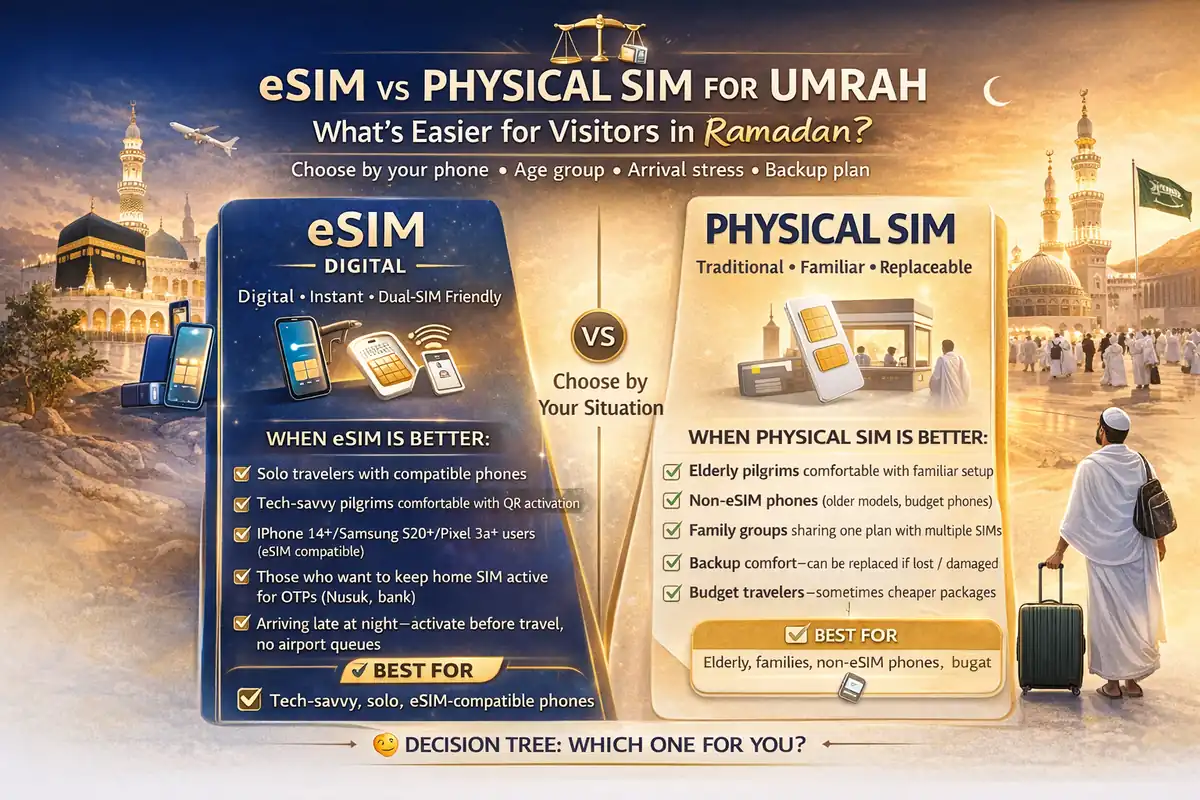
eSIM vs Physical Sim for Umrah in Ramadan: what’s easier for visitors?
Most pilgrims don’t get stuck on worship plans.
They get stuck on phone setup.
A phone that won’t connect in Saudi Arabia, a missed OTP, or a wrong SIM setting can turn a calm Umrah day into a stressful one. That’s why esim vs physical sim for umrah in ramadan is not a tech question only. It’s a comfort question.
Think of it like sandals for Umrah. The “best” pair is not the fanciest one. It’s the one that fits your feet, doesn’t slip, and won’t hurt you when the crowd gets heavy. Same with your sim card for pilgrims.
✅ TL;DR – esim vs physical sim for umrah in ramadan
eSIM is usually easier for solo pilgrims with a compatible phone because setup can be faster and you can keep your home SIM active. Physical SIM is often simpler for older travelers or family groups because it feels familiar and is easier to replace quickly if setup goes wrong.
quick answer
Quick answer: Choose eSIM if your phone supports it, you’re comfortable with app setup and QR activation, and you want to keep your home number active. Choose physical SIM if you want the simplest in-person setup, especially for elderly travelers or family-managed phones.
That’s the short answer.
But here’s what many forget: during Ramadan Umrah, “easy on paper” and “easy when tired at the airport” are not always the same thing.
If you’re asking should i use esim or physical sim for umrah, the better question is:
- Is my phone eSIM compatibility confirmed?
- Can I handle app steps and QR activation when I’m tired?
- Who is using this phone—me, my parent, or a child?
- Do I need a backup plan if setup fails?
That’s your real umrah travel sim choice.
when eSIM is better
When eSIM is better: eSIM for umrah visitors is usually the better choice when you have a supported iPhone or Android, want a faster digital setup, and want to keep your home line active for banking, family calls, or travel messages. It’s a strong fit for solo and confident travelers.
eSIM works like a built-in SIM slot inside your phone. No tiny plastic piece. No pin tool. No “where did I put that SIM tray?” panic. I used to mix this up all the time with beginners—they thought eSIM meant “internet only.” It doesn’t. It can be a full mobile line.
When saudi esim tourist setup usually feels easier:
- Your phone is clearly eSIM-compatible
- You want to keep your home SIM + Saudi line together (dual sim)
- You’re okay using the carrier app for activation and recharge
- You want less hardware hassle during travel
eSIM is also helpful if you want a cleaner saudi visitor phone setup because you can keep your home number available while using a Saudi line for data and local calls.
Micro-scenario: You land, open the app, scan the QR activation code, and your Saudi line appears while your home line stays on for messages. That’s a very nice start to the trip.
If you’re searching can tourists buy esim in saudi arabia, the short answer is yes—Saudi operators offer official eSIM options, but your phone must support it and the setup steps must be followed correctly.
esim for 7 day umrah trip is often a great fit for solo travelers who want speed and don’t want to touch their physical SIM tray.
when physical SIM is better
When physical SIM is better: physical sim saudi pilgrim setup is usually easier for older travelers, family groups, or anyone who gets stressed by app steps. A physical SIM feels familiar, and if something goes wrong, a store or airport counter can often replace it quickly.
This is not “old-fashioned.” It’s practical.
A plastic SIM can be easier because you can see it, touch it, and hand the phone to a staff member who knows what to do. For many families, that beats a digital setup screen in a crowded airport.
When physical sim at airport vs esim online usually wins:
- You’re helping an elderly pilgrim
- The phone is not eSIM-compatible
- You want in-person setup and testing before leaving the counter
- You prefer a simple “insert SIM and go” approach
physical sim for family travel umrah is often easier because one person can manage multiple phones at the counter, confirm each line is working, and avoid app confusion.
My students always ask about this part: “Is physical SIM slower?” Not always. If the line is activated correctly at the counter, it can be the fastest option for a tired family.
Micro-scenario: You’re with your mother, she doesn’t use apps much, and the phone language is not set right. A physical SIM with quick staff help can save a lot of stress.
compatibility checklist
Compatibility checklist: Before you choose umrah phone setup esim or physical SIM, confirm your phone supports eSIM, confirm it isn’t carrier-locked, and confirm you know how to switch the default line for data. Most “network problems” are really setup problems.
This is the section that saves people.
Use this simple check before flying for how to check esim compatibility before trip:
- Check your exact phone model (not just “iPhone” or “Samsung”)
- Check eSIM support in your phone settings
- Check carrier lock status (locked phones can cause trouble)
- Update your phone software before travel
- Save screenshots of your setup steps
Quirky beginner mistake #1: buying an eSIM for a phone that only supports physical SIM.
Quick fix: confirm the exact model first.
Quirky beginner mistake #2: thinking dual sim means both lines will auto-work correctly.
Quick fix: manually set default data line and default call line.
Quirky beginner mistake #3: using the wrong number format for signups and waiting forever for otp.
Quick fix: double-check country code and active line.
Quirky beginner mistake #4: deleting the setup email with the QR activation code too early.
Quick fix: keep it until your trip ends.
Quirky beginner mistake #5: blaming “coverage” when mobile data is turned off on the Saudi line.
Quick fix: check line settings before changing anything else.
dual-SIM setup tips
Dual-SIM setup tips: A clean dual sim setup for umrah travel saudi lets you keep your home line for messages and use the Saudi line for data and local calls. This is one of the best setups for solo pilgrims, business travelers, and anyone who needs both numbers during Umrah.
Think of dual sim like two doors in one house. One door is for family messages from home. The other is for local rides, maps, and hotel calls in Saudi Arabia. Both can stay open, but you need to choose which one handles mobile data.
Best dual-line habit for pilgrims:
- Home SIM: keep active for important messages and banking alerts
- Saudi line: set as default for data, maps, and local use
- Label both lines: “Home” and “Saudi” so you don’t mix them up
- Test a call + test internet: do both before leaving the airport/store
If you’re asking can i keep my home sim and saudi esim together, yes—on a compatible phone, that is one of the main benefits of eSIM.
For esim issues with nusuk otp saudi, the fix is often simple: check which line is active for messages, check your number format, and confirm your Saudi line is actually live.
ramadan travel stress factors
Ramadan travel stress factors: During Umrah in Ramadan, the easiest setup is the one you can manage when tired, in crowds, and under time pressure. That’s why your age, phone comfort, and arrival stress level matter just as much as the carrier or plan.
People compare SIMs like they are sitting at home with tea and full battery.
Real life is different: long flight, airport queue, family calling, hotel check-in, and you still need maps, transport, and Nusuk access.
This is where saudi airport sim esim decisions become very personal:
- Low stress / solo / tech-comfortable: eSIM often feels smoother
- High stress / family / elderly: physical SIM often feels safer
- Shared-family travel: use one easy main setup and one backup
A longer story, because this happens a lot: One family I guided had three phones and one very tired father trying to do everything. He bought an eSIM for himself, a physical SIM for his wife, and planned to sort the kids later. At the hotel, the father’s line worked, but he had set the wrong line for data, so maps failed. Everyone blamed the network. The fix took two minutes: switch the default data line, restart, test a call. After that, the trip was smooth. The problem was not the SIM type. It was the setup order.
If you’re searching does esim work better in makkah ramadan, the honest answer is: eSIM and physical SIM use the same network once activated. The easier option is the one you can set up correctly.
backup plan
Backup plan: The best saudi visitor phone setup always includes a backup. Not because things always fail, but because Ramadan travel is busy. A small backup plan can save a whole evening.
Please don’t skip this.
If you want a solid backup plan if esim activation fails, keep it simple:
- Backup 1: Keep your home SIM active
- Backup 2: Save hotel Wi-Fi details and front desk number
- Backup 3: Keep one recharge method ready (app/card)
- Backup 4: Save screenshots of activation steps
- Backup 5: Know the nearest official store/kiosk
If esim activation before arrival saudi does not finish properly, don’t panic. Use Wi-Fi, try again calmly, or switch to a physical SIM at an official point.
If recharge fails, first check whether you added balance only or actually bought a new package. Many pilgrims mix this up.
And if a telecom problem is still not solved after using the provider’s support path, there is a formal complaint route through CST in Saudi.
final recommendation by traveler type
Final recommendation by traveler type: Choose eSIM for speed and flexibility if your phone is compatible and you’re comfortable with apps. Choose physical SIM for simplicity and in-person help if you’re traveling with family, helping elders, or just want the least stressful path.
Use this pilgrim-friendly decision tree:
- Solo pilgrim + modern phone + app comfort: eSIM
- Elderly pilgrim + needs easy help: physical SIM
- Family group + multiple phones: mostly physical SIM, or mixed setup
- Business traveler + wants home line active: eSIM with dual sim
- Phone not compatible: physical SIM (easy answer)
If you’re still unsure, choose the setup you can explain to yourself in one sentence. If it sounds complicated now, it will feel worse after a long flight.
For most pilgrims, the best umrah travel sim choice is not the most advanced one. It’s the one that stays calm, works with Nusuk, and lets you focus on worship.
📊 esim vs physical sim for umrah in ramadan: easy decision table
Use this table to choose the right sim card for pilgrims by phone type, age group, and stress level at arrival. It helps with umrah phone setup esim, physical sim saudi pilgrim, and saudi visitor phone setup decisions.
📱 Show eSIM vs Physical SIM Table
| Traveler type | Better fit | Why it’s easier | Quick warning |
|---|---|---|---|
| Solo pilgrim | eSIM | Fast setup, keeps home line active, clean dual sim use | Must confirm compatible phone first |
| Elderly pilgrim | Physical SIM | Familiar setup, easier in-person help | Test call + data before leaving counter |
| Family group | Mostly Physical SIM or mixed | Easier to manage several phones quickly | Have one extra backup line plan |
| Business / frequent traveler | eSIM | Keeps home SIM active for messages and work | Label lines to avoid otp confusion |
| Phone not eSIM-ready | Physical SIM | Simple answer, no digital activation risk | Keep SIM tray tool safely |
| High-stress airport arrival | Whichever you can set up calmly | Ease beats “tech advantage” in crowded moments | Don’t leave until you test internet |
FAQs
📘 esim vs physical sim for umrah in ramadan FAQs
should i use esim or physical sim for umrah?
Show Answer
eSIM is usually easier for solo travelers with a compatible phone. Physical SIM is often easier for elderly pilgrims and families because it feels familiar and is simpler to fix in person.
can tourists buy esim in saudi arabia?
Show Answer
Yes, Saudi telecom operators offer official eSIM options. Your phone must be eSIM-compatible, and you’ll need to follow the app or QR activation steps correctly.
does esim work better in makkah ramadan?
Show Answer
Not by itself. Once activated, eSIM and physical SIM use the same network. The real difference is setup ease, not signal magic.
best option for elderly pilgrims esim or sim?
Show Answer
Physical SIM is usually the better choice for elderly pilgrims because it is easier to manage at a counter and easier to replace if something goes wrong.
what if my phone is not esim compatible?
Show Answer
Then use a physical SIM. Don’t force an eSIM setup on a non-compatible phone. It wastes time and creates stress.
dual sim setup for umrah travel saudi: what’s the easiest way?
Show Answer
Keep your home line active for messages and set the Saudi line as default for data and local calls. Label both lines in your phone settings so you don’t mix them up.
physical sim at airport vs esim online: which is easier?
Show Answer
For tech-comfortable solo travelers, eSIM can be easier. For families and tired arrivals, a physical SIM at an official airport/store counter can feel simpler because staff can test it on the spot.
which is easier to recharge in saudi esim or sim?
Show Answer
Usually both are easy if the line is active and the app is set up. The bigger issue is user comfort with the app and knowing the difference between adding balance and buying a package.
esim issues with nusuk otp saudi: what should i check first?
Show Answer
Check which line is active for messages, confirm the Saudi number is entered correctly, and make sure your Saudi line is actually live. Many OTP issues come from setup settings, not the SIM type.
can i keep my home sim and saudi esim together?
Show Answer
Yes, if your phone supports dual sim with eSIM. This is one of the main reasons pilgrims choose eSIM.
esim for 7 day umrah trip: is it worth it?
Show Answer
Yes, for many solo pilgrims it’s a very good option. A short Umrah trip often benefits from faster setup and the ability to keep your home line active.
backup plan if esim activation fails?
Show Answer
Use hotel or airport Wi-Fi, keep your home SIM active, retry the QR activation calmly, and switch to a physical SIM at an official point if needed. Always keep a simple backup path.
You Can Also Read

Farrukh Farooqi has been living in Sharaya, Makkah, Saudi Arabia since 2010. With over 14 years of firsthand experience witnessing the sacred journey of millions of pilgrims, Farrukh specializes in providing practical, insider tips for Hajj and Umrah travelers. His work blends real-world observations, the latest Saudi updates, and essential crowd management strategies — helping pilgrims and worshippers plan smarter, stay safer, and experience a spiritually fulfilling journey across the Holy Cities.


