
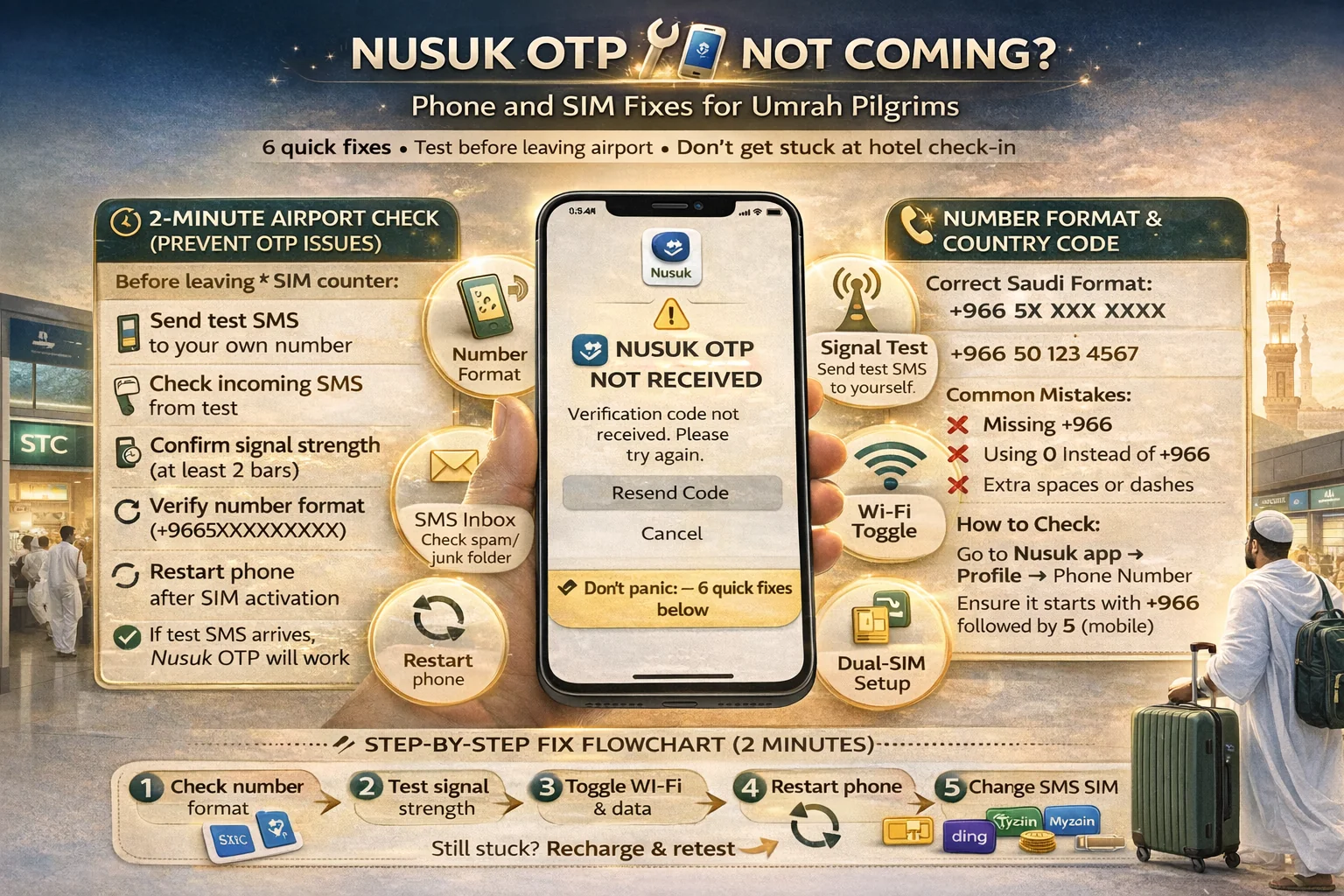
Nusuk Otp Not coming phone sim fixes pilgrims
You’re standing in the airport or hotel lobby, tired, bags in hand, and the Nusuk code still isn’t coming.
It feels like a big problem.
Most of the time, it’s a small one.
This guide for nusuk otp not coming phone sim fixes pilgrims is built for real Umrah travel moments, not tech support language. The code issue is usually a basic setup mistake: wrong number format, weak signal, delayed SMS, or a Saudi SIM OTP problem caused by a line that looks active but isn’t fully ready.
Think of OTP like a hotel room knock. If you gave the wrong room number, or you’re not in the room yet, the knock won’t reach you. Same idea here: your phone, SIM, and app must all be lined up.
✅ TL;DR – nusuk otp not coming phone sim fixes pilgrims
If Nusuk OTP is not arriving, the problem is usually a basic setup issue: wrong number format, weak network, delayed SMS, or SIM not fully activated. Start by testing normal SMS, switching between Wi-Fi and mobile data, and confirming your Saudi number format before trying again.
why OTP fails
Why OTP fails: A nusuk verification code issue usually happens because one part of the chain is off. The app sends the code, but your phone number was typed wrong, your saudi visitor sim otp setup is incomplete, or your phone is using the wrong line for messages or data.
This is common in Umrah trips.
People change phones, switch to a new Saudi Arabia line, use eSIM plus home SIM together, then try to log in quickly while moving between airport, taxi, and hotel. That’s a perfect setup for tiny mistakes.
The most common causes behind nusuk otp not received cases are:
- wrong phone number format (especially country code mistakes)
- SIM not fully activated after purchase
- weak signal or temporary SMS delay
- dual-SIM confusion (code goes to the other line)
- phone settings or inbox issues blocking normal message flow
- app session issue after a SIM change or repeated retries
If you’re asking why is nusuk otp not coming on saudi sim, don’t start with advanced settings. Start with the basics. A lot of pilgrims lose time because they begin with “big fixes” before checking whether their SIM can receive a simple text at all.
That basic check solves more cases than people expect.
first checks in 2 minutes
First checks in 2 minutes: This is the fast airport or hotel test. It’s the quickest umrah app otp fix path before you start changing settings. Do this in order. Don’t jump around.
Read slowly and do one step at a time.
Here’s the fast check list for nusuk app sms problem and nusuk login issue pilgrim cases:
- Check signal bars on your phone (not airplane mode, not no-service)
- Turn off Wi-Fi and retry once on mobile data
- Then turn Wi-Fi on and retry once on Wi-Fi
- Send/receive a normal SMS to test your line
- Confirm the number format with the right country code
- Restart the phone and try again
That’s your 2-minute airport check.
It’s simple on purpose. Pilgrims often overcomplicate this when they’re tired.
Micro-scenario: You just bought a SIM at the airport, but you never tested regular SMS. The Nusuk OTP fails, and you assume the app is broken. Real issue: the line was active for data, but SMS was not ready yet. A quick SMS test would have shown it.
If you searched best way to test sms after buying sim in airport, this is it: test one normal message before trying any OTP app login.
number format and country code
Number format and country code: A wrong number entry is one of the biggest reasons for phone number verification umrah failure. This sounds basic, but it happens constantly—especially when pilgrims switch from a foreign number to a Saudi line during travel.
This is the sneaky one.
Everything looks fine, but the code is going to a number format the app doesn’t recognize correctly.
If you’re dealing with a wrong country code nusuk otp issue, check these points:
- Are you entering your Saudi number, not your home number?
- Did you select the correct country code in the app?
- Did you accidentally add an extra zero or remove one?
- Are you trying to log in with a number different from the one used earlier?
For can i use foreign number for nusuk otp, it depends on your account flow and what number you registered with. The practical rule is simple: use the same number you expect to receive the code on right now, and double-check the country code before tapping send.
One beginner mistake I see a lot: the person reads their number from memory and types it fast. But they’re actually reading the old home number in their head. Then they blame the network.
Slow down here. This one step can fix the whole problem.
signal and SMS testing
Signal and SMS testing: If the number format is correct, the next check is message delivery. A sms otp not arriving saudi problem is often just a line readiness issue. Your SIM may show bars, but normal SMS still needs a minute, a restart, or a better signal spot.
Signal bars are not the full story.
A phone can show service and still behave poorly for a few minutes after activation, especially when you’re in a crowded arrival area in Ramadan.
If you’re asking how to check if my saudi sim can receive sms, do this:
- Ask someone to send you a normal text (or use another phone if available)
- Send a text out if your plan supports SMS/calls
- Move a little (sometimes a different spot improves signal)
- Restart your phone once
- Retry Nusuk OTP only after normal SMS works
That order matters.
Quirky beginner mistake #1: they keep tapping “send OTP” five times before checking if normal SMS works. Quick fix: stop, test a normal text first.
Quirky beginner mistake #2: they’re using roaming on the old SIM and expect the new Saudi line to receive the code. Quick fix: confirm which line is active and which number you entered.
Quirky beginner mistake #3: they sit in a weak indoor corner and assume the carrier is bad. Quick fix: move near a better signal area and retry once.
If your problem is otp delayed in makkah during ramadan what to do, the same logic still helps: wait a minute, avoid repeated rapid retries, confirm number format, and test normal SMS first.
Wi-Fi vs mobile data retry
Wi-Fi vs mobile data retry: For a otp fix in saudi arabia case, many pilgrims don’t know whether to use Wi-Fi or mobile data. The short answer: try both, but do it in order. Don’t keep switching every few seconds.
Here’s the easy way to think about it.
Wi-Fi is the road your app request travels on. SMS is the door the code arrives through. Even though OTP is an SMS message, the app still needs a stable connection to request the code cleanly. That’s why both can matter.
If you’re asking use wifi or mobile data for nusuk otp, use this sequence:
- Try once on mobile data (with Wi-Fi off)
- Wait briefly for delayed SMS
- Try once on Wi-Fi (stable hotel or airport Wi-Fi)
- Do not spam retries back-to-back
Why this helps: sometimes your mobile data is weak but SMS works fine. Other times Wi-Fi is weak but mobile data is stronger. Testing both gives you a clean answer.
Micro-scenario: a pilgrim stays on weak airport Wi-Fi, keeps retrying, and says “Nusuk is down.” He turns off Wi-Fi, uses mobile data, and the OTP request goes through. The app wasn’t the issue. The connection path was.
If you’re already at the hotel, hotel Wi-Fi can be useful for the app request, but make sure your Saudi SIM is the one receiving SMS.
eSIM and dual-SIM issues
eSIM and dual-SIM issues: A lot of saudi sim otp problem cases happen on phones running two lines together—home SIM + Saudi line. This is common and helpful for travel, but it can confuse OTP flow if the wrong line handles SMS or data.
This happens on both iPhone and Android.
If you’re asking does esim affect nusuk sms otp in saudi, the answer is: not by itself. eSIM is usually fine. The issue is often line settings, not the eSIM technology.
Check these dual-line basics:
- Which number did you enter in Nusuk? (Saudi line or home line)
- Which line is set for mobile data?
- Which line receives SMS? (watch the message label carefully)
- Is your home SIM on roaming? It may still grab attention and confuse the flow
If your problem is dual sim causing otp issue on iphone android, a simple temporary fix is to make the Saudi line your main line for data during setup, retry OTP once, then switch things back later if you want.
Also, if you recently changed SIMs and now have a nusuk login not working after sim change problem, restart the phone and sign in again slowly with the correct number format. SIM swaps can leave the phone in a messy state for a short time.
A small human aside: my students always ask, “Should I remove my home SIM?” Usually no. You just need the right line selected while logging in.
when to contact support
When to contact support: Contact support after you do the basic checks, not before. If normal SMS works, your number format is correct, and you tried both Wi-Fi and mobile data, then it makes sense to ask for help with a nusuk verification code issue.
Support is for stuck cases, not first checks.
If you’re wondering what to do before contacting support nusuk, make sure you can answer these clearly:
- Which number are you using (Saudi or foreign)?
- Did you test normal SMS successfully?
- Are you on eSIM or physical SIM?
- Did you try on both Wi-Fi and mobile data?
- Did the issue start after a SIM change?
That information saves time.
If you still can’t receive the code, use the official Nusuk support path and explain the issue simply: “OTP not arriving, normal SMS works/doesn’t work, using Saudi SIM, tried Wi-Fi and data.”
And if normal SMS does not work, your first support contact may need to be your telecom line support, because the problem may be with the SIM message service, not the app.
This is also where STC, Zain, Mobily, or Red Bull Mobile support can matter—especially if your line is active for data but not receiving messages.
prevention checklist
Prevention checklist: The best fix is the one you never need. This checklist prevents most nusuk otp not received and umrah app otp fix problems before you reach the hotel.
Do this early, not when you’re already stressed.
- After buying your SIM, test one normal SMS immediately
- Save your Saudi number in notes and screenshot it
- Confirm the correct country code before entering the number in Nusuk
- If using eSIM + home SIM, label your lines clearly
- Set the Saudi line as mobile data line during setup
- Update the Nusuk app if needed when you have stable Wi-Fi
- Restart the phone once after SIM activation (simple but helpful)
- Do one app login test before leaving airport or before hotel check-in
If you searched temporary fix if otp is delayed during travel, the safest move is: stop repeated retries, wait a minute, test normal SMS, then retry once with the correct line and connection.
If you searched pilgrim checklist for app login before hotel check-in, this section is your answer.
Fix the phone first. Then focus on your Umrah. That’s a much better travel day.
📊 nusuk OTP fix table: fast checks for pilgrims
Use this table when nusuk otp not coming phone sim fixes pilgrims is your problem. It helps you find whether the issue is number format, SMS, Wi-Fi, mobile data, or a dual-SIM setting.
📱 Show Nusuk OTP Troubleshooting Table
| Problem | Quick check | Fix |
|---|---|---|
| OTP not arriving | Test normal SMS | Fix SIM/SMS first, then retry Nusuk |
| Wrong number issue | Check country code + digits | Re-enter the number slowly and retry once |
| App request fails | Try on mobile data, then Wi-Fi | Use the stronger connection path |
| Dual-SIM confusion | Check active line for data/SMS | Set Saudi line as primary during login |
| Signal weak or delayed SMS | Move location + restart phone | Retry after signal improves |
| Still not working | Confirm normal SMS works | Contact Nusuk support (or telecom if SMS fails) |
FAQs
📘 nusuk otp not coming phone sim fixes pilgrims FAQs
why is nusuk otp not coming on saudi sim?
Show Answer
Usually it’s a basic setup issue: wrong number format, delayed SMS, weak signal, or the Saudi line is not fully ready for messages yet.
how to fix nusuk verification code not received?
Show Answer
Start with the basics: test normal SMS, check the number and country code, switch between Wi-Fi and mobile data, then retry once after restarting the phone.
can i use foreign number for nusuk otp?
Show Answer
Use the number you expect to receive the code on right now, and double-check the correct country code. Mixing a home number and Saudi number is a common reason for OTP failure.
does esim affect nusuk sms otp in saudi?
Show Answer
eSIM itself usually is not the problem. The issue is often a dual-SIM setting, wrong data line, or confusion about which number receives SMS.
otp delayed in makkah during ramadan what to do?
Show Answer
Don’t spam retries. Wait briefly, check signal, confirm number format, test a normal SMS, then retry once on a stable connection.
how to check if my saudi sim can receive sms?
Show Answer
Ask someone to send you a normal text or test from another phone. If normal SMS does not arrive, fix that first before retrying Nusuk OTP.
nusuk login not working after sim change?
Show Answer
After a SIM change, restart your phone, confirm the correct line is active, and enter the correct number format again. SIM swaps can confuse line settings for a short time.
use wifi or mobile data for nusuk otp?
Show Answer
Try both, but in order: first mobile data (with Wi-Fi off), then Wi-Fi. OTP is an SMS, but the app still needs a stable connection to request the code.
wrong country code nusuk otp issue: what’s the fix?
Show Answer
Go back and re-enter the number slowly. Make sure the selected country code matches the SIM number you want to receive the OTP on.
phone settings blocking sms codes saudi?
Show Answer
First check the basics: normal SMS delivery, signal, and active SIM line. Then restart the phone and retry. Most cases are not deep phone settings issues.
dual sim causing otp issue on iphone android?
Show Answer
Yes, it can. Make sure the Saudi line is the active data line during login and confirm the OTP is being sent to the same number you entered in Nusuk.
what to do before contacting support nusuk?
Show Answer
Test normal SMS, confirm your number format and country code, try on both Wi-Fi and mobile data, and note whether you use eSIM or physical SIM.
temporary fix if otp is delayed during travel?
Show Answer
Stop repeated retries, wait a little, move to a stronger signal area, test normal SMS, and retry once using the correct line and connection.
best way to test sms after buying sim in airport?
Show Answer
Send or receive one normal text before trying any app login. This quick test prevents many nusuk otp not received problems later at the hotel.
pilgrim checklist for app login before hotel check-in?
Show Answer
Test SMS, confirm number format, check Wi-Fi and mobile data, then do one Nusuk login test before you leave the airport or before hotel check-in.
You Can Also Read
- Stc Vs Zain Vs Mobily vs Red Bull for ramadan umrah
- Best Sim For Umrah Visitors in ramadan saudi
- eSIM vs Physical Sim for Umrah in Ramadan
- jeddah airport sim buying guide
- Madinah airport sim setup umrah arrivals

Farrukh Farooqi has been living in Sharaya, Makkah, Saudi Arabia since 2010. With over 14 years of firsthand experience witnessing the sacred journey of millions of pilgrims, Farrukh specializes in providing practical, insider tips for Hajj and Umrah travelers. His work blends real-world observations, the latest Saudi updates, and essential crowd management strategies — helping pilgrims and worshippers plan smarter, stay safer, and experience a spiritually fulfilling journey across the Holy Cities.


