
Family sim strategy for umrah ramadan
Family trips don’t fail because of one big problem.
They fail because of ten small phone problems at the same time.
One person has no data. Another phone is dead. Kids used the hotspot. The elder can’t open WhatsApp. The organizer is trying to book taxis with 3% battery.
This guide is your practical family umrah phone setup plan for Ramadan. It is built for real family travel in Saudi Arabia, especially Makkah and Madinah, where timing, movement, and crowd stress make “we’ll figure it out later” a bad plan.
Think of family internet like slippers at the hotel door. If everyone throws theirs in one pile, somebody always loses time. A good family sim strategy for umrah ramadan gives each person the right level of phone access without making the whole trip depend on one phone.
✅ TL;DR – family sim strategy for umrah ramadan
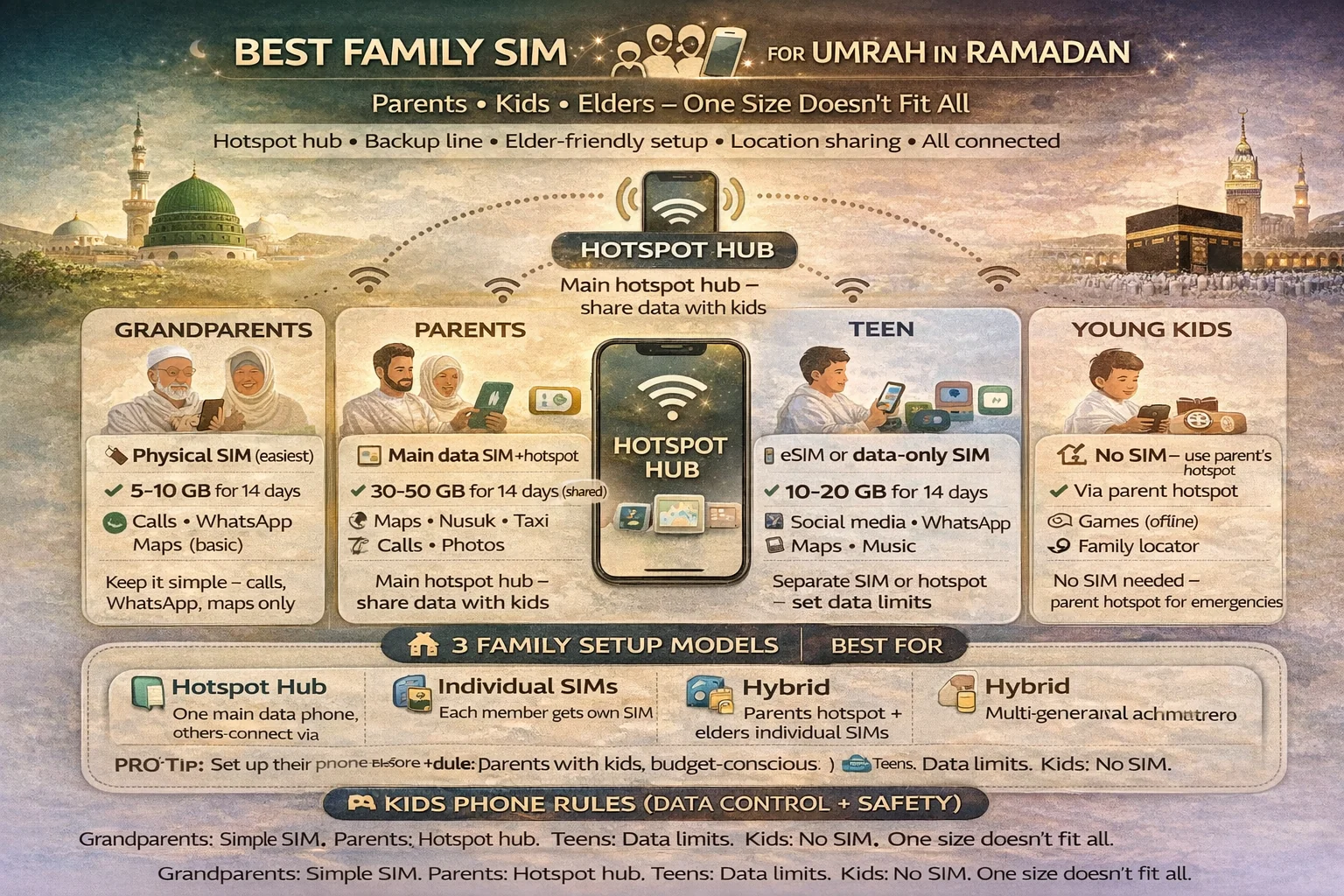
The best family sim strategy for umrah ramadan is usually not one shared package for everyone. Most families do better with one main data phone (for hotspot, maps, Nusuk, and taxis), plus one backup line for emergencies, while elders get a simple setup with calling, maps, and WhatsApp only.
why family plans fail
Why family plans fail: Most saudi sim for family pilgrims setups fail because families choose by price first and roles later. A cheap setup can still be stressful if nobody knows who handles maps, who has the backup line, and who can call when the group splits.
This is the root problem.
People search cheapest family connectivity plan for umrah, but the real question should be: “Who needs what on this trip?” A child does not need the same setup as the organizer. An elderly pilgrim does not need the same setup as a tech-savvy parent.
Common failure patterns in ramadan umrah family internet planning:
- One phone carries the whole family on hotspot and dies early
- No one sets up offline maps before leaving the hotel
- Elders get a complicated app-only setup instead of simple calling + WhatsApp
- Kids use too much data during transfers and waiting time
- No one saves a recharge backup method
Here’s the thing: family travel needs a “roles first” setup. Not “everyone gets the same plan.”
Another issue is stress timing. Ramadan travel is tiring. The phone problem usually appears when you’re hungry, late, or moving between hotel and Haram. That is exactly when weak planning hurts most.
If you’re asking best sim setup for family umrah trip in ramadan, the answer is not a single package name. It’s a family structure.
3-family setup models
3-family setup models: This is the heart of your group sim strategy saudi. Pick one model based on family size, age mix, and how confident you are with phones. Most families only need one of these three models.
Keep it simple.
Model 1: Main line + backup line (best default)
This is the best setup for most families. One phone gets a stronger local data line for hotspot, Nusuk, maps, and taxi apps. A second adult gets a lighter backup line for emergencies, separation, and direct calling.
This model answers the common question one hotspot phone or separate sims for pilgrims in the most practical way: use one strong main phone, but don’t make it your only lifeline.
Model 2: Two independent adults + elders simple lines
This works well for bigger groups or families that move in smaller pairs. Each adult has their own line. Elders get a basic calling + WhatsApp setup. Kids usually stay on controlled Wi-Fi/hotspot access only.
This is often the easiest multiple sims for pilgrims setup if your group may split (shopping, hotel rest, prayer timing differences, etc.).
Model 3: Budget setup (small family, tight control)
One main line with hotspot, one low-cost backup line, and strict phone rules for kids. This can work if you actively manage battery, data use, and recharge timing.
But don’t confuse “budget” with “no backup.”
If you’re asking can one sim support family hotspot during umrah, yes, sometimes. But only if your family is small, your use is light, and you manage it carefully. For most families, one SIM alone becomes a stress point by day 2 or 3.
A quick micro-scenario: father has the main line, mother has no data line, and the kids go with mother to the hotel while father stays outside. Suddenly no taxis, no live location, no easy contact. One backup line fixes that problem before it starts.
📦 Family Setup Box (Pick One)
Best default: 1 main data line + 1 backup line + elder simple phone setup.
Best for larger groups: 2 adult lines + elder simple lines + kids on controlled access.
Best budget option: 1 strong line + 1 light backup line + strict hotspot rules.
elder-friendly setup
Elder-friendly setup: The safest elderly pilgrim mobile setup is the one they can actually use without help. Family members often over-design this part and create stress for the person who needs the calmest phone setup.
Simple wins here.
For most elders, the best setup includes:
Calling (regular call ability), WhatsApp for family messages, one map shortcut, and a few saved contacts. That’s enough. They do not need a complicated app stack, and they usually should not depend only on someone else’s hotspot.
If you’re searching elderly pilgrim phone setup in saudi arabia or easiest sim setup for parents and elders in saudi, focus on these points:
1) Give them a line that can call directly.
A data-only setup can go wrong at the worst time.
2) Use a familiar phone if possible.
Umrah travel is not the best time to teach a brand-new phone.
3) Put only the needed apps on the home screen.
Too many icons confuse people when they’re tired.
4) Save family contacts with clear names.
Use names like “Son Main Phone” and “Daughter Hotel.”
5) Keep maps and WhatsApp visible and tested.
Don’t assume it works. Test once before the family leaves the hotel.
I’ve seen this many times: families give the elder the “smartest” setup, then spend the whole trip fixing small issues. A calmer setup makes everyone calmer.
And yes, elders still need a backup plan if the group separates for a short time. Even a basic line helps.
kids phone rules
Kids phone rules: A good kids phone plan umrah is less about package size and more about rules. Children can drain data and battery fast without meaning to, especially during waiting times, hotel downtime, and transfers.
Kids are not the problem.
No rules is the problem.
If you’re asking kids phone data control during umrah travel, use simple, clear rules the whole family follows. Don’t make new rules every day.
- No video streaming on mobile data (hotel wifi only)
- Location sharing stays on for older kids when outside
- Battery check before leaving hotel
- No hotspot password sharing with cousins/friends
- Emergency call and WhatsApp only when group is moving
That one list fixes half of family phone problems.
For family location sharing setup for makkah trips, choose one method and stay with it. Don’t mix five apps. Usually, WhatsApp live location or the phone’s built-in sharing feature is enough if everyone knows how to open it.
Another micro-scenario: a teen says “my net is not working,” but the issue is actually battery saver mode, low battery, and ten background apps. Teach one quick check routine. It saves arguments.
If your family asks should each family member buy a sim for umrah, the answer is usually no. Not everyone needs a full line. Kids often need controlled access, not full independent plans.
👦 Kids Rules Box (Keep It Calm)
Use mobile data for: WhatsApp, maps, emergency contact.
Use hotel wifi for: updates, videos, downloads, app installs.
Daily check: battery + location sharing + family contact list.
hotspot and battery planning
Hotspot and battery planning: A strong hotspot for family umrah setup can make travel smooth, but it can also destroy your battery and data if you treat it like unlimited home internet.
Hotspot is a tool.
Not a full-time lifestyle.
The best family data plan umrah saudi setups use hotspot in short windows: hotel transfer, taxi booking, quick route check, or temporary separation. They do not run hotspot all day for everyone.
If you’re asking how much data family needs for umrah in ramadan, usage changes a lot based on hotspot habits. Families who use hotspot constantly need much more data than families who use it only when moving.
Battery planning matters just as much as SIM planning. A perfect SIM is useless on a dead phone.
Use this simple battery routine for the main organizer phone:
Before leaving hotel: charge well, close heavy apps, turn on only what you need.
During movement: use hotspot only when needed; turn it off after use.
At hotel return: recharge early, not at midnight panic time.
A quirky beginner mistake I still see: families keep hotspot on all day “just in case,” then wonder why battery drops so fast. The fix is easy—switch it on when needed, switch it off when done.
For dual sim strategy for family trip to saudi, many organizer phones can use a home line and a Saudi line together (depending on phone support). That can be helpful, but keep the Saudi line as the main data line during the trip to avoid confusion.
Also, set offline maps before busy days. If data slows in crowded times, your route still works.
backup line and emergency contacts
Backup line and emergency contacts: This is the part families skip, then regret. A best backup phone plan for group pilgrims does not need to be expensive. It just needs to exist and be ready.
Every family should have a backup line.
Not because something bad will happen. Because travel is unpredictable.
Your backup line should be on a second adult phone or helper phone, with basic calling, WhatsApp, and maps. It should not depend on the main organizer’s hotspot.
If you’re planning emergency contact setup for pilgrims in saudi, make a small contact list on every family phone:
Main organizer, second adult, hotel, driver/transport contact (if any), and one back-home contact. Keep it simple. Use clear names.
Also set one easy contact shortcut (or pinned chat) on WhatsApp. In stress, people tap what they can see fast.
For umrah family connectivity guide planning, this section is more important than package shopping. A weak package with a backup line is often better than a strong package with no backup line.
And if your family uses wa.me links for quick contact sharing, save them in notes before travel so you’re not hunting numbers later.
recharge plan
Recharge plan: A clean family recharge plan during 14 day umrah prevents the most common mid-trip argument: “Who used all the data?” Recharge stress usually comes from no plan, not from the network itself.
Don’t wait for zero.
For saudi sim for family pilgrims, use a simple family rule:
Main line: check balance daily (quick check only).
Backup line: check every 2–3 days.
Kids phones: no random top-ups without parent approval.
If you’re asking family recharge plan during 14 day umrah or just a shorter trip, the smart method is to recharge at calm times—usually at the hotel on hotel wifi with battery charged. Not while standing outside trying to get a taxi.
Another small thing that helps: save screenshots of the numbers and package details on the main phone. My students always ask for the number exactly when nobody can find it.
If your family uses both eSIM and physical SIM phones, write that down too. It sounds basic, but it stops a lot of confusion.
checklist
Checklist: Use this quick list the night before your main Umrah movement day, or before leaving Madinah for Makkah. It keeps your family sim strategy for umrah ramadan working when everyone is tired.
This is your calm-check.
Organizer phone: Saudi data line active, maps tested, Nusuk opens, battery okay, hotspot password saved.
Backup phone: calling works, WhatsApp works, basic data works, family contacts saved.
Elders: call button easy to find, one map option ready, key family contacts pinned.
Kids: location sharing on (if age-appropriate), battery checked, mobile data rules repeated.
Everyone: hotel name saved, one meeting point agreed, one emergency plan agreed.
If you’re here because you searched what apps to install on all family phones before umrah, keep it minimal: WhatsApp, maps, Nusuk (where needed), and the telecom app on the main phone. Too many apps make troubleshooting harder.
Set roles. Test once. Then stop worrying about phones and focus on worship.
📊 family sim strategy for umrah ramadan: choose the right setup
Use this table to pick a family sim strategy for umrah ramadan based on group size, elders, kids, and hotspot use. It helps you choose a practical family umrah phone setup without overbuying.
📱 Show Family SIM Setup Table
| Family type | Best setup | Why it works |
|---|---|---|
| Small family (2 adults + kids) | 1 main data line + 1 backup line + kids on controlled access | Low stress, easy hotspot control, backup if group splits |
| Family with elders | Main line + backup line + elder simple calling/WhatsApp setup | Elders stay reachable without complex phone steps |
| Larger group | 2 adult lines + 1 basic helper/backup line | Better for movement days in Makkah/Madinah |
| Budget-focused family | 1 strong line + 1 light backup + strict kids rules | Controls cost without risking total disconnection |
| Organizer with dual-SIM phone | Dual sim (home + Saudi) + second adult backup line | Keeps travel communication flexible and safer |
FAQs
📘 family sim strategy for umrah ramadan FAQs
what is the best sim setup for family umrah trip in ramadan?
Show Answer
For most families, the best setup is one main data phone for hotspot, maps, Nusuk, and taxis, plus one backup line on a second adult phone.
should each family member buy a sim for umrah?
Show Answer
Usually no. Not everyone needs a full line. Adults and elders may need direct calling and data, while kids often only need controlled access.
one hotspot phone or separate sims for pilgrims?
Show Answer
One main hotspot phone can work, but it should not be your only line. A second backup SIM/line is the safer family setup.
elderly pilgrim phone setup in saudi arabia: what is easiest?
Show Answer
Keep it simple: direct calling, WhatsApp, a basic maps option, and saved family contacts. Avoid complicated app-heavy setups.
kids phone data control during umrah travel: what rules should we use?
Show Answer
Use fixed rules: no streaming on mobile data, keep location sharing on when needed, and use hotel wifi for downloads and videos.
family location sharing setup for makkah trips: what is the easiest way?
Show Answer
Pick one method and keep it simple, usually WhatsApp live location or a built-in phone location-sharing option everyone can open.
cheapest family connectivity plan for umrah: how do we keep cost low?
Show Answer
Use one stronger main line, one light backup line, and strict kids data rules. Also use hotel wifi for heavy use like videos and updates.
best backup phone plan for group pilgrims?
Show Answer
A simple backup line with calling, WhatsApp, and basic data on a second adult or helper phone is usually enough.
can one sim support family hotspot during umrah?
Show Answer
Sometimes, yes, for smaller families with light use. But most families should still keep a backup line because one phone can fail, die, or get separated.
how much data family needs for umrah in ramadan?
Show Answer
It depends on your hotspot use, video habits, and how much you use hotel wifi. Families that use hotspot all day need much more data.
easiest sim setup for parents and elders in saudi?
Show Answer
A simple line with calling + data, WhatsApp, saved contacts, and one tested map option is usually the easiest and safest setup.
dual sim strategy for family trip to saudi: is it useful?
Show Answer
Yes, if the organizer phone supports it. Keeping a home line and Saudi line together can help, but use the Saudi line as the main data line to avoid confusion.
what apps to install on all family phones before umrah?
Show Answer
Keep it minimal: WhatsApp, maps, and Nusuk where needed. Put the telecom app on the main organizer phone for easier recharge.
family recharge plan during 14 day umrah: what is the smart way?
Show Answer
Check the main line daily, backup line every few days, and handle recharge at the hotel on hotel wifi with a charged battery.
emergency contact setup for pilgrims in saudi: what should be saved?
Show Answer
Save the main organizer, second adult, hotel, transport contact, and one back-home contact on every phone with clear labels.
You Can Also Read
- Stc Vs Zain Vs Mobily vs Red Bull for ramadan umrah
- Best Sim For Umrah Visitors in ramadan saudi
- eSIM vs Physical Sim for Umrah in Ramadan
- jeddah airport sim buying guide
- Madinah airport sim setup umrah arrivals
- Nusuk Otp Not coming
- Best 14 day data plans for ramadan

Farrukh Farooqi has been living in Sharaya, Makkah, Saudi Arabia since 2010. With over 14 years of firsthand experience witnessing the sacred journey of millions of pilgrims, Farrukh specializes in providing practical, insider tips for Hajj and Umrah travelers. His work blends real-world observations, the latest Saudi updates, and essential crowd management strategies — helping pilgrims and worshippers plan smarter, stay safer, and experience a spiritually fulfilling journey across the Holy Cities.


