
Recharge fails during umrah saudi all networks: what to do (stc, zain, mobily, red bull)
A failed recharge during Umrah can ruin your mood fast.
Especially if you’re outside the Haram, your data is gone, and your family is waiting on your location.
The good news: most recharge failed saudi sim problems are fixable. The bad news: many people make it worse by retrying too fast, getting charged twice, or forgetting to save proof.
This guide gives you a simple flow for STC, Zain, Mobily, and Red Bull Mobile: stop, check, prove, then act.
✅ TL;DR – recharge fails during umrah saudi all networks
If a recharge fails, don’t keep retrying immediately. First confirm whether payment was charged, check your balance or package status, and save screenshots. Most problems are fixed faster when you have exact proof, and repeated retries can make the issue harder to track.
first thing to do after failed recharge
First thing to do after failed recharge: Stop retrying. A failed top-up often looks like “nothing happened,” but your payment may still be processing or pending. If you hit pay again too quickly, you can create a double-charge mess that is harder to fix.
This is the most important step in the whole article.
Most umrah sim top-up problem cases get worse because people panic-tap the button five times.
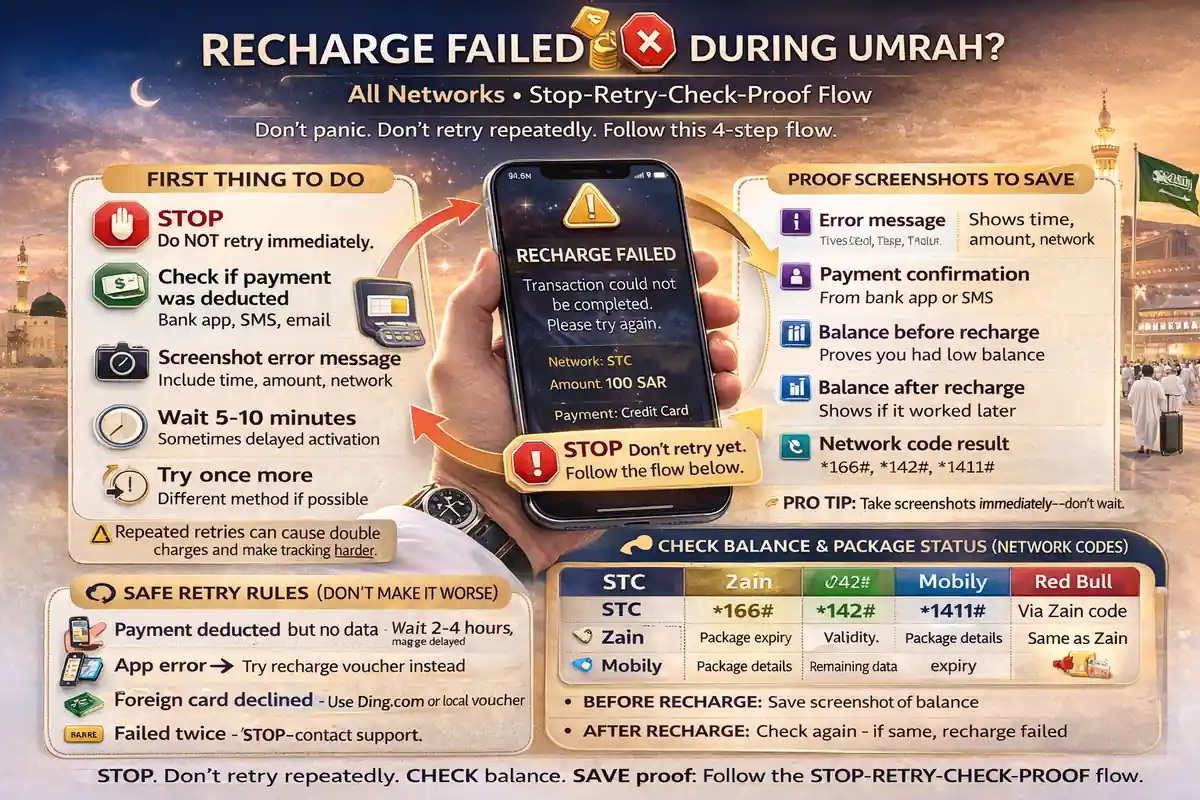
Use this “stop-retry-check-proof” flow the moment you see a saudi mobile recharge issue:
- Stop – don’t pay again yet
- Check – see if the money was deducted or the package was actually added
- Proof – save screenshots before anything changes
- Then act – retry safely or contact support
If you’re near the Haram and need internet urgently, don’t rush into repeated payments. First check if your line already got balance or a package but the app screen just failed to refresh.
That happens more often than people think.
check if payment was deducted
Check if payment was deducted: Before anything else, confirm whether your card or wallet was charged. A recharge can fail on-screen but still create a pending payment, or it can show an error while the top-up actually succeeds. You need the payment truth first.
Think of it like ordering food online. Sometimes the app freezes, but the order still goes through.
Check these places in order:
- Bank app / card app – look for a completed or pending charge
- Provider app – check balance and recent transactions
- SMS inbox – look for top-up confirmation or payment alerts
- Email (if used) – check payment receipts
If you see a pending charge, do not assume it failed.
If you see a completed charge but no package yet, treat it as a failed top-up pilgrim case with proof and move to the next step.
Micro-scenario: a pilgrim pays in the app, sees an error, retries twice, and later finds three card charges. The first one was only slow. The extra taps created the real problem.
This is why avoid repeat charging after failed recharge matters so much during Umrah travel.
confirm package status
Confirm package status: Don’t only check raw balance. Confirm whether a package was added, because some recharges add basic credit while others activate a data bundle. A lot of pilgrims think “recharge failed” when the real issue is: credit was added, but no package was bought.
This is the classic recharge deducted but no data added saudi network problem.
And it confuses almost everyone the first time.
For STC, Zain, Mobily, and Red Bull Mobile, check these inside the app if possible:
- Current balance
- Active package name
- Package expiry / validity
- Recent transactions (top-up, bundle purchase, failed payment)
If your visitor sim recharge not working problem happened on a family hotspot phone, check the right line. I’ve seen people check one phone, but the recharge was done on another line entirely.
Quirky beginner mistake #1: Top-up added balance, but no data package was activated.
Quick fix: Use the balance to buy a package, don’t assume recharge alone gives internet.
Quirky beginner mistake #2: The package is active, but the phone is using the wrong SIM for data.
Quick fix: Set the correct Saudi line as the mobile data line.
Quirky beginner mistake #3: No confirmation SMS came, so user assumes failure.
Quick fix: Check app transaction history and actual package status first.
safe retry rules
Safe retry rules: Only retry after you check payment status and package status. If you retry too early, you risk double charges. If you retry too late without checking, you waste time. A calm retry is better than a fast retry.
This part saves money.
Here’s a safe rule set for umrah phone recharge troubleshooting across all networks:
- Do not retry immediately after an app error screen
- Wait briefly and refresh app transactions first
- Retry once only after checking bank/app status
- Switch method if needed (app → voucher, or app → website/quick pay)
- Do not mix random methods without checking results in between
Can I use recharge card if online payment fails? Yes, a voucher or recharge card can be a good backup if your app payment fails or your foreign card has trouble. But check first whether the first payment is pending before adding more.
How long to wait after failed recharge before retrying? There is no one exact time for every payment method, so use the safer approach: check bank status, app transaction history, and package status first. Retry only when you know the first attempt is not already processing.
Quirky beginner mistake #4: Retrying in app, then trying website, then trying voucher—all in 2 minutes.
Quick fix: Pause and verify each attempt before using another method.
proof screenshots to save
Proof screenshots to save: Save proof before chatting with support. A good complaint with clear screenshots gets fixed much faster than a vague message like “my recharge failed.” Save your proof while the details are visible.
This is your best weapon.
And most people forget it.
For a strong screenshot checklist for recharge complaint saudi, save these:
- Error screen (showing time/date if possible)
- Provider app transaction history
- Current balance screen
- Package status screen (active / inactive / expired)
- Bank/card charge screen (completed or pending)
- SMS confirmation or no-confirmation context
- Your mobile number screen (to avoid number mistakes)
How to prove failed recharge in saudi telecom app? The easiest way is a set of screenshots that show the failed or pending transaction, your current package status, and your payment charge. That three-part proof usually tells the full story.
Micro-scenario: a pilgrim says, “They took my money.” Support asks for the number, charge proof, and time. He has none. Another pilgrim has screenshots of the app error, bank charge, and package page. Guess who gets a faster answer?
Even one clean screenshot can save you 20 minutes of explaining.
provider support steps
Provider support steps: After checking payment and package status, contact your provider with proof. Start with the official app chat or official support channel for STC, Zain, Mobily, or Red Bull Mobile. Keep your message short, specific, and complete.
Don’t send a long emotional paragraph.
Send a clean issue report.
Use this simple message template for any recharge error stc zain mobily or red bull mobile recharge issue:
“My recharge failed. I was charged [amount] on [time]. My number is [number]. I checked balance and package, and no package was added / recharge is not showing. I have screenshots.”
That message works because it answers the support agent’s first questions before they ask.
Network-specific support path (safe order):
- STC: use the official mystc app or official support/contact channels
- Zain: use the official Zain app, quick pay/recharge page, or official contact channels
- Mobily: use the official Mobily app, recharge/payment channels, or official support channels
- Red Bull Mobile: use the official Red Bull Mobile app or official recharge/support channel
Visitor sim recharge with foreign card problem is also common. If your foreign card is the issue, a voucher recharge can be the fastest backup—especially if you need internet urgently near the Haram.
Top-up failed near haram what is fastest fix? The fastest fix is usually: check if payment already went through, confirm package status, then use one clean backup method (like a voucher) instead of repeating the same broken payment attempt.
when to escalate
When to escalate: Escalate only after you contact the provider and give them a fair chance to fix it. If the issue stays unresolved and you have proof, then you can escalate through CST. Start with the telecom company first. That step matters.
This is where people get the order wrong.
Should I contact provider or CST first for recharge issue? Contact the provider first. If they don’t solve it properly, then escalate through CST using your proof.
Use escalation when:
- You were charged but no recharge/package was added
- Support keeps closing the issue without fixing it
- You have clear proof (charge + app status + screenshots)
- The issue is a real telecom service dispute, not just a settings mistake
When to escalate recharge dispute in saudi telecom? Escalate after provider support fails or closes the issue without a proper fix. Save your case number, screenshots, and payment proof before escalating.
A short story from a beginner mistake: one pilgrim got a saudi telecom top-up fix in five minutes, but only on the second try with support. Why? The first time he wrote, “internet not working.” The second time he sent the exact charge time, amount, number, and screenshots. Same issue. Better proof. Fast result.
For Umrah, the goal is simple: fix the line, avoid double charges, and get back to worship without turning a recharge problem into a full-day problem.
📊 recharge fails during umrah saudi all networks: stop-retry-check-proof table
Use this table when a recharge failed saudi sim issue happens. It works for STC, Zain, Mobily, and Red Bull Mobile and helps avoid repeat charging.
💳 Show Failed Recharge Fix Table
| Step | What to check | Why it matters | Common mistake to avoid |
|---|---|---|---|
| 1. Stop | Pause after error screen | Prevents double charging | Retrying 3–5 times immediately |
| 2. Check payment | Bank/card app for completed or pending charge | Tells you if money actually left | Assuming “error” means no charge |
| 3. Check package | Balance, package name, validity, transaction history | Recharge may have worked but app didn’t refresh | Checking only balance, not package status |
| 4. Save proof | Screenshots of error, charge, number, package page | Speeds up support and disputes | Waiting too long and losing the error screen |
| 5. Retry once | Use one method only after checks | Keeps issue trackable | Mixing app + website + voucher at once |
| 6. Contact provider | Official app/support with exact details | Most issues get fixed here | Sending vague message without proof |
| 7. Escalate | CST (after provider fails) | Formal complaint path | Escalating before contacting provider |
FAQs
📘 recharge fails during umrah saudi all networks FAQs
what to do if my saudi sim recharge fails during umrah?
Show Answer
Stop and don’t retry immediately. First check if your payment was charged, then check your balance and package status, and save screenshots. After that, retry once or contact support.
recharge deducted but no data added saudi network?
Show Answer
This usually means the top-up added basic balance but did not activate a data package. Check your package page and buy the correct bundle if needed.
how to prove failed recharge in saudi telecom app?
Show Answer
Save screenshots of the error message, app transaction history, current package status, and bank/card charge. This proof makes support much faster.
app recharge not working for visitor sim in saudi?
Show Answer
If the app recharge fails, check whether the payment was charged first. Then try one backup method only, like official quick pay or a voucher, instead of repeated app attempts.
can i use recharge card if online payment fails?
Show Answer
Yes, a recharge voucher can be a good backup if online payment fails. Just confirm your first payment is not pending before adding more credit.
how long to wait after failed recharge before retrying?
Show Answer
There isn’t one exact time for all methods. The safer rule is to check bank/card status, app transactions, and package status first, then retry once only when you know the first attempt did not go through.
no confirmation sms after recharge in saudi?
Show Answer
No SMS does not always mean failure. Check your provider app for transaction history and package status first. The recharge may still have worked.
top-up failed near haram what is fastest fix?
Show Answer
Fastest fix: stop retrying, check if you were charged, confirm your package status, then use one backup method like an official voucher or official recharge page if needed.
visitor sim recharge with foreign card problem?
Show Answer
This can happen. If your foreign card fails, use a local-friendly method like official app alternatives or a voucher. But first check whether the first charge is pending.
should i contact provider or cst first for recharge issue?
Show Answer
Contact the provider first (STC, Zain, Mobily, or Red Bull Mobile). If they don’t fix it properly, then escalate through CST.
when to escalate recharge dispute in saudi telecom?
Show Answer
Escalate after provider support fails or closes the issue without fixing it. Keep your screenshots, payment proof, and support case details ready.
best backup top-up method for pilgrims in saudi?
Show Answer
A good backup is an official provider app plus one secondary method like official quick pay or a voucher. Don’t rely on a single payment path during Umrah travel.
You Can Also Read
- Stc Vs Zain Vs Mobily vs Red Bull for ramadan umrah
- Best Sim For Umrah Visitors in ramadan saudi
- eSIM vs Physical Sim for Umrah in Ramadan
- jeddah airport sim buying guide
- Madinah airport sim setup umrah arrivals
- Nusuk Otp Not coming
- Best 14 day data plans for ramadan
- Family sim strategy for umrah ramadan
- Keep Saudi Sim active until return flight umrah

Farrukh Farooqi has been living in Sharaya, Makkah, Saudi Arabia since 2010. With over 14 years of firsthand experience witnessing the sacred journey of millions of pilgrims, Farrukh specializes in providing practical, insider tips for Hajj and Umrah travelers. His work blends real-world observations, the latest Saudi updates, and essential crowd management strategies — helping pilgrims and worshippers plan smarter, stay safer, and experience a spiritually fulfilling journey across the Holy Cities.


