
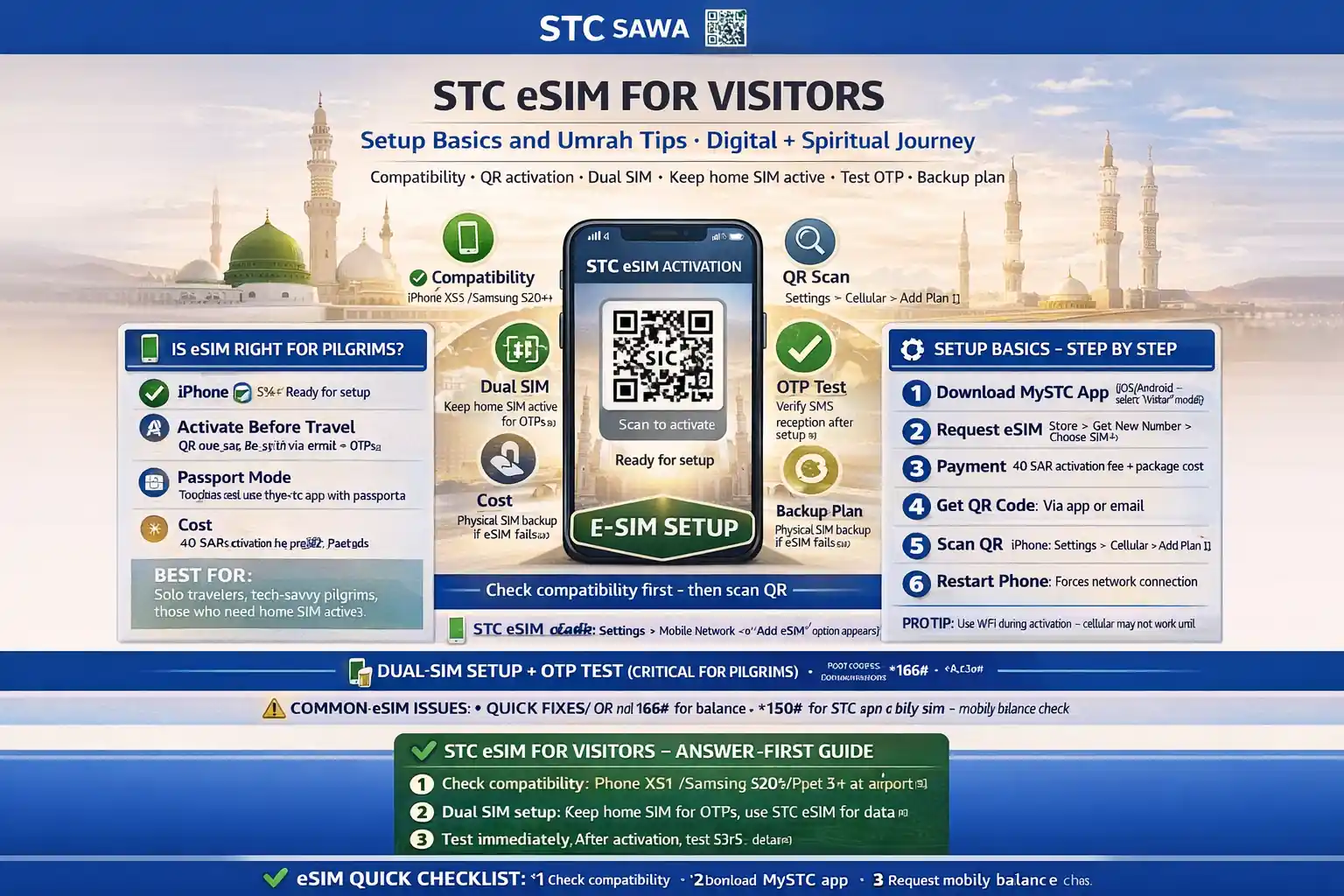
STC eSIM for Visitors: Setup Basics and Umrah Tips
If you want a Saudi line without opening your phone tray, eSIM is the easiest path.
For many pilgrims, it’s the clean setup: keep your home SIM active, add STC as a second line, and use data for maps, Nusuk, and hotel contact during Umrah.
But the part people rush past is the most important part: compatibility. If the phone doesn’t support eSIM, no QR code in the world will save the setup.
This guide is built for pilgrims. We’ll check if stc esim for visitors umrah saudi is right for you, how to set it up, how to test it, and what to do if activation fails at the worst time.
✅ TL;DR – stc esim for visitors umrah saudi
STC eSIM is a good option for visitors with compatible phones, especially if you want to keep your home SIM active. The key is checking compatibility first and testing SMS + data right after setup.
📌 Pilgrim Setup Path (Simple)
Check phone compatibility → get/request STC eSIM → scan QR code → set STC as data line → test SMS, OTP, and mobile data before leaving the counter or hotel.
That last test step is what saves headaches in Makkah and Madinah.
Is eSIM right for pilgrims
Is eSIM right for pilgrims? Yes, for most travelers with a supported phone. stc esim saudi tourists setups are especially helpful if you want to keep your home number active and add an STC line for Saudi data and calls during Umrah.
The biggest win is convenience. No tiny SIM tray. No pin tool. No swapping cards at the airport counter while people wait behind you.
There’s also a practical travel benefit: many phones let you use dual SIM mode, so your home line can stay on for bank messages while your STC eSIM handles local data.
But here’s the honest part: stc esim vs physical sim depends on the person, not just the phone.
If you’re setting up a phone for an elderly parent, or someone who gets stressed by menus, a physical SIM can sometimes be easier to understand later. If it’s your own phone and you’re comfortable with settings, stc esim pilgrims setup is usually smoother.
Micro-scenario: your father only needs calls and basic WhatsApp. A physical SIM may be easier for him. Your phone, though? eSIM is great because you can keep your home line for OTP messages and still use local data.
Compatibility
Compatibility is the first real checkpoint for stc esim guide saudi searches. Before buying anything, confirm your phone model supports eSIM. This is the step most people skip, then they blame activation.
Think of it like trying to charge a laptop with the wrong port. The charger is fine. The port is the issue.
Based on the device list you shared, STC eSIM support commonly includes many recent iPhone, Samsung, Huawei, Honor, Xiaomi, Redmi, and Motorola models. Example families in your provided list include:
Apple: iPhone 11/12/13/14/15/16 series, XS/XS Max/XR, SE 2/SE 3
Samsung: Galaxy S20 to S24 series, Z Flip/Fold lines, Note 20, Galaxy A55
Huawei/Honor/Xiaomi/Motorola: selected recent flagship and supported models
Good rule for pilgrims: don’t assume because a friend’s phone supports eSIM, yours does too. Check your exact model.
For a visitor setup, also confirm these basics before purchase:
- Phone supports eSIM (exact model)
- Phone is unlocked (not carrier-locked)
- Internet/Wi-Fi available for QR activation
- You can access settings (no forgotten lock restrictions)
- Home SIM is optional if you want dual SIM use
This section answers common searches like does stc offer esim for visitors in saudi and check if phone supports stc esim.
Setup basics
Setup basics for stc visitor esim setup are simple if you do them in order. The usual flow is: request the eSIM through the mystc app, generate the QR code, connect to Wi-Fi, scan it, and wait for activation.
Most setup problems happen because people try to rush the QR scan without good internet.
Based on the STC steps you shared, the basic process looks like this:
1) Request the eSIM in the mystc app
Generate the QR code for activation.
2) Connect to internet/Wi-Fi
You need a working connection to complete activation. Hotel Wi-Fi or airport Wi-Fi works fine.
3) Scan the QR code in your phone settings
– iPhone: Settings → Cellular → Add Cellular Plan → scan QR
– Android (Samsung-style): Settings → Connections → SIM Manager → Add Mobile Plan → scan QR
– Android (Huawei-style): Settings → Mobile Network → Manage SIM Cards → Add eSIM → scan QR
4) Wait for activation
Let the phone finish adding the line. Don’t close the process too early.
5) Name the line clearly
Use a label like “STC Umrah” so you don’t confuse it with your home line later.
I used to see people skip the line naming step and then send data through the wrong SIM all week.
If you want more help before activation, these internal pages fit naturally: mystc app guide, STC SIM activation, and how to activate STC internet.
📦 Visitor Package Snapshot (from your screenshot)
These are STC visitor package examples visible in your screenshot (useful for pilgrims comparing data size vs stay length). I’m listing only what is clearly visible.
visitor 35: 5GB, 1 hour flex, 2 weeks, activation code 6735, price 40.25 SAR
visitor 52: 21GB, 2 hours flex, 2 weeks, activation code 6755, price 60 SAR
visitor 65: 30GB, 3 hours flex, 3 weeks, activation code 6770, price 75 SAR
visitor 104: 61GB, 5 hours flex, 4 weeks, activation code 6710, price 120 SAR
visitor 130: 74GB, 6 hours flex, 4 weeks, price appears as 150 SAR in the card style (activation code is not clearly visible in your screenshot)
visitor 165: 100GB, 10 hours flex, 4 weeks, activation code 6765, price 190 SAR
For your detailed plan pages, link naturally to: STC prepaid packages, STC call packages, and STC SIM for Hajj and Umrah.
Dual-SIM
Dual-SIM is where stc esim travel saudi becomes really useful. You can keep your home SIM for banking messages and family calls, and use STC eSIM for local data in Saudi Arabia.
This is the setup many Umrah visitors want but don’t configure correctly.
Do this right after activation:
• Set STC eSIM as the default data line
This helps your phone use local data instead of burning your home roaming balance.
• Keep home SIM for calls/SMS if needed
Useful for bank OTPs and travel alerts.
• Turn off automatic data switching while testing
This prevents the phone from quietly jumping back to your home SIM.
• Test SMS on both lines
Especially important if you need app logins or OTP codes.
Micro-scenario: you land in Jeddah, activate STC eSIM, and your phone still uses home roaming data because it stayed the default line. One setting change fixes the whole thing.
This part helps with searches like dual sim setup home sim + stc esim and stc esim foreign phones.
Data/SMS tests
Data/SMS tests are the step that separates a “looks activated” line from a working pilgrim setup. For stc esim umrah pilgrims, test everything before you leave the counter, hotel desk, or Wi-Fi spot.
Don’t just check signal bars.
Bars are not proof.
Use this quick test checklist after activation:
1) Data test: Open a light page first, then maps
2) SMS test: Send/receive one text on the STC line
3) App test: Open Nusuk or another needed app
4) OTP test: If possible, confirm you can receive a code on the line you expect
5) Call test: Optional, but useful for peace of mind
This is where many nusuk otp on stc esim issues problems get caught early. Sometimes the app is fine, but the wrong line is set for SMS or data.
If you need balance or number checks right away, these pages fit well: how to check STC KSA number, how to check STC data balance, and check STC balance Saudi Arabia.
Common issues
Common issues with stc esim activation visitor are usually fixable. Most are not “eSIM is bad” problems. They’re setup order problems, line-selection problems, or internet problems during activation.
Here are the five beginner mistakes I see most:
Mistake 1: Buying before checking compatibility
Quick fix: Confirm your exact iPhone or Android model first.
Mistake 2: Scanning the QR code on weak internet
Quick fix: Use stable Wi-Fi and wait for the process to finish.
Mistake 3: Forgetting to set STC eSIM as the data line
Quick fix: Open SIM settings and assign local data to STC.
Mistake 4: Assuming activation worked because bars appeared
Quick fix: Test SMS, maps, and one app immediately.
Mistake 5: No backup plan if activation fails
Quick fix: Keep hotel Wi-Fi ready and know where to contact support.
A short story from a real travel pattern: one visitor scanned the QR code successfully, saw the STC line show up, and walked away. Later, Nusuk didn’t load. He thought the eSIM was broken. It wasn’t. His phone was still using the home SIM for data. We changed one dual SIM setting, and everything started working. He said, “So the eSIM was fine, I was the issue.” Exactly.
This section covers searches like stc esim not working after activation fix, stc esim qr code setup guide, and stc esim for iphone and android pilgrims.
Backup plan
Backup plan matters more than people think. A pilgrim-friendly setup is not just “best option.” It’s also “what do I do if this fails right now?” For stc esim makkah madinah travel, keep a simple backup path ready.
The safest path is:
• Use hotel or airport Wi-Fi to finish activation or troubleshoot
• Keep your home SIM active until STC data and SMS are confirmed
• Visit an STC counter/shop if the QR setup fails twice
• Consider physical SIM if the phone is not eSIM-friendly or the user is not comfortable with menus
This is especially useful for searches like backup if stc esim activation fails and elder pilgrim phone and stc esim choice.
If you need support and complaint routes, link naturally to: STC customer care number, CITC complaint STC, and STC data SIM.
FAQs
📘 stc esim for visitors umrah saudi FAQs
Does STC offer eSIM for visitors in Saudi Arabia?
Show Answer
Yes, STC supports eSIM on compatible devices. Visitors can use supported STC packages, then activate through the mystc app using a QR code flow.
Is stc esim for visitors umrah saudi better than a physical SIM?
Show Answer
For many pilgrims, yes—especially if you want dual SIM use and want to keep your home SIM active. A physical SIM can still be easier for users who dislike phone settings.
How do I check if my phone supports STC eSIM?
Show Answer
Check your exact phone model, not just the brand. Many recent iPhone, Samsung, and other flagship models support eSIM, but you should confirm the exact model before buying.
Can I activate STC eSIM at the airport or in a shop?
Show Answer
Yes, many visitors start setup at an airport kiosk or STC counter, but the actual phone activation still needs a working internet connection and the QR code setup steps.
What do I need before scanning the QR code?
Show Answer
You need a compatible phone, a generated QR code from mystc, and a stable internet/Wi-Fi connection. Weak internet during scanning is a common reason setup fails.
How do I use dual SIM with home SIM + STC eSIM?
Show Answer
Keep your home SIM for calls/SMS if needed, and set STC eSIM as the default mobile data line. Turn off automatic data switching while testing.
What should I test after activation for Umrah travel?
Show Answer
Test data, SMS, maps, and one app like Nusuk before leaving the setup location. Signal bars alone are not enough.
Why is my STC eSIM line visible but internet not working?
Show Answer
The most common reason is the phone still using your home SIM for data. Check dual SIM settings and set STC as the data line.
Can Nusuk OTP issues happen on STC eSIM?
Show Answer
Yes, usually because the wrong line is set for SMS or data. Test both lines and confirm which one receives the code before relying on it.
What is the backup if STC eSIM activation fails?
Show Answer
Use hotel/airport Wi-Fi, retry the QR code setup once, then visit an STC counter. If needed, switch to a physical visitor SIM for a simpler setup.
Which STC visitor package is good for a 7-day or 14-day Umrah trip?
Show Answer
It depends on your use. Light users can choose smaller packages, while heavy maps/video users should pick bigger data bundles. Your screenshot shows 2-week, 3-week, and 4-week visitor options, which is useful for both 7-day and 14-day stays.
📊 STC eSIM pilgrim setup: eSIM vs physical SIM quick comparison
Use this to choose fast. Both can work for Umrah. The better choice depends on your phone, comfort level, and whether you want to keep your home SIM active.
📱 Show eSIM vs Physical SIM Table
| Point | STC eSIM | Physical visitor SIM |
|---|---|---|
| Phone requirement | Needs eSIM compatibility | Needs SIM tray support (most phones) |
| Setup method | QR code + settings + internet | Insert SIM, then setup if needed |
| Keep home SIM active | Usually easy with dual SIM | Depends on phone slots / dual-SIM support |
| Best for | Comfortable users, newer phones | Users who prefer simple physical setup |
| Common issue | Wrong data line after activation | SIM insertion / activation confusion |
| Pilgrim-safe tip | Test SMS + data + Nusuk immediately | Test package and data before leaving counter |
You Can Also Read
- STC visitor sim umrah guide saudi
- Sawa visitor vs regular stc prepaid umrah
- Best stc visitor package 7 days umrah
- Best stc visitor package 14 30 days saudi
- How to activate stc visitor sim step by step for pilgrims
- STC visitor sim not working after recharge
- STC Data Not Working in Makkah
- STC Data Not Working in Madinah

Farrukh Farooqi has been living in Sharaya, Makkah, Saudi Arabia since 2010. With over 14 years of firsthand experience witnessing the sacred journey of millions of pilgrims, Farrukh specializes in providing practical, insider tips for Hajj and Umrah travelers. His work blends real-world observations, the latest Saudi updates, and essential crowd management strategies — helping pilgrims and worshippers plan smarter, stay safer, and experience a spiritually fulfilling journey across the Holy Cities.


