
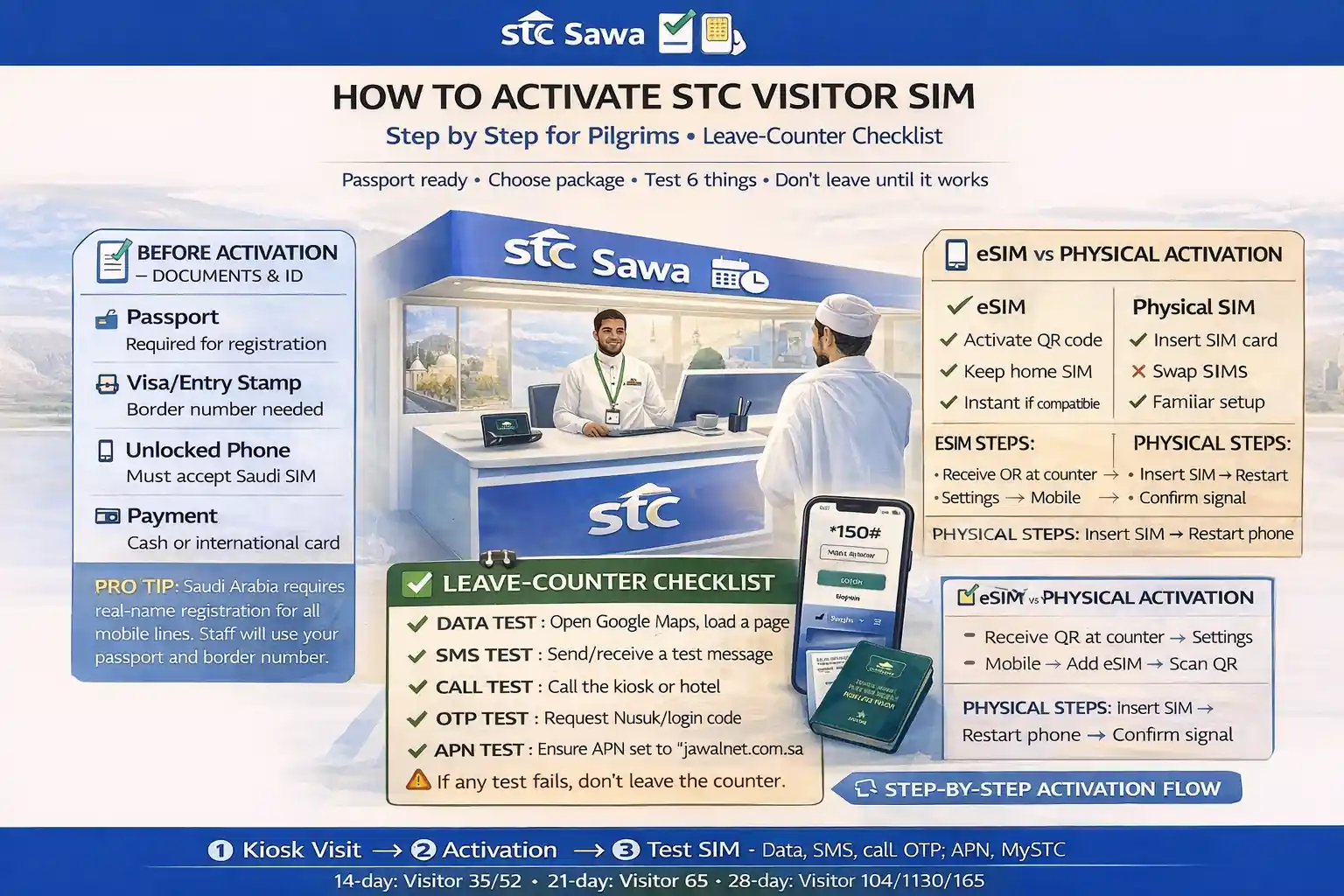
How to activate stc visitor sim step by step for pilgrims
If you land in Saudi tired, sleepy, and holding two bags, your SIM setup should feel like opening a door, not solving a puzzle.
That’s why this guide is written for pilgrims, not telecom staff.
The biggest problem I see is not “activation failed.” It’s this: the line looks active, but SMS doesn’t work, or data wasn’t tested, and the issue shows up later when you need Nusuk or a taxi app.
I used to mix this up with students too—“active” and “ready” are not the same thing.
✅ TL;DR – how to activate stc visitor sim step by step
STC Visitor SIM activation is easiest when you finish setup at the counter and test SMS, data, and one app before walking away. Most pilgrim problems happen after purchase because the SIM was inserted, but not fully tested. Bring your passport, choose eSIM or physical SIM correctly, then do a 3-minute leave-counter test.
before activation
Before activation, do one simple thing: decide your setup path first. Physical SIM is easier for most first-time pilgrims. eSIM is cleaner and faster only if your phone supports it and you’re comfortable scanning a QR code.
Think of this step like putting your ihram on correctly before the journey starts. If the base is wrong, every next step feels harder.
For pilgrims, the best timing is right at an airport kiosk or official STC shop on day one. You want working data and SMS before you leave for the hotel, not after you’re already trying to check in or use a ride app.
If you’re traveling with elders, activate one phone fully first, then repeat the same steps on the next device. Don’t open three SIM packets at once.
documents
What documents do you need? In most pilgrim cases, you need a valid passport for identity verification. Staff may also ask for travel/entry details depending on the activation method used at the counter.
Keep the passport in your hand, not packed away. This sounds obvious, but my students always ask about this after standing in line for ten minutes.
For a smooth stc visitor sim activation, also keep these ready on the phone:
- Phone unlocked (not carrier-locked from your home country)
- Battery charge above 30%
- Wi-Fi access if you’re doing eSIM
- Email access (useful for app and account setup)
If the staff mentions self-service or app activation, don’t panic. STC also has a self-activation path in the mystc app, but assisted setup at the counter is usually easier for first-time visitors and pilgrims.
esim vs physical
Which is better for pilgrims: eSIM or physical SIM? For most first-time Umrah travelers, a physical SIM is the safer choice because it is simple and easy to swap into another phone if needed. eSIM is excellent when your phone supports it and you want a clean setup without handling a SIM tray.
eSIM feels like a digital key. No chip, no tray pin, no tiny plastic piece to lose. But if your device doesn’t support it, you lose time fast.
STC’s official eSIM page shows the standard flow: request eSIM in the mystc app, generate a QR code, connect to internet/Wi-Fi, then scan the QR code from your phone settings and wait for activation.
Beginner-safe rule:
- If you are unsure your device supports eSIM, choose physical SIM.
- If you need two lines active (home line + Saudi line), eSIM can be very helpful.
- If you’re helping an elderly pilgrim, physical SIM is usually easier to troubleshoot.
Micro-scenario: You reach Makkah and your aunt’s phone loses signal after an eSIM setup. With a physical SIM, you can test the same SIM in another phone in seconds. That one trick saves a lot of stress.
activation flow
How to activate STC Visitor SIM step by step? The easiest way is to activate at an STC counter, make sure the line is registered, insert the SIM (or scan eSIM), then confirm service works before leaving. If you’re using a package code, STC’s visitor packages have activation codes such as 6735, 6755, 6770, 6710, and 6730 for common visitor bundles.
Here is the pilgrim-friendly order. Follow it exactly.
- Choose your SIM type (physical or eSIM) before paying.
- Show your passport and complete identity verification at the counter.
- Insert the SIM (or ask the staff to help) / or scan eSIM QR if using eSIM.
- Wait for signal bars and network name to appear.
- Select the visitor package you want. STC’s visitor page lists package activation codes (for example: Visitor 35 = 6735, Visitor 52 = 6755, Visitor 65 = 6770, Visitor 104 = 6710, Visitor 130 = 6730).
- Ask the staff to confirm package activation on the line (don’t assume it’s included automatically).
- Run the leave-counter test (next section). This is the most important part.
STC also shows a self-activation SIM flow in mystc with steps like scanning the SIM barcode, entering details, verification code, and authentication. For most pilgrims, assisted activation is still the calmer route, especially after a long flight.
📦 Pilgrim Activation Codes (Common STC Visitor Bundles)
Use this only after the SIM is registered and inserted. Counter staff can usually do it for you, but it helps to know the codes.
Visitor 35
Code: 6735 • 2 weeks
Visitor 52
Code: 6755 • 2 weeks
Visitor 65
Code: 6770 • 3 weeks
Visitor 104
Code: 6710 • 4 weeks
Visitor 130
Code: 6730 • 4 weeks
data/sms tests
What should you test before leaving the counter? Test three things in this order: mobile data, SMS, and one real app login or OTP. If those three work, your stc tourist sim setup is usually ready for the trip.
This part takes less than three minutes.
Use this exact test flow:
- Data test: Turn off Wi-Fi and open a website or map.
- SMS test: Send one SMS and receive one SMS (important for OTP).
- Call test: Make a short local call if possible.
- App test: Open a key app like Nusuk, maps, or a taxi app.
Micro-scenario: The line shows signal, but Nusuk doesn’t send an OTP. Usually the issue is not “the app.” It’s SMS not fully working yet. Test SMS before you walk away.
Another one. If data works only on Wi-Fi, you’re not really ready. Turn Wi-Fi off and try again. I’ve seen pilgrims think everything is fine because the airport Wi-Fi was carrying the whole setup.
If you need a quick guide later, these are natural support links to keep handy on your site: STC app guide, how to check STC data balance, and check STC balance in Saudi Arabia.
mystc setup
Do you need the mystc app? Yes, for most pilgrims it helps a lot. The mystc app makes it easier to check balance, watch data use, and buy add-ons without guessing at codes.
Think of it like a dashboard for your line. Without it, you can still drive, but you’re missing the speed meter.
After activation, do this while you still have support nearby:
1) Install/open mystc
2) Sign in with your STC number
3) Confirm OTP arrives
4) Check your active package name
5) Check remaining data / validity
If the app feels confusing in Arabic, switch your phone language or use your own guides like change STC SIM language and inquire balance in STC later from the hotel.
For people comparing plans after setup, you can naturally link to STC prepaid packages and your broader STC SIM for Hajj and Umrah page.
common problems
Common STC activation problems for pilgrims usually come from one of seven things: locked phone, wrong SIM type, incomplete registration, no SMS test, data roaming settings confusion, weak indoor signal, or package not actually activated.
Here’s the part most people miss: the SIM can be registered, but the package still isn’t active yet.
Use this quick table when something looks wrong.
📊 STC Visitor SIM activation problems and quick fixes
One table only, built for pilgrims. Check the symptom first, then do the fastest fix before changing settings randomly.
📱 Show STC Activation Fix Table
| Problem | What it usually means | Quick fix |
|---|---|---|
| No signal bars | SIM not inserted well / eSIM not added / line not active yet | Restart phone, recheck SIM/eSIM, ask counter to confirm line status |
| Signal appears but no internet | Package not active or mobile data settings issue | Turn off Wi-Fi, confirm package, use how to activate STC internet |
| OTP/SMS not arriving | SMS not tested, delayed registration, or app issue | Send/receive a test SMS first, then retry Nusuk/login |
| eSIM QR won’t scan | Phone not connected to internet/Wi-Fi or unsupported device | Connect to Wi-Fi, re-open settings, switch to physical SIM if needed |
| Wrong PIN / SIM locked | PIN entered too many times | Use your STC PUK code guide before trying again |
| Balance/package unclear | Package activated but user can’t confirm remaining usage | Check in mystc or use balance/data check guide |
Five quirky beginner mistakes I see again and again:
Mistake 1: Buying the SIM and leaving without testing SMS. Fix: Always do one OTP-style test at the counter.
Mistake 2: Keeping airport Wi-Fi on, then thinking mobile data works. Fix: Turn Wi-Fi off for the data test.
Mistake 3: Choosing eSIM on a phone that doesn’t support it. Fix: Confirm support first or use physical SIM.
Mistake 4: Not writing down the Saudi number. Fix: Save it in notes and check it using how to check STC KSA number.
Mistake 5: Assuming any recharge will restore a missing package. Fix: Confirm the active package and use the right top-up method.
a short pilgrim story (the mistake and the fix)
A brother once bought an STC Visitor SIM in a rush at the airport and said, “I’m good, there are bars.”
By the time he reached the hotel, he couldn’t get the Nusuk OTP.
He thought the app was broken, then he thought the phone was broken.
The real issue? He never tested SMS at the counter.
Next morning he went back, sent one test message, restarted the phone, and it all worked in two minutes. He laughed and said, “I lost one hour because I skipped a ten-second test.”
That’s why this guide keeps repeating the same point. Not because it’s fancy. Because it saves real people real stress.
ending: make it work before you walk away
How to activate STC visitor SIM step by step is not hard. The hard part is doing it while tired and rushed.
So slow down for three extra minutes.
Bring your passport, choose the right SIM type, finish the registration, and test data + SMS before leaving the counter. That’s the pilgrim-safe method.
If something still goes wrong later, keep your support pages ready: STC customer care number, STC SIM activation guide, and if needed, your CST complaint guide for STC.
Quiet setup. Working line. Peace of mind.
faq
📘 how to activate stc visitor sim step by step FAQs
how to activate stc visitor sim at saudi airport?
Show Answer
Go to an official STC counter, show your passport, choose eSIM or physical SIM, complete registration, then test data and SMS before leaving. Don’t skip the test.
what documents are needed for stc visitor sim activation?
Show Answer
A valid passport is the main document for visitor registration. Keep it ready at the counter, and keep your phone charged and unlocked.
can pilgrims activate sawa visitor sim through mystc app?
Show Answer
STC has a self-activation flow in the mystc app, but many pilgrims find assisted counter setup easier. If you’re new, counter activation is usually the safer option.
how do i activate a sawa visitor package code?
Show Answer
Common STC visitor package codes include 6735, 6755, 6770, 6710, and 6730 for different visitor bundles. Ask the STC staff to confirm activation on your line before you leave.
stc sim is active but no internet what should i do?
Show Answer
Turn off Wi-Fi first, then test mobile data again. If it still fails, confirm the package is active and check your settings using your STC internet activation guide.
how to test sms and nusuk otp after activation?
Show Answer
Send one test SMS first, then receive one. After that, open Nusuk or another app that uses OTP. If SMS works, OTP usually works too.
is esim better than physical sim for umrah pilgrims?
Show Answer
eSIM is great if your phone supports it and you’re comfortable with QR setup. Physical SIM is easier for most first-time pilgrims and easier to troubleshoot.
how long does stc visitor sim activation take?
Show Answer
It can be quick at the counter, but timing depends on queue and verification. The important part is not speed—it’s leaving only after data and SMS are tested.
what if i enter the wrong pin and lock the sim?
Show Answer
Don’t keep guessing. Use the correct PUK process and follow your STC PUK code guide to unlock it safely.
how can i check my stc visitor balance and data?
Show Answer
The easiest way is the mystc app. You can also use your site guides like STC data balance check and STC balance inquiry.
what is the safest one-line rule for pilgrim sim activation?
Show Answer
Don’t leave the counter until mobile data, SMS, and one OTP app test all work.
You Can Also Read
- STC visitor sim umrah guide saudi
- Sawa visitor vs regular stc prepaid umrah
- Best stc visitor package 7 days umrah
- Best stc visitor package 14 30 days saudi

Farrukh Farooqi has been living in Sharaya, Makkah, Saudi Arabia since 2010. With over 14 years of firsthand experience witnessing the sacred journey of millions of pilgrims, Farrukh specializes in providing practical, insider tips for Hajj and Umrah travelers. His work blends real-world observations, the latest Saudi updates, and essential crowd management strategies — helping pilgrims and worshippers plan smarter, stay safer, and experience a spiritually fulfilling journey across the Holy Cities.


