
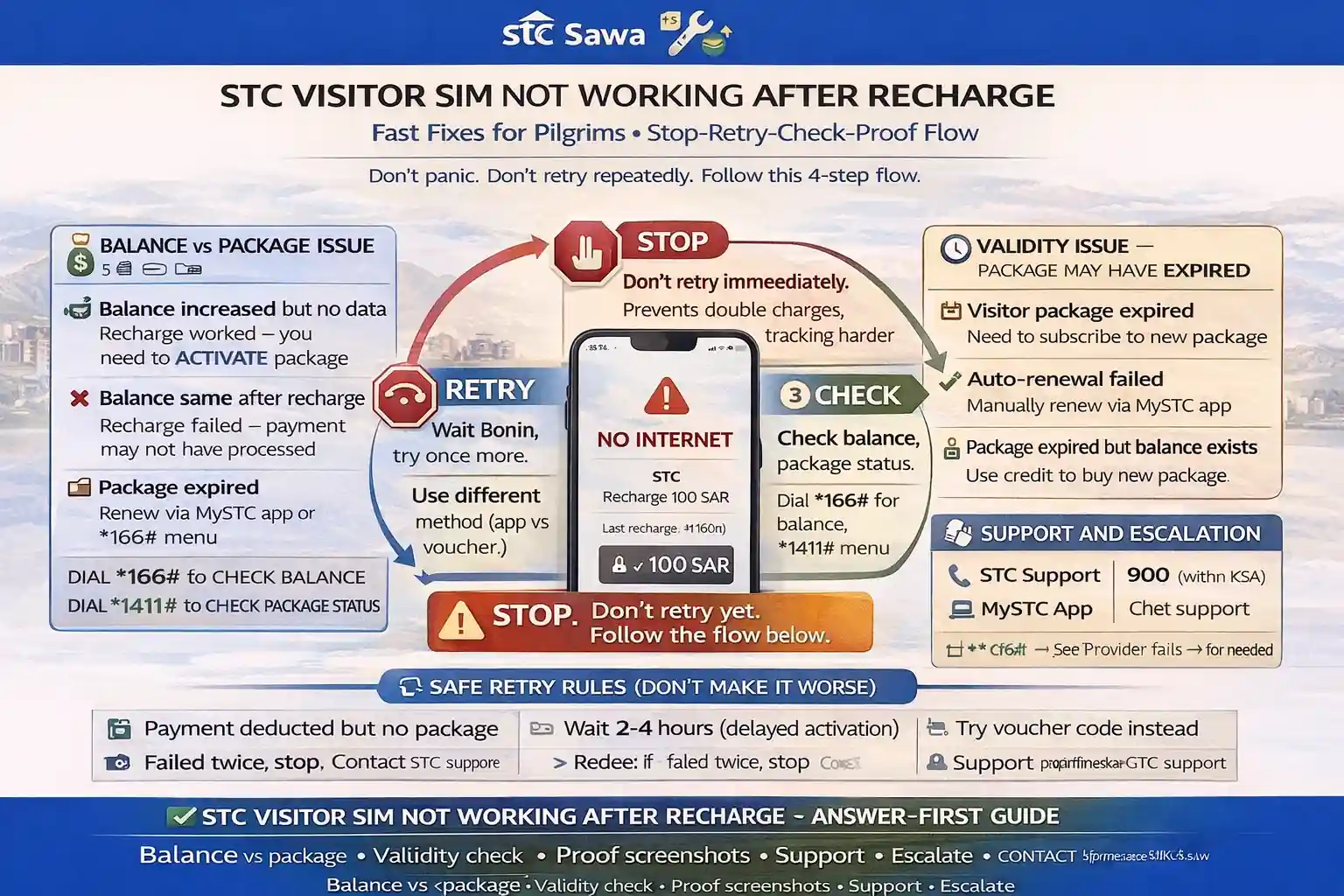
STC visitor sim not working after recharge: Fast Fixes for Pilgrims
You topped up your line, money went out, and now the phone still won’t load maps.
That moment is stressful—especially when you’re in Makkah, trying to call family, open Nusuk, or book a ride.
The good news? In many cases, the line is not “dead.” The issue is usually one of three things: balance added but no package activated, package active but phone settings are wrong, or line/package validity ended.
I’ve seen pilgrims panic and recharge two or three times in a row. That’s the worst move because it can create a second problem: a double charge.
✅ TL;DR – stc visitor sim not working after recharge
If your STC Visitor SIM stops working after recharge, don’t recharge again immediately. First check: (1) did balance increase, (2) did a package actually activate, and (3) is your line/package still valid. Take screenshots before retrying. Most fixes are solved in 5–10 minutes if you follow the right order.
First checks
First checks for stc visitor sim not working after recharge: confirm the phone is seeing the network, restart once, and test whether the issue is no signal, no data, or no package. A recharge can add credit without starting internet.
Start simple. Don’t jump into five settings at once.
Use this order:
- Turn Airplane Mode on for 10 seconds, then off
- Restart the phone once
- Check if STC signal bars are visible
- Turn mobile data on
- Make sure the STC SIM is selected for data (dual-SIM users miss this a lot)
One sentence that saves time: “Recharge success” does not always mean “internet package active.”
Micro-scenario: your call works, but WhatsApp and Maps don’t. That usually means the line is active, but the data package didn’t start (or ended), even though your balance is there.
🔎 Fast Check Box (Do This First)
1) Open mystc and check if the recharge appears.
2) Check if a package is active (not just credit).
3) Check remaining data by SMS (send 2220 to 900).
4) If still no data, check phone APN and SIM validity before paying again.
Balance vs package
Balance vs package is the biggest confusion in stc recharge no data cases. In plain words: recharge puts money in your wallet. It does not always buy the package for you.
Think of it like putting cash in your pocket before entering a shop. The cash is there, but you still need to choose what to buy.
This is where many stc top-up issue visitor sim complaints come from. The pilgrim sees “charged” in the app or voucher success, but no internet because the line has credit only.
Check these separately:
- Balance increased? (credit was added)
- Package active? (data/calls bundle started)
- Package status valid? (not expired / not fully used)
If your balance increased but data still doesn’t work, subscribe to a package (or re-subscribe if the previous one ended). For package and balance steps, your existing guides fit naturally here: how to check STC data balance, inquire balance in STC, and check STC balance in Saudi Arabia.
My students always ask about this part: “I recharged with voucher, why no data?” Because a voucher can be just a top-up. You still need the package step.
Validity
Validity is the hidden reason behind many stc package not active after recharge cases. The recharge may succeed, but if the SIM or package validity has a problem, the line may still not behave normally.
For pilgrims, this shows up in two common ways:
Case 1: Package expired (data finished or package period ended), but SIM line still exists.
Case 2: SIM validity problem after long inactivity, especially on a reused line from an old trip.
Beginner-safe rule: check both the package expiry and the line status in mystc before doing anything else.
Micro-scenario: You came back for Umrah and inserted an old STC visitor line. It shows a number, but no proper service after recharge. That can happen if the old line passed its validity window and the recharge did not restore usable service the way you expected.
If you suspect a line-validity issue, don’t keep guessing. Open mystc or call support and confirm the line status directly. If it’s a fresh line, package validity is the more likely issue.
Retry safely
Retry safely means you stop random recharges and follow a proof-first order. This section matters because many stc recharge deducted twice issue stories start with panic tapping.
Don’t pay again in the first 30 seconds.
Use this safe retry flow for stc top-up failed or stc no internet after recharge:
- Step 1: Wait a few minutes and refresh mystc
- Step 2: Check SMS confirmations from 900
- Step 3: Check balance and package status
- Step 4: If no package is active, buy/activate the package once
- Step 5: Restart phone and test data again
- Step 6: Only then consider another recharge
A short story from a real beginner-type situation: one pilgrim in Madinah recharged twice because Uber would not load. He thought the first payment failed. It didn’t. The first recharge added balance, the second recharge added more balance, but no package was activated. He ended up with extra credit and no data for another ten minutes. We opened the app, chose the package, restarted the phone, and it worked. He laughed and said, “I paid twice for panic.”
Also check your phone data settings before a second payment:
APN: on many STC setups, jawalnet.com.sa is the expected APN. If your phone has a wrong APN (or blank one after eSIM changes), data can fail even if the package is active.
If your line is still not working and you’re using a dual-SIM phone, make sure mobile data is not accidentally set to your home-country SIM. That tiny setting causes a lot of stc data not added after recharge confusion.
Proof screenshots
Proof screenshots make support much faster. If you need help for a stc visitor recharge fix, you want clean proof before anything disappears from your screen.
Take screenshots of these items in this exact order:
- Recharge confirmation (app, bank, or voucher result)
- Current balance in mystc
- Active package page (or no package shown)
- Error screen if data/calls fail
- Phone signal + data icon visible on top bar
This matters if you later report stc package not active after top up or mystc recharge pending but charged. Support can understand your case in one minute instead of asking five rounds of questions.
Quirky beginner mistake #1: taking a screenshot after fixing the issue and forgetting the original error screen. Quirky beginner mistake #2: deleting the bank/Apple Pay notification because “it’s clutter.” Keep it until the issue is solved.
📸 Proof Pack (Save Before Support)
For any stc recharge problem saudi case, save: recharge confirmation, current balance, package page, timestamp, and one screenshot showing no internet/no service. This prevents “please explain again” loops with support.
Support/escalation
Support/escalation should be your last step, not your first. But once you reach this stage, be clear and direct. Say what happened, what was charged, and what you already checked.
For stc pilgrim sim recharge issue cases, contact channels that actually help fast:
mystc live chat is usually easiest because you can attach screenshots immediately.
Call 900 if you can call from the STC line or another Saudi line.
Outside Saudi: use the international STC support number if needed.
If your issue is still unresolved, use your own site guides naturally for the next step: STC customer care number and CST complaint for STC.
Important: only escalate to CST after giving STC a fair chance to fix it. Keep your screenshots, timestamps, and recharge proof ready. That’s what makes your case strong.
Quirky beginner mistake #3: calling support without the STC number written down. Quirky beginner mistake #4: saying “internet not working” without mentioning recharge time. Quirky beginner mistake #5: retrying recharge during the call and confusing the case even more.
📊 stc visitor sim not working after recharge: quick fix map
Use this table when you’re stressed. It separates the problem type so you don’t keep doing random top-ups.
📶 Show STC Recharge Troubleshooting Table
| What you see | Most likely reason | Fast fix |
|---|---|---|
| Balance increased, no internet | Recharge added credit only, package not active | Open mystc, activate a package, restart phone |
| Package active, still no data | Phone setting/APN/data SIM issue | Check APN, mobile data, dual-SIM selection, airplane mode |
| No confirmation SMS after top-up | Pending recharge or app/payment delay | Wait briefly, refresh app, save proof, do not pay again yet |
| No service / weak signal | Network registration issue or SIM seating issue | Restart phone, reinsert SIM, test another spot |
| Old visitor line not behaving normally | Line/package validity issue after long inactivity | Check line status in mystc or contact STC support |
| Charged twice | User retried too fast during delay | Collect screenshots and contact support with timestamps |
FAQs
📘 stc visitor sim not working after recharge FAQs
why is my stc visitor sim not working after recharge even though payment succeeded?
Show Answer
Most often, the recharge added balance but did not activate a data package. Check mystc to confirm whether a package is active.
does recharge automatically activate an STC visitor package?
Show Answer
Not always. A top-up can simply add credit. You may still need to subscribe to a package manually.
how do I check stc package status after recharge?
Show Answer
Open mystc and check active bundles, or use the STC balance/data check methods. This tells you if the package started or not.
what SMS code checks STC data balance?
Show Answer
Send 2220 to 900 to check remaining data balance on STC.
should I retry recharge immediately if no internet appears?
Show Answer
No. First check balance, package status, and validity. Retrying too fast can cause double charges.
my stc recharge no data issue happened after voucher top-up. what now?
Show Answer
Voucher top-up may have added credit only. Open mystc and subscribe to a data package using that credit.
what APN should I check if package is active but data still fails?
Show Answer
On many STC setups, the APN is jawalnet.com.sa. If APN is wrong or missing, data may not work even with an active package.
how do I contact STC for a stc top-up issue visitor sim problem?
Show Answer
Use mystc live chat, call 900 in Saudi, or use the international STC support number if you are outside Saudi Arabia.
what proof should I save before contacting support?
Show Answer
Save screenshots of recharge confirmation, current balance, active package page, and the error/no-data screen with time visible.
can I file a complaint if STC does not solve my recharge issue?
Show Answer
Yes. First contact STC support and keep your proof. If the issue is not resolved, you can escalate through the telecom complaint path (CST) with screenshots and timestamps.
is this problem common for Umrah visitors?
Show Answer
Yes, especially for first-time users. The usual reason is confusion between credit recharge and package activation, not a broken SIM.
what if my SIM is old from a previous trip?
Show Answer
Check line validity in mystc first. Old visitor lines can have validity issues after long inactivity, even if you add recharge later.
Quick pilgrim checklist before you pay again
Quick checklist: If you’re standing outside a hotel or masjid and data dies after recharge, do these in order and stop after each step if fixed.
- ✅ Check balance and active package in mystc
- ✅ Send 2220 to 900 for data check
- ✅ Restart phone + Airplane Mode toggle
- ✅ Confirm mobile data is on and STC SIM is selected
- ✅ Check APN (jawalnet.com.sa)
- ✅ Save screenshots before any second recharge
- ✅ Contact STC support if still stuck
That’s the calm way to fix stc visitor sim not working after recharge without wasting money during Umrah.
You Can Also Read
- STC visitor sim umrah guide saudi
- Sawa visitor vs regular stc prepaid umrah
- Best stc visitor package 7 days umrah
- Best stc visitor package 14 30 days saudi
- How to activate stc visitor sim step by step for pilgrims

Farrukh Farooqi has been living in Sharaya, Makkah, Saudi Arabia since 2010. With over 14 years of firsthand experience witnessing the sacred journey of millions of pilgrims, Farrukh specializes in providing practical, insider tips for Hajj and Umrah travelers. His work blends real-world observations, the latest Saudi updates, and essential crowd management strategies — helping pilgrims and worshippers plan smarter, stay safer, and experience a spiritually fulfilling journey across the Holy Cities.


