
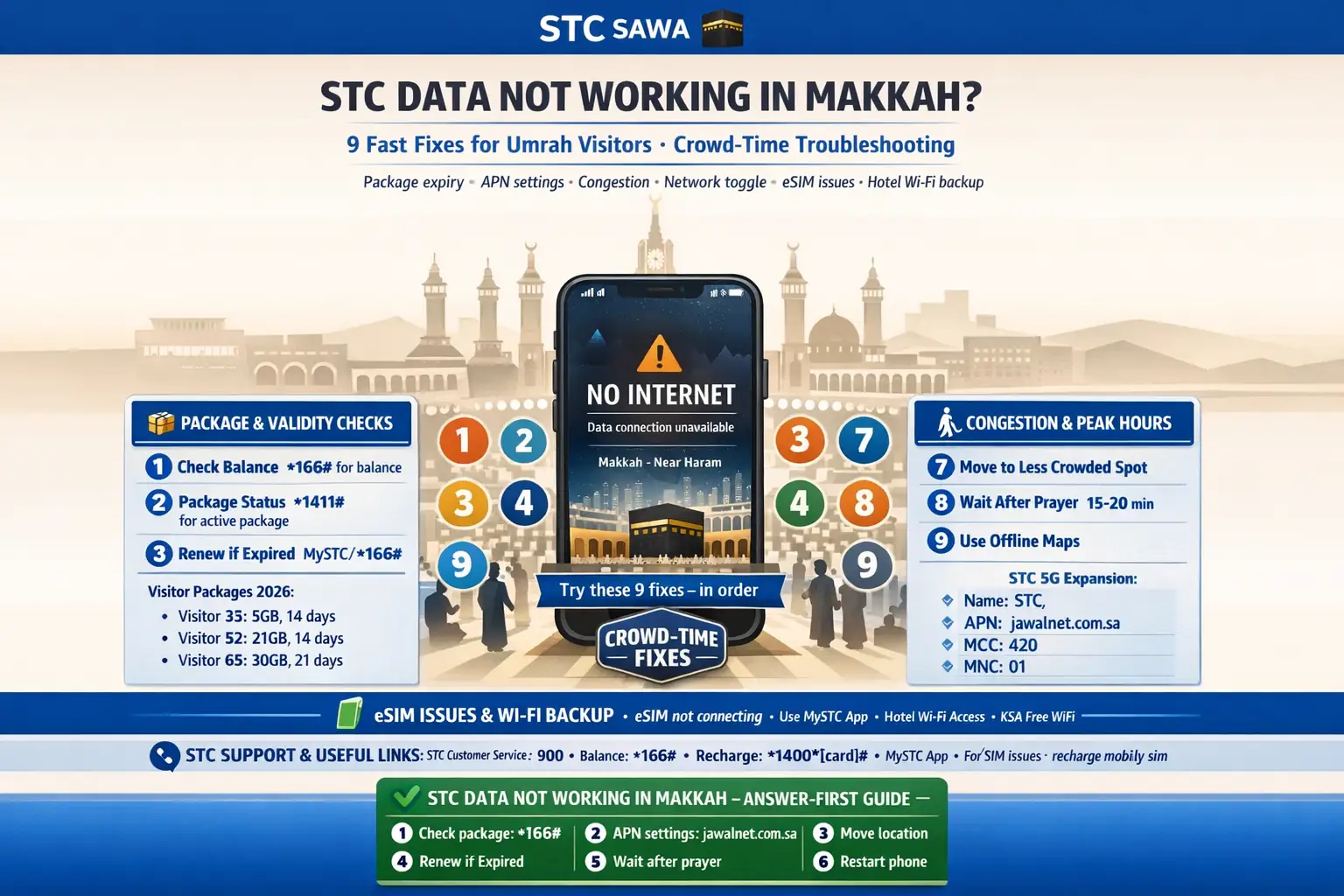
STC Data Not Working in Makkah: 9 Fixes for Umrah Visitors
You’re in Makkah, you open maps, and nothing loads.
That moment feels small, but during Umrah it can mess up your whole plan—hotel return, Nusuk screens, meeting your family, even finding the right gate.
I’ve seen pilgrims panic and think the SIM is dead, when the real issue was much simpler: a used-up package, a phone setting, or heavy crowd-time congestion near the Haram area.
This page is your practical fix guide. No drama. Just what to check first, what to try next, and when to contact support.
✅ TL;DR – stc data not working makkah umrah visitors
STC data problems in Makkah are usually caused by package expiry, phone settings, or temporary congestion in crowded zones. Test the basic fixes first, then move to a less crowded spot before assuming your visitor SIM is broken.
📶 Quick Fix Path (Pilgrim-Friendly)
Start in this order: data toggle → restart → check package → check APN → move away from the Haram area crowd → test again.
If still stuck, use hotel Wi-Fi or stcwifi as a backup, then contact STC support.
Quick checks
Quick checks fix a lot of stc internet not working makkah problems in under two minutes. Do these first before changing deeper settings. Most of the time, the issue is a temporary tower refresh problem or your phone holding on to a weak signal in a crowded spot.
- Toggle Airplane Mode for 10 seconds, then turn it off.
- Turn mobile data off and on (simple data toggle refresh).
- Restart your phone (yes, the boring fix works).
- Turn off VPN if you’re using one.
- Move 100–300 meters away from the densest crowd area and test again.
- Try loading a light page first (not a heavy video app).
One quick test I like: open a small website or send a WhatsApp text before testing maps. If text works but maps don’t, your data may be weak, not fully dead.
Keyword check: If you searched stc no data makkah or stc network issue makkah pilgrims, this is the right starting point.
Package/validity
Package and validity issues are one of the top causes of stc visitor sim no internet complaints in Makkah. Your line may still make calls or receive SMS, but mobile data can stop if the package expired, the quota finished, or a top-up did not apply correctly.
Many pilgrims miss this because they see signal bars and assume “network is fine.” Bars only show signal. They don’t prove your data package is active.
Check your package status in the mystc app. It’s usually the fastest way to confirm if your data is active, how much is left, and whether your top-up was actually applied to the correct number.
If you need help with your balance and package checks, these pages fit naturally before you panic: how to check STC data balance, check STC balance in Saudi Arabia, and STC prepaid packages.
Micro-scenario: your Nusuk app worked in the morning but not after Asr. Don’t assume the phone broke. First check if your package ran out during video calls, uploads, or hotspot sharing.
Phone settings
Phone settings are the next place to check for stc data troubleshooting makkah. A wrong APN, manual network lock, or old profile can block data even when your STC SIM shows signal and calls work.
Start with these settings checks, in this order:
1) Network mode: Set your phone to automatic network selection. Then make sure your preferred network is set to 4G/5G (not 2G/3G-only mode).
2) Manual network test: If automatic mode is unstable, try manual network selection and choose STC, then test again.
3) APN profile: Check that your APN matches the active STC internet profile on your phone. On many phones, the profile appears under a JAWALNet/Jawalnet-style name. If you changed it before, reset mobile network settings or restore the default STC profile.
4) VPN / private DNS: Turn off VPN and any strict private DNS app for a minute and retest. I used to mix this up all the time when testing travel SIMs.
5) Roaming toggle (for visitors): If your line is a visitor setup and the phone was used in another country just before arrival, check the data roaming setting and test both on/off only if your plan requires it. Keep this step simple and avoid random changes if you’re not sure.
If you need full setup help, these pages support this step well: how to activate STC internet, STC SIM activation, and mystc app guide.
This is also where many “stc calls work but no data saudi” cases get fixed.
Congestion
Congestion in the Haram area is a very common reason for stc network slow haram area and stc internet crowded area fix searches. During peak prayer windows, your phone may show signal but data gets slow because thousands of devices are using the same nearby cells at the same time.
This does not always mean your SIM is faulty.
Think of it like one road with too many cars. The road exists. It’s just crowded.
Here’s what helps most in Makkah crowd-time troubleshooting for pilgrims:
• Move slightly, not far: Even shifting to a side street, hotel lobby, or less packed area can improve data speed.
• Test outside peak windows: Try before or after the heaviest prayer movement times if your task can wait.
• Use low-data mode: Load text first, then maps. Avoid videos when signal is weak.
• Download offline maps: This saves you when maps stop loading in the worst moment.
Micro-scenario: maps and Nusuk not loading on stc data right outside the Haram. Step into your hotel entrance area, toggle data, wait 20–30 seconds, and test again. That tiny move often works.
If you are planning your line before travel, these supporting pages also help: STC SIM for Hajj and Umrah and STC data SIM.
eSIM issues
eSIM issues can look exactly like a network outage, especially for visitors using dual-SIM phones. If you have an eSIM and a physical SIM in the same phone, the phone may be using the wrong line for data without making it obvious.
This section is for anyone searching stc esim internet issue makkah or stc umrah sim issue.
Check these eSIM basics:
• Default data line: Make sure your STC line is selected as the mobile data line.
• Data switching: Turn off automatic switching between SIMs while testing.
• Preferred SIM for apps: Some phones keep calls/SMS on one line and data on another. Confirm the data line again after a restart.
• eSIM profile status: Confirm the STC profile is enabled and not paused/disabled.
My students always ask about this part: “Why do calls work but internet doesn’t?” On dual-SIM phones, it’s often because voice is using STC but data is still assigned to the other SIM.
If your issue started right after activation or top-up, also check: stc no internet after activation in makkah hotel and stc pilgrim internet issue after top-up style cases usually come down to activation delay, package mismatch, or SIM line selection.
Wi-Fi backup
Wi-Fi backup is not a defeat. It’s a smart pilgrim move. When STC mobile data is slow due to crowd congestion, a stable hotel Wi-Fi connection can save your route, booking screens, and family coordination.
Use this backup plan without guilt. Worship trips are not the time to prove your data is stronger than everyone else’s.
You have two practical options:
1) Hotel Wi-Fi: Best for heavy tasks like maps, video calls, and app updates.
2) STC Wi-Fi hotspots: In some places, you can connect to stcwifi and authenticate with your SIM on supported devices.
For Android devices, STC’s hotspot instructions commonly include choosing stcwifi and selecting SIM in the EAP method when prompted.
This also helps with the common search: hotel wifi vs stc data fallback. The answer is simple—use both. Mobile data for movement, hotel Wi-Fi for reliability.
If you’re comparing plans for a longer stay, these pages may help naturally: STC unlimited internet and STC roaming packages.
Support
Support is the final step when the basic fixes fail. If your STC line still has no data after package checks, settings checks, and a congestion test in a less crowded area, contact STC directly or visit an outlet in Makkah.
Don’t wait too long if you depend on your phone for hotel directions or family contact.
Use this simple support order:
1) mystc app: Check package, line status, and top-up details first.
2) Call 900: From your STC line inside Saudi Arabia.
3) Call +966 11 455 5555: From another phone or from outside Saudi Arabia if needed.
4) Visit an STC branch/outlet in Makkah: Best if you suspect SIM damage, activation issues, or registration mismatch.
If you need complaint help after support, your internal pages fit here naturally: STC customer care number and CITC complaint for STC.
A short story before you go: one pilgrim told me, “My STC SIM is not working today, it died.” He had already reset everything twice. We checked the mystc app, and the line was fine—but his package had ended after he shared hotspot data with three family members. He topped up, restarted once, and the data came back. The SIM was never broken. The plan was just finished.
FAQs
📘 stc data not working makkah umrah visitors FAQs
Why is STC data not working in Makkah during Umrah?
Show Answer
The most common reasons are package expiry, wrong APN or phone settings, and heavy congestion near the Haram area. Start with quick checks, then test again in a less crowded spot.
What should I do first for stc no data makkah?
Show Answer
Turn on Airplane Mode for 10 seconds, turn it off, restart the phone, and check your package in the mystc app. These three steps fix a big share of cases.
How do I check if my STC package expired?
Show Answer
Use the mystc app to check remaining data, package validity, and recharge status. If calls or SMS work but data does not, package expiry is a common reason.
What if calls work but data does not on my visitor SIM?
Show Answer
That usually points to a data-package issue, APN/network setting problem, or an eSIM data-line mismatch. Calls and SMS can still work while mobile data fails.
Can Ramadan crowds near the Haram make STC data slow?
Show Answer
Yes. Heavy crowd-time usage can slow data even when you still have signal. Move to a less crowded area and test again before changing too many phone settings.
What APN issue can cause stc internet not working makkah?
Show Answer
If the STC internet profile was changed or corrupted, your phone may show signal but no data. Check the APN profile and restore the default STC/JAWALNet-style internet profile or reset mobile network settings.
My eSIM is active, but internet still does not work. Why?
Show Answer
On dual-SIM phones, the wrong line is often selected for mobile data. Make sure the STC eSIM is the active data line and turn off automatic SIM data switching while testing.
Can I use stcwifi if mobile data is weak?
Show Answer
Yes, in supported hotspot locations. On some Android devices, you can join stcwifi and select SIM in the EAP method to connect using your STC line.
What is better in a crowded area: hotel Wi-Fi or mobile data?
Show Answer
Use both. Hotel Wi-Fi is usually more stable for heavy tasks, while mobile data is better when you are moving outside. In peak congestion, hotel Wi-Fi is often the safer backup.
How do I complain about an STC network problem?
Show Answer
First contact STC support through the mystc app or by calling 900. If the issue is unresolved, you can follow the telecom complaint route (your CITC complaint guide can help).
What is the STC support number if my data is not working?
Show Answer
Call 900 from your STC line inside Saudi Arabia. From another phone or outside Saudi Arabia, use +966 11 455 5555.
Can a registration issue stop my visitor SIM data?
Show Answer
Yes, it can. If your SIM was newly purchased and data never worked properly, ask STC to check registration and activation status, especially for visitor/passport-based lines.
📊 STC Makkah data issue: quick fix table for Umrah visitors
Use this table as your fast troubleshooting map. Start from the left and stop when your internet starts working again.
📶 Show STC Troubleshooting Table
| Problem sign | Most likely cause | Best first fix |
|---|---|---|
| Signal bars but no internet | Package expired or APN/settings issue | Check mystc app, then check APN |
| Internet works, then dies near Haram | Crowd congestion | Move to a less crowded spot and retest |
| Calls/SMS work, no data | Data package issue or wrong data SIM | Check package + default data line |
| eSIM active but no internet | Dual-SIM data-line mismatch | Set STC eSIM as data line |
| Maps/Nusuk not loading only | Weak data speed, not full outage | Use hotel Wi-Fi or stcwifi backup |
| No data after activation | Activation/registration delay | Check mystc or call 900 |
You Can Also Read
- STC visitor sim umrah guide saudi
- Sawa visitor vs regular stc prepaid umrah
- Best stc visitor package 7 days umrah
- Best stc visitor package 14 30 days saudi
- How to activate stc visitor sim step by step for pilgrims
- STC visitor sim not working after recharge

Farrukh Farooqi has been living in Sharaya, Makkah, Saudi Arabia since 2010. With over 14 years of firsthand experience witnessing the sacred journey of millions of pilgrims, Farrukh specializes in providing practical, insider tips for Hajj and Umrah travelers. His work blends real-world observations, the latest Saudi updates, and essential crowd management strategies — helping pilgrims and worshippers plan smarter, stay safer, and experience a spiritually fulfilling journey across the Holy Cities.


