
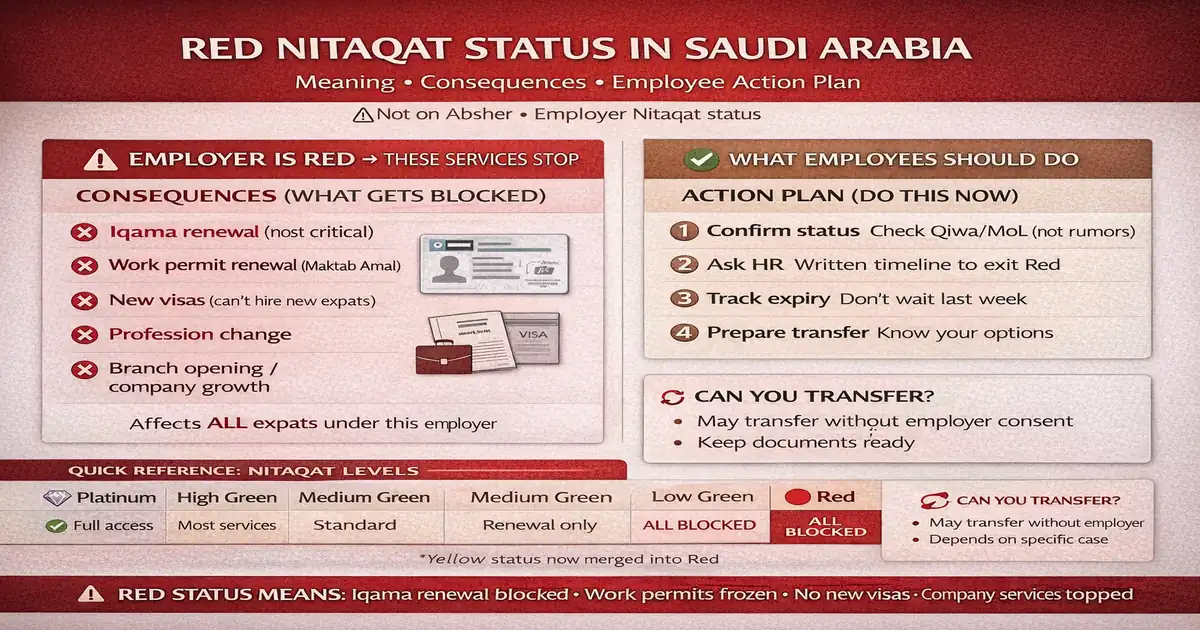
Red Nitaqat Status Blocked Services: Meaning, Consequences, and What Employees Should Do
When a company turns “Red,” employees feel it first.
Renewal screens fail. HR says “system issue.” People start panicking.
This guide explains red nitaqat status blocked services in simple words: what Red really means, what gets blocked, what might still work, how to check officially, and what you should do before your Iqama expiry becomes a crisis.
✅ TL;DR – red nitaqat status blocked services
Red Nitaqat means your employer is non-compliant with Saudization, so key Ministry services can be restricted—especially Iqama renewal and work permit steps. First confirm status officially (Qiwa/MHRSD inquiry), save proof, then follow the action plan: push HR for a written timeline and prepare transfer options if renewal becomes impossible.
What is Red Nitaqat status? (Quick Answer)
Red Nitaqat status means the employer (establishment) is below required Saudization compliance, so the system restricts many employer services. It’s not your personal “Iqama color.” It’s the company’s compliance category—and that’s why renewals and other actions suddenly stop working.
Red Nitaqat = employer is non-compliant with Saudization
In one line: company in red nitaqat = the sponsor is non-compliant, so they lose access to key services until they fix their Saudization level and related admin issues.
Red status affects Ministry services for expats (not “your Iqama color”)
People say “my iqama is red.” Usually that’s wrong. Red refers to the employer’s status. Your Iqama is your ID; Nitaqat is your sponsor’s compliance.
Biggest risk: renewal + work permit services get blocked
The biggest pain is iqama renewal blocked red and work permit renewal blocked. You can be fully employed and still get blocked because the employer can’t complete required system actions.
Red Nitaqat Consequences for Employees (What gets blocked)
Red Nitaqat consequences show up as “services restricted red” messages and failed renewals. Here’s what employees most commonly hit first.
Iqama renewal blocked: what it means in real life
Iqama renewal blocked red usually means the employer can’t process the renewal path, so your renewal attempt fails or stalls. In real life, that looks like: HR delays, “come tomorrow,” or “system down” every week.
One sentence reality: if expiry is close, you can’t afford silence.
Work permit renewal blocked (Maktab Amal)
If the work permit step is blocked, the renewal chain breaks. Many employees confuse “permit issue” with “Iqama issue.” They’re connected, but not the same. A permit block can stop everything.
New visas blocked (company can’t hire new expats)
New visas blocked nitaqat is common in Red status. Companies can’t bring new staff easily, which is why hiring freezes and projects slow down.
Profession change blocked (common restriction)
Profession changes often become hard or impossible when services are restricted. Employees feel this when HR says: “We can’t change your profession right now.”
Branch opening/services blocked (company growth freezes)
When a company is Red, many growth-related services can freeze. That’s why Red status often leads to internal chaos—because the business can’t move forward normally.
Can an Employee Transfer if Company is Red?
Can I transfer sponsorship from red company? Sometimes it may be possible depending on your case and what the system allows at that time. But many situations still get blocked or delayed—so your safest move is to prepare proof and plan early, not one week before expiry.
When transfer may be allowed without employer approval
Some situations are treated more flexibly (especially when the employee is at risk due to blocked renewals). But rules can depend on conditions and timing, so don’t trust “always yes” messages. Confirm through official channels and keep documentation.
When transfers are still blocked (common situations)
Transfer blocked red nitaqat commonly happens when required system steps can’t be completed, or when your own records (work permit, fees, status) aren’t clean. A Red employer can also make processes slower even when transfer is possible.
What documents to keep before you start any transfer
Keep a paper trail. My students always ignore this until it’s too late.
- Iqama expiry date screenshot and any renewal attempt screens
- Work permit status/number (if shown) and any error messages
- Any HR messages about “blocked services” (screenshots)
- A status proof screenshot showing the employer is Red + date
Red vs Green vs Platinum (Nitaqat Levels Explained)
Nitaqat levels are basically service access levels. The higher the compliance, the more services the employer can use. The lower, the more doors are closed.
Platinum: full access + fastest services
Platinum is top compliance. In simple terms: the employer usually has the widest access to services and the least friction.
High/Medium Green: most services available
High/Medium Green generally means most employer services work, so renewals and HR processes are easier—assuming fees and prerequisites are cleared.
Low Green: partial restrictions
Low Green is compliant but closer to the edge. Some services may be limited compared to higher green levels, and the company has less margin for errors.
Red: most Ministry services stopped
Red status meaning Saudi: non-compliance + service restrictions. This is the zone where employees face the most problems with renewals, new visas, and many employer actions.
Yellow: moved into Red (what users should know)
People still search “Yellow” because old posts never die. But the practical takeaway today: treat “Yellow” as merged into Red and confirm your current level in the official status screen.
How to Check Red Nitaqat Status (Official)
How to check nitaqat status online? Use official channels only. Don’t rely on WhatsApp screenshots from random groups. Confirm it yourself and save proof.
Check on Qiwa: where “establishment Nitaqat” shows
In Qiwa, the employer/authorized user can view establishment details where Nitaqat level is shown. If HR claims “we’re green,” ask for a screenshot from the official establishment screen with the date visible.
Check on MoL/MHRSD inquiry page (Non-Saudi employee inquiry)
The MHRSD inquiry result shows your employment record and the employer status range. If you want the exact step-by-step, use this once: How to check Iqama red/green status (step-by-step).
What input works: Iqama number vs border number vs passport
Use the ID that fits your stage:
Iqama (best for residents) → Border number (best for new arrivals) → Passport (when you don’t have the other two).
What to screenshot: company name + status + date
Screenshot the result with company name, the status range (Red/Green/Platinum), and the date. If HR denies anything later, this proof matters.
“My Iqama Renewal is Failing” — Is Red Nitaqat the Reason?
Iqama renewal blocked red is a common reason renewal fails, but not the only one. This quick split helps you stop guessing.
Signs it’s Nitaqat-related (service not available / blocked)
If you see “service not available,” “blocked,” or HR says “Ministry stopped services,” that often points to red status blocked services or related establishment restrictions.
Signs it’s fee/permit-related (payments/work permit)
If the issue is unpaid fees, a missing work permit step, or a permit status problem, the message often looks different: “payment required,” “work permit not renewed,” or similar. That’s not pure Nitaqat—it’s prerequisites.
Quick check: verify expiry + permit + company status
Do this in order: check your expiry date → check work permit status (if visible) → check employer status officially. Don’t do it the other way around.
What to Do If Your Company is Red (Action Plan)
Red nitaqat immediate actions for expats should be boring and practical. No drama. Just steps.
Step 1: confirm status on official portal (don’t trust rumors)
Confirm it in Qiwa/MHRSD inquiry and save screenshots. Rumors waste time. Proof saves time.
Step 2: ask HR for a written timeline to move out of Red
Ask for a written plan: what they will fix, by when, and who is responsible. “Soon” is not a plan.
Step 3: track your Iqama expiry date (don’t wait last week)
Set your own reminder and track it. I used to think “HR will handle it.” That belief is expensive.
Step 4: prepare transfer options if renewal becomes impossible
Start exploring options early if expiry is approaching and progress is not real. Keep your documents ready and your proof organized.
What Employers Must Do to Exit Red Zone
This section is for understanding what your employer must fix. It also helps you judge whether HR is serious or just calming you down.
Increase Saudization percentage (core requirement)
The core requirement is improving Saudization compliance (hiring and maintaining required Saudi workforce levels) for the company’s size and activity.
Fix employee records and classifications (common admin cause)
Sometimes the damage is not only hiring numbers. It can be admin issues: wrong classifications, mismatched records, or incorrect worker data. These issues can keep a company stuck even after they “hire a few Saudis.”
How long it can take to reflect in systems (practical expectation)
Even after fixes, systems may not show changes instantly. That’s why you need a written HR plan and a realistic timeline—plus your own backup plan if your expiry is close.
FAQs
📘 red nitaqat status blocked services FAQs
What does Red Nitaqat status mean in Saudi Arabia?
Show Answer
It means the employer is non-compliant with Saudization requirements, so many employer services can be restricted. Employees often feel it through failed renewals, blocked work permit steps, and HR service delays.
Can a Red company renew Iqama?
Show Answer
Often renewals become blocked or delayed because employer services are restricted. Outcomes can vary by prerequisites and case, so confirm the employer status officially and check work permit/fee prerequisites too.
How to check Nitaqat status online?
Show Answer
Check through official channels like Qiwa (establishment Nitaqat) or the MHRSD employee inquiry result. Save a screenshot showing company name + status + date.
Can I transfer my Iqama if my company is Red?
Show Answer
Sometimes it may be possible depending on your case and system conditions, but many red-company situations get blocked or delayed. Prepare proof, track expiry, and confirm options officially.
What is the difference between Red and Green Nitaqat?
Show Answer
Green (and Platinum) generally indicates compliance with wider service access. Red indicates non-compliance with heavier restrictions—especially around renewals, visas, and employer-side HR services.
Is Yellow Nitaqat still active or merged into Red?
Show Answer
Most practical guidance today treats Yellow as merged into Red. If you see Yellow in old posts, confirm your current official level on the status screen.
📊 Blocked vs Sometimes vs Usually allowed (Red status reality)
| Area | In Red, it’s usually… | What you should do |
|---|---|---|
| Iqama renewal | Blocked or delayed | Confirm status + check prerequisites + demand written HR plan |
| Work permit renewal | Often blocked (chain breaks) | Separate “permit vs Nitaqat” checks; keep screenshots |
| New visas | Usually blocked/restricted | Expect hiring freeze; don’t rely on “new visa promises” |
| Transfer options | Sometimes possible, often slow | Prepare proof early; don’t wait until last week |
| Company growth services | Often restricted | Expect instability; protect your renewal timeline |
You can also read these articles
- Iqama red/green meaning Saudi Arabia (Nitaqat colors + impacts)
- How to check iqama red/green status (step-by-step)
- Border vs Iqama vs Visa (don’t confuse the numbers)

Farrukh Farooqi has been living in Sharaya, Makkah, Saudi Arabia since 2010. With over 14 years of firsthand experience witnessing the sacred journey of millions of pilgrims, Farrukh specializes in providing practical, insider tips for Hajj and Umrah travelers. His work blends real-world observations, the latest Saudi updates, and essential crowd management strategies — helping pilgrims and worshippers plan smarter, stay safer, and experience a spiritually fulfilling journey across the Holy Cities.


