
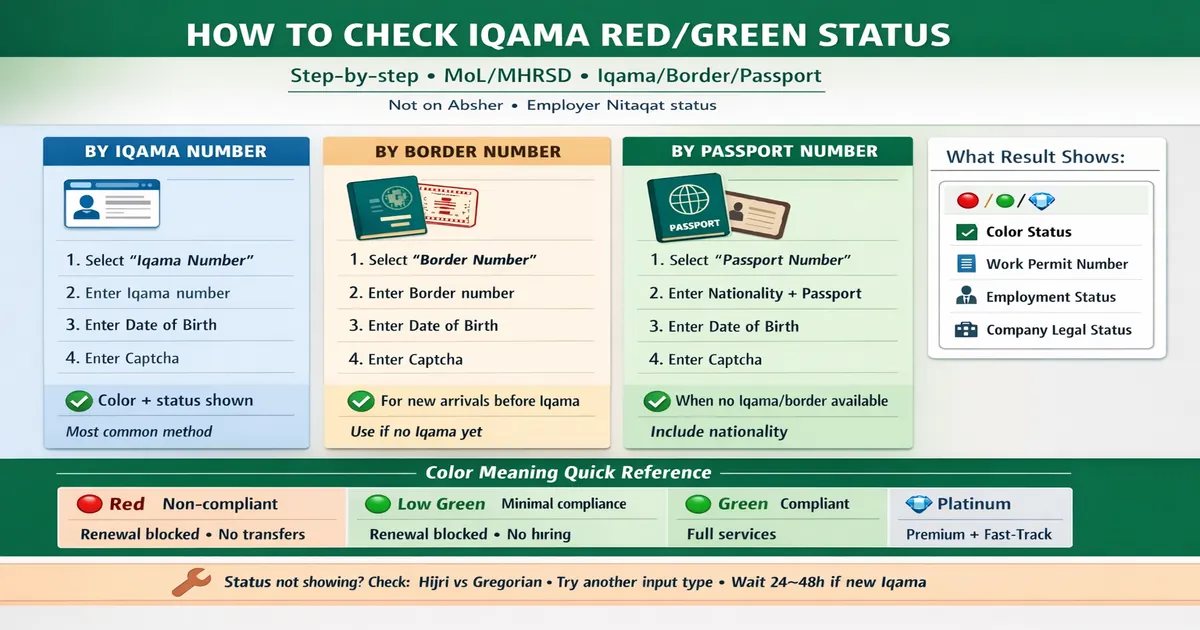
How to Check Iqama Red/Green Status (Step-by-step)
You’re not checking a “color on your card.”
You’re checking your employer.
How to check iqama red green status really means: how to check your sponsor’s Nitaqat level using the official Ministry inquiry page. Once you see the result, you’ll understand why renewals and transfers feel easy for some people and impossible for others.
✅ TL;DR – how to check iqama red green status
Use the official MHRSD (MoL) “Non-Saudi Employee Inquiry” page. Pick ONE input: Iqama (best for residents), Border Number (best for new arrivals), or Passport (when you don’t have the other two). Enter your date of birth with the correct calendar, solve captcha, then read the screen: Nitaqat color, work permit ID, job status, and company legal status.
If you want the deeper meaning and what each color blocks, use this once: Iqama red/green meaning in Saudi Arabia (Nitaqat colors explained).
Can you check Iqama red/green on Absher or MOI? (Quick Answer)
Can you check iqama red/green on Absher or MOI? No. The red/green result comes from the Ministry’s labor inquiry (MHRSD/MoL). Absher is great for things like Iqama expiry, but it doesn’t show the Nitaqat color status screen. And MOI portals aren’t the standard place for Nitaqat.
Red/Green status is checked on MoL/MHRSD portal — not moi.gov.sa
The official check is on the labor side (MHRSD/MoL). That’s where the company nitaqat check appears.
Absher shows Iqama expiry, but not Nitaqat color status
Absher can show your Iqama validity/expiry service, but the “red/green” color status people talk about comes from the labor inquiry result screen, not Absher.
Red/Green refers to employer Nitaqat status, not your card color
This is where people lose hours: they search “iqama color status check” thinking it’s their personal ID card. It’s the employer nitaqat status.
Official Link to Check Iqama Color Status (MoL/MHRSD)
Official link to check iqama color status is the “Non-Saudi Employee Inquiry” service on the MHRSD portal. Use this exact page (official service):
https://es.hrsd.gov.sa/services/inquiry/nonsaudiempinquiry.aspx
Open the Non-Saudi Employee Inquiry page (official service)
Open the page, and if it loads in Arabic, use the site language switch (if visible) or browser translate. Don’t use random “copy sites.”
Choose one ID input: Iqama number OR border number OR passport number
You must choose one path. If one fails, you can switch to another input type (we’ll do that later in fixes).
Enter date of birth (Hijri vs Gregorian) + captcha
The #1 cause of nitaqat inquiry not working what to do is calendar mismatch. Hijri/Gregorian confusion ruins the result even when the number is perfect.
Step-by-Step: Check Iqama Red/Green Status Using Iqama Number
Step by step nitaqat inquiry for expats is easiest with the Iqama number. This is the cleanest method for residents who already have an Iqama.
Step 1: Open MoL/MHRSD inquiry page and switch to English
Open the official page. Switch to English if available, otherwise use browser translate so you don’t click the wrong field.
Step 2: Select “Iqama Number” as the search option
Select Iqama as your ID type. This is the normal mol nitaqat check route for residents.
Step 3: Enter Iqama number + date of birth (correct calendar)
Type the Iqama digits carefully. Then enter date of birth exactly as your records expect. If you’re unsure which calendar to pick, check how your DOB is written in your documents and match it.
Step 4: Enter captcha and click Next/Search
Captcha fails happen. If it keeps failing, refresh the page and try again slowly.
Step 5: Read results: Iqama color + company legal status
You’ll see a result set that typically includes iqama red green check info (Nitaqat range), plus the employer status fields (work permit ID, job status, company legal status).
Micro-scenario: Your friend says “you’re green.” You check and you’re actually Low Green. That one difference can explain why your transfer is stuck.
Step-by-Step: Check Iqama Red/Green Status Using Border Number
Check nitaqat with border number is the best option for new arrivals before an Iqama is issued. It’s also useful if your Iqama number isn’t working on the inquiry page.
When border number works best (new arrivals before Iqama)
If you just entered Saudi and you’re waiting for residency steps, border number is often the fastest ID you still have.
If you need help locating it first, use this once: Where to find your border number (passport stamp + visa documents).
Step 1: Select “Border Number”
Select Border Number as the ID type on the inquiry page.
Step 2: Enter border number + date of birth
Enter the border number digits carefully, then your date of birth using the correct calendar option.
Step 3: Submit and check Nitaqat range shown
You should see the employer’s range (Red/Green/Platinum and sometimes the green level range), plus job/work permit details.
Need a 2026 border-number guide? Use this once: Check border number in Saudi Arabia (2026 guide).
Step-by-Step: Check Iqama Red/Green Status Using Passport Number
Check nitaqat with passport number is for people who don’t have an Iqama number yet and can’t access the border number, or they’re stuck with document issues.
Who should use passport number (no Iqama/border available)
Use passport number if you truly don’t have the other IDs available. It’s also helpful when you suspect the border number is being entered incorrectly.
Step 1: Select “Passport Number”
Select Passport Number as the ID type.
Step 2: Enter nationality + passport number + date of birth
Nationality matters here. Then passport number, then date of birth. Small typos here cause false failures.
Step 3: Submit and verify your employment status result
When it works, the results will show job status and employer data. If it fails, move to the fix section below instead of repeating the same wrong inputs.
What Result Screen Shows (What to Look For)
What details are required for nitaqat inquiry is one part. The other part is knowing what the result actually means. This screen is your proof when HR plays games.
Iqama color status (Red / Green / Platinum ranges)
This is the headline: the red green status saudi outcome that people call “Iqama red/green.” It’s the employer’s Nitaqat range.
Work permit number (Maktab Amal / Work Permit ID)
You’ll usually see a work permit identifier. Don’t ignore it—sometimes renewal issues are work-permit related, not just Nitaqat.
Employment status (on job / not on job)
This is important for expats. If it shows “not on job” when you are working, you need to address that fast through official paths.
Company legal status (active / blocked / etc.)
If the company legal status is blocked, you may face service issues even if the color isn’t the only problem.
Meaning of Each Color (Fast, CTR-friendly)
Nitaqat color meaning in simple words: the higher the compliance, the more employer services work. The lower the compliance, the more services freeze.
Platinum / High Green / Medium Green: what services work
These levels generally mean the employer can do most Ministry services: renewals, many HR processes, and receiving workers through transfers (subject to other requirements).
Low Green: what is restricted (common limits)
Low Green is “still in the compliant neighborhood,” but closer to the edge. Some services may be limited compared to higher green levels, and the employer has less room for mistakes.
Red: what becomes blocked (renewal/visas/transfers)
Red is where restrictions hit harder. Common impacts: difficulties with renewals, limits on new visas, and blocked or reduced employer services. That’s why people search why iqama renewal fails due to nitaqat.
Yellow status: merged into Red (what users should know)
Many people still search “red green yellow nitaqat check method.” Saudi’s Nitaqat Yellow band was eliminated and moved into Red (effective January 26, 2020), so if you see Yellow mentioned in old posts, treat it as Red in today’s system.
“مستبعد / Excluded”: what it means and why it’s not “Red”
“مستبعد / Excluded” often confuses users. It’s not automatically “Red.” It can mean the establishment falls outside certain Nitaqat counting rules (for example, very small headcount). The safest move: read the result exactly as shown and confirm with official guidance if you’re unsure.
“Iqama Red/Green Not Showing” (Fixes That Work)
If your iqama red green check result isn’t showing, don’t keep smashing refresh like a broken elevator button. Use these fixes in order.
Wrong calendar (Hijri vs Gregorian) is the #1 cause
Switch the calendar selection and re-enter the date. This one change fixes a shocking number of failures.
Captcha error or page not loading (browser fixes)
Try a different browser, disable heavy ad-blockers for that page, refresh, and try again. If the site is busy, waiting a few minutes can help.
Try another input type (Iqama vs border vs passport)
If Iqama fails, try border. If border fails, try passport. This is the simplest “decision guide” that saves time:
- Have Iqama? use Iqama method.
- No Iqama yet? use Border Number.
- No border available? use Passport Number.
If newly issued Iqama: wait for system update
Sometimes a new record needs time to appear. If you just got a new Iqama or you just entered Saudi, try again later rather than assuming something is wrong.
If your border details are failing and you keep seeing “not found,” use this once: Border number not found in Saudi Arabia: 9 fixes before you panic.
Why Your Status Matters (Renewal + Transfer)
This is why people care about check kafeel nitaqat and employer nitaqat status. The color changes what the employer can do for you.
Iqama renewal issues linked to employer Nitaqat
When employer services are restricted, renewals can fail or delay even if you personally did everything right. That’s when you hear “service not available” messages and everyone starts blaming the employee.
Transfers: when Green companies can receive workers
Green-range employers are generally in a stronger position to receive workers through transfers (subject to rules and conditions). That’s why people ask nitaqat status affects transfer how.
Why Red employers lose key Ministry services
Red-range employers can lose access to key Ministry services until compliance improves. That’s the real reason HR suddenly “can’t do anything.”
One short story, because this happens every week: a worker told me his renewal failed and he assumed he was in trouble. He wasn’t. The employer’s status had dropped, and nobody explained it. He checked the official inquiry screen, saved a screenshot, and finally HR started speaking clearly.
FAQs
📘 how to check iqama red green status FAQs
How to check Iqama red green color status online?
Show Answer
Use the official MHRSD “Non-Saudi Employee Inquiry” page. Choose Iqama, border, or passport input, enter date of birth with the correct calendar, solve captcha, then read the Nitaqat color range shown.
How can I check my Iqama status with MoL?
Show Answer
Open the MHRSD inquiry page, pick the ID type (Iqama/border/passport), enter your date of birth and captcha, then review the result screen for Nitaqat range, work permit ID, and job status.
How to check kafeel status red or green?
Show Answer
You’re checking the employer’s Nitaqat range through the MHRSD inquiry result. Use your Iqama number (or border/passport) to pull your employment record, then read the color range shown for the establishment.
Can I check red/green status without Absher?
Show Answer
Yes. This check is done on the MHRSD inquiry page and does not require Absher login for the red/green Nitaqat view.
What does it mean if company is Red in Saudi Arabia?
Show Answer
Red generally means the employer is in a restricted compliance range. Some Ministry services can be blocked or delayed, which is why renewals, new visas, and certain HR actions become harder until the status improves.
📊 Which ID should I use? (Iqama vs border vs passport)
✅ Show decision table
| Your situation | Use this ID | What to enter |
|---|---|---|
| You already have an Iqama | Iqama number | Iqama + DOB + captcha |
| New arrival, no Iqama yet | Border number | Border + DOB + captcha |
| No Iqama/border available | Passport number | Nationality + passport + DOB + captcha |
You can also read these articles

Farrukh Farooqi has been living in Sharaya, Makkah, Saudi Arabia since 2010. With over 14 years of firsthand experience witnessing the sacred journey of millions of pilgrims, Farrukh specializes in providing practical, insider tips for Hajj and Umrah travelers. His work blends real-world observations, the latest Saudi updates, and essential crowd management strategies — helping pilgrims and worshippers plan smarter, stay safer, and experience a spiritually fulfilling journey across the Holy Cities.


