
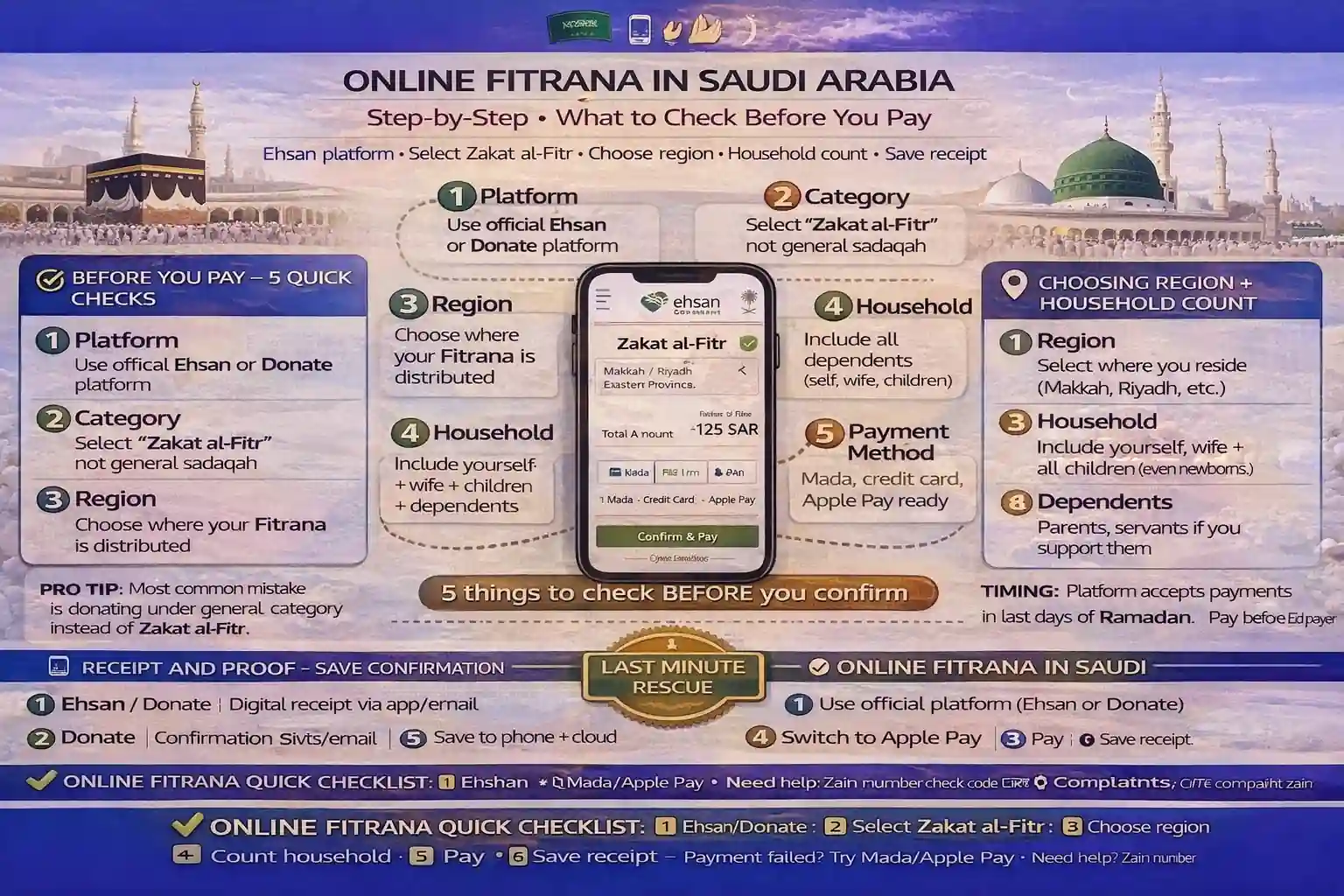
Pay Fitrana online in KSA with trusted donation platform checks, correct Zakat al Fitr category selection, region and household count steps, SADAD or bank card payment, confirmation message and receipt proof, distribution timing before Eid prayer, and last minute payment failed fixes

Zakat al fitr online saudi step by step: Step-by-Step (What to Check Before You Pay)

Online Fitrana is easy in Saudi… until you do it in a rush.

That’s when people pick the wrong donation category, forget the kids, or lose the receipt. Then Eid morning turns into a mini crisis.

If you want zakat al fitr online saudi step by step done cleanly, think of it like sending an important parcel: correct label, correct address (region selection), correct quantity (household count), and a saved proof of delivery (receipt proof zakat).

I’ve seen this happen: someone paid “something” online… but it was general charity, not Zakat al-Fitr. Their heart was good, but the category was wrong. So we fixed the habit: check first, pay once, save proof.

✅ TL;DR – zakat al fitr online saudi step by step

To pay fitrana online ksa, pick a trusted donation platform saudi, select Zakat al-Fitr (not general charity), choose number of people fitrana, and (if offered) choose region zakat al fitr. Pay early enough for zakat al fitr distribution on time before Eid prayer. Save the receipt and confirmation.

AEO answer-first snippet: To pay fitrana online in Saudi, pick a trusted channel, select Zakat al-Fitr, choose the number of people, and (if offered) select the region for distribution. Pay early enough for delivery before Eid prayer, then save the receipt/confirmation. The most common mistake is donating under a general category instead of Zakat al-Fitr.

If you want the yearly Saudi amount page (so you don’t guess), use Zakat al-Fitr 2026 or Zakat al-Fitr 2025.

If you want a quick tool inside this post: Fitrana calculator (embed with

Fitrana / Zakat al-Fitr Calculator
Estimate an amount in Saudi Riyal based on household size and local prices.
Household count
Count all adults and children you intend to include.
Tip: Use the + / − buttons for quick changes.
Optional breakdown men / women / kids
Method and item
Choose a method and (if needed) a staple item.
You can switch anytime; the result updates instantly.
Prices vary by brand and market; enter what applies locally.
“Sa’” is approximate and can be adjusted below.
kg
Adjust if your preferred estimate differs.
SAR/kg
If you’re paying in food, you can still estimate using a local market price.
Result
This is an estimate based on your entries.
Total estimate
0.00 SAR
Note: This widget provides an estimate for planning. For official local guidance, refer to trusted announcements in your area.
' ].join('');var w = window.open('', '_blank', 'noopener,noreferrer,width=900,height=700'); if (!w){ toast(widgetEl, 'Popup blocked'); return; } w.document.open(); w.document.write(html); w.document.close(); }function escapeHtml(s){ return String(s) .replace(/&/g,'&') .replace(//g,'>') .replace(/"/g,'"') .replace(/'/g,'''); } function escapeHtmlAttr(s){ return escapeHtml(s).replace(/"/g,'"'); }function boot(){ var widgets = qsa(document, '.ft-widget[data-ft-widget="fitr-calculator"]'); widgets.forEach(function(w, i){ initWidget(w, i); }); }if (document.readyState === 'loading'){ document.addEventListener('DOMContentLoaded', boot, { once: true }); }else{ boot(); } })(); ).

For the full Saudi workflow page, keep this open: Fitrana Saudi payment guide.

Before you pay: 5 quick checks

Snippet-ready answer: Before online charity payment, check the category is Zakat al-Fitr, confirm the Eid prayer deadline (timing), confirm your household members count, confirm region (if offered), and confirm you can save a receipt. These five checks prevent most last-minute mistakes.

Here are the five checks I teach beginners. Simple, but powerful.

  • Check #1 (category): It must say Zakat al-Fitr / Fitrana. Not general charity. Not “Ramadan donation.”
  • Check #2 (timing): Are you too close to the Eid prayer deadline? If yes, don’t experiment—use the fastest trusted route you already know.
  • Check #3 (household count): Decide your number of people fitrana now (you + spouse + kids + dependents you support).
  • Check #4 (region): If the platform asks, choose region zakat al fitr carefully (your city/region for distribution).
  • Check #5 (proof): Make sure you can save receipt proof zakat (screenshot + confirmation message).

One sentence that prevents 90% of confusion: don’t pay until you can explain what you’re paying, for how many people, and where it will be distributed.

Micro-scenario: You’re paying on the night before Eid and your family keeps interrupting. Pause. Count your household first. Then pay once. Your future self will thank you.

Step-by-step payment flow (generic)

Answer-first: The basic zakat al fitr online saudi step by step flow is: open a trusted platform (app/website), select Zakat al-Fitr, set household count, choose region (if offered), pick payment method (like bank card donation or sadad donation where available), confirm, then save the confirmation and receipt.

I’m keeping this “generic” on purpose, because screens change. The logic doesn’t.

Step 1: Open the official platform website or app.

Step 2: Find the Zakat al-Fitr section. During the last days of Ramadan, it’s usually placed where you can’t miss it.

Step 3: Confirm the donation type is not “general sadaqah.” This is the big one: how to confirm it is zakat al fitr not general sadaqah. Read the label slowly.

Step 4: Enter your household members count. This answers how many people to select for fitrana.

Step 5: If asked, choose your region/city for distribution. This answers how to choose city/region for fitrana distribution.

Step 6: Pick a payment method. Many people use Mada/bank card/Apple Pay where available. Some flows offer SADAD or banking options. Choose what you can complete smoothly.

Step 7: Confirm. Then save proof (receipt + confirmation message).

Step 8: Do one tiny final check: did you accidentally donate twice? It happens during lag or repeated taps.

🧠 The #1 mistake (and the quick fix)

The most common mistake is donating under a general category instead of Zakat al-Fitr. Quick fix: always read the donation title again on the final confirmation screen before you tap “Pay.”

Micro-scenario: You’re doing last minute fitrana online and the page loads slowly. Don’t press “Pay” five times. Wait. Then check your confirmation messages and receipt once.

Choosing region + household count

Snippet-ready answer: For choose region zakat al fitr, pick the region where you want distribution handled (often your current Saudi city/region). For number of people fitrana, include yourself and everyone you’re responsible for financially—especially spouse and children. The biggest errors are “wrong region” and “forgot the kids.”

Region selection sounds like a small dropdown.

It’s not small.

It’s the delivery address of your charity.

If the platform asks for region, pick it carefully. If it does not ask, don’t force it—just ensure the donation is clearly marked as Zakat al-Fitr and distributed on time.

Now household count.

People ask: can i pay fitrana for someone else? In practice, yes—you can pay on behalf of others if you intend it that way and you select the correct count. The key is clarity in your heart and clarity in your record.

If you’re not sure whether you already included someone, don’t guess. Check your saved proof first. I’ve seen families double-pay for the same person because everybody “just did it quickly.”

And if you want a simple helper, use your calculator page: Fitrana calculator.

Receipt and proof

Answer-first: Always keep receipt proof zakat: screenshot the confirmation screen, save any email/SMS confirmation message, and write a short note in your phone like “Fitrana paid for 6 people.” This solves “did I pay?” arguments on Eid morning and helps if you need customer support.

Receipts are not about showing off.

They’re about preventing confusion.

Here’s the proof habit I recommend:

1) Screenshot the final confirmation screen.

2) Save the confirmation message (SMS/email/app confirmation).

3) Write one short line in Notes: “Fitrana: 6 people, paid, date/time.”

This directly answers: do i need a receipt for fitrana payment. You don’t need it for Allah to know. You need it for humans to stop arguing.

If you want to understand how this differs from general Zakat and other charity types, these help: What is Zakat, Zakat and Sadaqah, and What is Nisab.

If someone in your family mixes Fitrana with other obligations, keep these separate pages handy: Fidya in Islam and Kaffarah in Islam.

If payment fails near deadline

Snippet-ready answer: If what if payment failed last minute happens, don’t panic-click. First, check if you received any confirmation message. If no confirmation, try one different method (for example, switch from card to SADAD if available, or use a different bank card). If timing is very tight, use the fastest trusted channel you already know and save proof.

This is the “rescue section.” Keep it calm.

When a payment fails close to Eid prayer, people waste time in two ways: repeated tapping, and switching platforms randomly without checking whether the first payment actually went through.

Do this instead:

Rescue Step 1: Check your confirmation messages (SMS/app/email). No confirmation? Treat it as not paid.

Rescue Step 2: Check your bank app for a successful charge. If you see a pending charge, don’t assume it’s completed. Wait a moment and refresh.

Rescue Step 3: Try one change only: different payment method (another card, or sadad donation if offered). Keep everything else the same.

Rescue Step 4: If the platform is clearly down and time is tight, use your fastest trusted alternative route and save the receipt. Don’t let pride trap you into missing the window.

Micro-scenario: You tried bank card donation, it failed, and you’re tempted to keep trying the same card again and again. Switch once to another method, then stop. Endless retries waste the last safe minutes.

Five quirky beginner mistakes (and quick fixes):

Mistake 1: Donating to “Ramadan charity” instead of Zakat al-Fitr. Fix: read the category twice before paying.

Mistake 2: Selecting the wrong region selection because you tapped too fast. Fix: slow down on the dropdown.

Mistake 3: Forgetting one child in the household count. Fix: write the family number first, then pay.

Mistake 4: Paying twice because the screen lagged. Fix: wait, then check confirmations before retrying.

Mistake 5: Losing the receipt and arguing later. Fix: screenshot immediately and save.

📊 Online Fitrana checklist (Saudi) — fast + safe

CheckpointWhat to confirmWhy it matters
CategoryIt says Zakat al-Fitr, not general charityAvoids wrong donation type
TimingEnough time for distribution before Eid prayerProtects the “Eid-day” purpose
Householdnumber of people fitrana is correctAvoids forgetting dependents
Regionchoose region zakat al fitr correctly (if offered)Correct distribution area
Payment methodbank card donation or sadad donation that you can finishReduces last-minute failure risk
ProofSave receipt proof zakat + confirmation messageStops Eid-morning confusion

For timing guidance, see Fitrana timing before Eid prayer.

FAQs

📘 zakat al fitr online saudi step by step FAQs

How to pay Zakat al-Fitr online in Saudi step by step?

Show Answer

Pick a trusted platform, select Zakat al-Fitr, set your household count, choose region if offered, pay using a method you can complete, then save the confirmation and receipt.

What to check before paying fitrana online?

Show Answer

Check the category is Zakat al-Fitr, confirm timing before Eid prayer, confirm region (if offered), confirm household number, and confirm you can save receipt proof zakat.

How do I confirm it is Zakat al-Fitr not general sadaqah?

Show Answer

Read the donation title on the final screen. It should clearly say Zakat al-Fitr / Fitrana. If it only says “Ramadan charity” or “general donation,” don’t proceed until you find the correct category.

How many people to select for fitrana?

Show Answer

Select yourself and everyone you financially support as a household: typically spouse and children, plus dependents under your care. If you’re unsure, write the names once, then count from that list.

How to choose city/region for fitrana distribution?

Show Answer

If the platform offers region selection, choose your current Saudi region/city (or the region you want distribution handled in). Don’t rush the dropdown—wrong region is a common mistake.

Do I need a receipt for fitrana payment?

Show Answer

You don’t need it for Allah to know, but you need it to avoid Eid-morning confusion. Save a screenshot and any confirmation message as receipt proof zakat.

Can I pay fitrana online at night before Eid?

Show Answer

Yes, and it’s often the calmest time. Paying earlier reduces the risk of delay and helps ensure distribution before Eid prayer.

What if payment failed last minute?

Show Answer

First check if you received confirmation. If not, try one different payment method (another card or SADAD if offered). Don’t panic-click and don’t switch platforms randomly without checking proof.

Can I edit the number of people after paying?

Show Answer

Usually you can’t “edit” a completed payment. If you made a mistake, the practical fix is to pay the missing amount separately and keep both receipts for your records.

Can I split fitrana across platforms?

Show Answer

You can, but splitting increases counting mistakes. If you split, write down exactly who was covered on each platform and save every receipt.

Farrukh Farooqi Author Photo
About the Author

Farrukh Farooqi has been living in Sharaya, Makkah, Saudi Arabia since 2010. With over 14 years of firsthand experience witnessing the sacred journey of millions of pilgrims, Farrukh specializes in providing practical, insider tips for Hajj and Umrah travelers. His work blends real-world observations, the latest Saudi updates, and essential crowd management strategies — helping pilgrims and worshippers plan smarter, stay safer, and experience a spiritually fulfilling journey across the Holy Cities.

Related Posts