
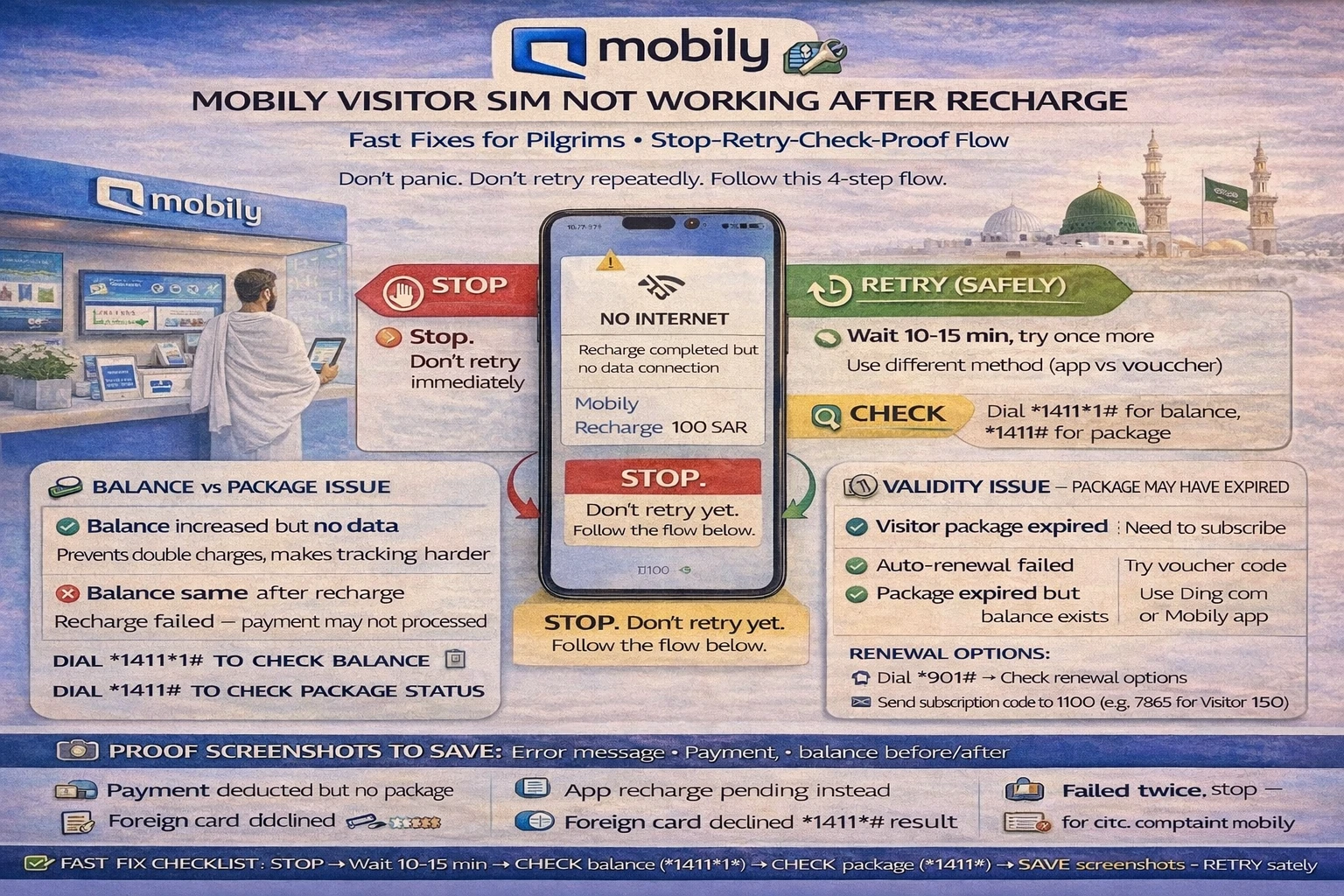
Mobily visitor sim not working after recharge: fast fixes for pilgrims
You recharge. The payment goes through. Then your phone still acts dead.
That moment feels worse during Umrah, because you don’t just “lose internet.” You lose maps, ride apps, hotel calls, and family contact.
mobily visitor sim not working after recharge usually comes down to one of a few simple problems: the balance increased but no package started, the package started but your phone is still on the wrong setting, or the line/package validity already ended. The mistake most people make is panic-retrying and getting charged twice.
Don’t do that.
The safest method is: stop → check → save proof → retry once.
✅ TL;DR – mobily visitor sim not working after recharge
If your Mobily line stops working after a recharge, don’t keep retrying. First check if the recharge added balance, then check if the package actually activated, and then check validity. Save proof screenshots before any second try. That one habit can prevent double charging and makes support much faster.
First checks
First checks should take two minutes, and they solve a lot of cases. The quick answer is simple: restart the phone, confirm signal, and check whether the recharge changed your line status or just added credit.
Think of recharge like filling a water tank. Adding water is one step. Opening the tap is another. Many pilgrims do the first step only.
Start here, in this order:
- Restart your phone (quick network refresh)
- Check signal bars (make sure the line is actually connected)
- Turn off Wi-Fi (so you test mobile data, not hotel Wi-Fi)
- Check your Mobily balance/package status
If the line has signal but no internet, don’t assume the recharge failed. It may be a mobily package not activated after recharge issue, not a payment issue.
Micro-scenario: a pilgrim tops up in the lobby and sees “successful payment” in the app, but YouTube still doesn’t load. He buys another top-up right away. Later he learns the first recharge added balance only; no package was selected yet. That second charge was avoidable.
Use your internal guide for a quick Mobily balance check before doing anything else. This is the cleanest first move.
Balance vs package issue
Balance vs package issue is the most common reason behind mobily recharge done but no data. A recharge can add credit to the line but still not start a data/calls bundle. That means your money is on the SIM, but your package is not active yet.
This confuses people because “recharged” sounds like “internet should work now.” Not always.
Here’s the simple difference:
Balance problem: recharge did not reflect (or is pending), so your line credit didn’t change.
Package problem: recharge reflected, but no bundle started, so the SIM has credit but no active data package.
That’s why mobily data not added after recharge can happen even when the payment was real.
📦 Fast check box: what kind of problem is it?
If balance increased but data still fails: likely a package status issue (bundle not active yet).
If balance did not increase: likely a voucher/payment issue, delay, or pending charge.
If calls work but internet fails: the line may be active, but the right data package is missing or expired.
For pilgrims, this matters a lot because one phone often handles family maps and ride bookings. If that phone has only credit but no package, it looks like the whole SIM is broken.
It’s not always broken. Sometimes it just needs the right package step.
If your readers need the actual top-up path again (voucher or card flow), link them naturally to your Mobily recharge guide so they don’t guess commands or repeat the wrong method.
Validity issue
Validity issue is the second big reason for mobily no internet after recharge. Pilgrims often focus only on data size, but the line/package validity is what quietly causes the problem, especially near the end of the trip.
Here’s the thing, a recharge does not magically fix every expiry problem.
You can add money and still have no usable package if the old package expired and a new one was not started.
This shows up a lot on longer Umrah stays. Someone buys a visitor package at arrival, forgets the validity window, then later recharges and expects the old benefits to continue.
Micro-scenario: your family reaches Madinah after a few busy days in Makkah. The line still has some credit, but the package validity ended yesterday. Calls may behave differently, and data stops. You recharge in a hurry, but you still need to start a valid package again.
For mobily pilgrim sim recharge issue cases, always ask these two questions:
1) Did the recharge add credit?
2) Is there an active package right now?
If the answer to #1 is yes and #2 is no, the problem is not “Mobily stole my recharge.” It’s usually a package/validity step.
I used to see beginners skip this check and spend more money than needed. They were topping up the line again and again when the real fix was choosing the right active package once.
Safe retry rules
Safe retry rules are what protect you from double charging. The quick answer: don’t retry blindly, don’t stack recharges, and don’t keep changing methods all at once.
This section is the heart of the mobily top-up failed guide style flow.
Follow this stop-retry-check-proof method:
- Stop: Do not retry immediately after the first failed-looking result
- Check: Confirm balance, package status, and signal/data settings
- Proof: Save screenshots and payment details before a second attempt
- Retry once: Use one clear method only (not app + voucher + card together)
Why this works: many recharge problems are not “failed payment” problems. They are delayed updates, package-selection issues, or line-setting issues. If you keep retrying, you create a second problem: duplicate charges.
One-sentence rule:
No second recharge until you have proof of what the first one did.
For mobily app recharge pending but charged card situations, don’t keep tapping “pay” again. Wait a short while, check line status, and save the transaction screen first.
If you use a voucher, also confirm the voucher number was entered correctly before trying another card or another voucher. Mixed methods create confusion later when support asks what happened.
And if your phone is a family hotspot device, test the data on the main phone itself first. Don’t test only on connected family phones. Otherwise, you may think the recharge failed when the hotspot setting is the real issue.
Proof screenshots
Proof screenshots make support much faster. This is the part most people ignore, then regret when they contact support and can’t show what happened.
Save proof before you retry anything.
Not after.
For a clean mobily visitor recharge fix process, collect these proof items the moment you notice the issue:
Payment proof: app payment screen, bank card charge screen, or voucher purchase proof
Time stamp: screenshot showing the time/date of the recharge
Line status proof: balance/package screen or code result
Error proof: screenshot of “pending,” failure message, or no-data issue
This is especially useful for mobily recharge deducted twice visitor sim issue complaints. Support teams move faster when the timeline is clear.
🧾 Pilgrim proof box (save these before support)
Screenshot 1: Recharge success / pending screen
Screenshot 2: Bank/app card debit proof (if card charged)
Screenshot 3: Current balance or package status
Screenshot 4: Error message / no-data symptom (optional but helpful)
Small human tip: make one album in your phone called “Mobily issue.” It sounds silly, but when you’re traveling, screenshots get buried under family photos fast.
Support and escalation
Support and escalation should be the final step, not the first. Once you’ve checked balance, package status, validity, and saved proof, support can usually help much faster.
For most pilgrims, this is the best support order:
1) Self-check first: balance + package + validity + settings
2) Mobily support: contact support with screenshots ready
3) Escalation path: use formal complaint route only if the issue stays unresolved
This keeps your mobily recharge problem saudi case clean and easy to explain.
When talking to support, use simple wording: “Recharge was done at [time]. Card/voucher proof is ready. Balance/package did not update correctly. I have screenshots.”
That sentence works better than a long angry story.
If your readers need a step-by-step support fallback, naturally link your existing CST complaint guide for Mobily issues after support attempts. It’s a good backup for unresolved billing or service problems.
And if the issue started right after a fresh setup, point them back to your pillar and activation content too. Many “recharge problems” are actually setup problems that only show up after top-up.
Final pilgrim rule: protect your money first, then retry. A calm check is faster than three rushed top-ups.
📊 mobily visitor sim not working after recharge: stop-check-proof table
Use this table to quickly spot what kind of recharge problem you have before retrying.
| What you see | Most likely issue | Best next step |
|---|---|---|
| Card charged but no data | Balance added but package not active | Check package status before any second recharge |
| Voucher used but nothing changed | Voucher entry error or delayed reflection | Save proof, recheck balance, retry once only |
| Calls work, internet does not | No active data package / expired validity | Check validity + active bundle status |
| App says pending | Processing delay | Wait briefly, save screenshots, then check line status |
| No service after top-up | Line/settings/network issue (not just recharge) | Restart phone, reinsert SIM, test signal/settings first |
| Family hotspot still dead | Main phone data/hotspot settings issue | Test data on main phone before blaming recharge |
📘 mobily visitor sim not working after recharge FAQs
why is my mobily visitor sim not working after recharge?
Show Answer
Most cases are one of three things: balance was added but no package activated, the package expired (validity issue), or the phone still has a data/settings problem.
mobily recharge successful but no internet on visitor sim — what should i check first?
Show Answer
First check if the recharge increased your balance. Then check if a package is active. Many pilgrims recharge credit but forget the package step.
should i retry mobily recharge immediately if no data appears?
Show Answer
No. Don’t retry right away. Use a stop-check-proof flow first so you don’t get charged twice.
how do i know if it is a balance issue or a package issue?
Show Answer
If your balance increased but internet still fails, it’s usually a package status issue. If balance did not increase, it may be a voucher/payment problem or pending charge.
what if mobily app says recharge pending but my card was charged?
Show Answer
Save screenshots first, wait briefly, then check balance and package status. Don’t tap pay again until you confirm what happened to the first charge.
can validity expiry cause no internet even after recharge?
Show Answer
Yes. If your old package expired, a new recharge may add credit but still not restore data until a valid package is active again.
what proof screenshots should i save for a recharge problem?
Show Answer
Save the payment result, bank/voucher proof, time/date, and your current balance/package status. These make support much faster.
my family hotspot phone has no internet after top-up. is it a recharge issue?
Show Answer
Not always. Test internet on the main phone first. If the phone itself has data, the issue may be the hotspot setting, not the recharge.
how can i check mobily balance/package status after recharge?
Show Answer
Use your saved Mobily balance check guide first. It helps you confirm what changed before you retry anything.
what if my mobily voucher recharge is not reflecting?
Show Answer
Double-check the voucher entry, save proof, and check balance before retrying. Don’t switch to a card payment immediately or you may create a duplicate-charge mess.
when should i contact mobily support for a top-up issue?
Show Answer
After you’ve checked balance, package status, validity, and phone settings—and after you’ve saved screenshots. Support is much faster when you provide proof clearly.
what if mobily support does not solve the recharge issue?
Show Answer
Keep your proof and use your CST complaint guide for Mobily for the formal escalation path in Saudi.
You Can Also read
- mobily visitor sim umrah guide saudi
- Mobily visitors package vs regular prepaid umrah
- Best mobily visitor package for 7 days umrah
- Best mobily visitor package 14 30 days saudi
- How to activate mobily visitor sim step by step

Farrukh Farooqi has been living in Sharaya, Makkah, Saudi Arabia since 2010. With over 14 years of firsthand experience witnessing the sacred journey of millions of pilgrims, Farrukh specializes in providing practical, insider tips for Hajj and Umrah travelers. His work blends real-world observations, the latest Saudi updates, and essential crowd management strategies — helping pilgrims and worshippers plan smarter, stay safer, and experience a spiritually fulfilling journey across the Holy Cities.


