
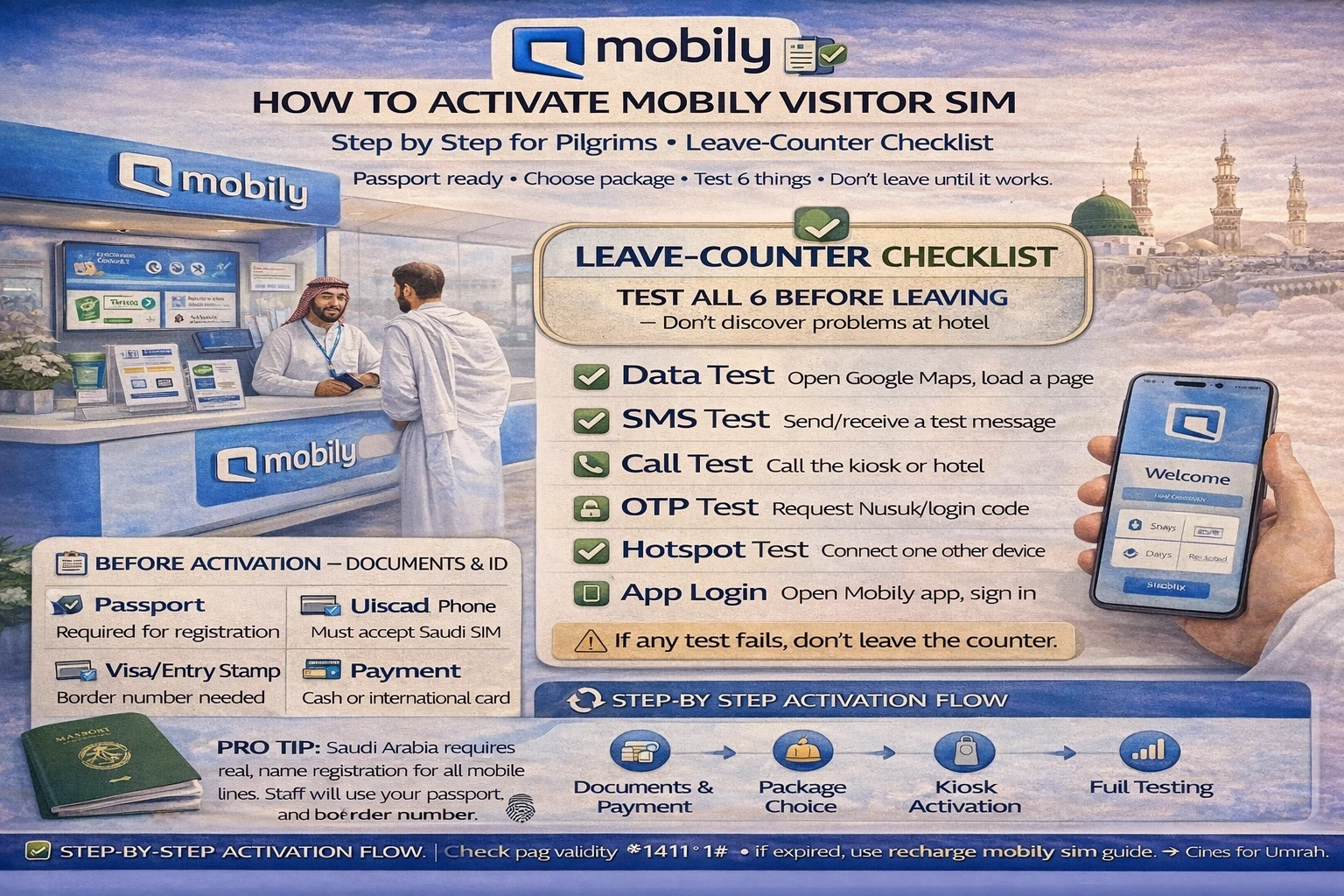
How to activate mobily visitor sim step by step for pilgrims (easy checklist)
You can buy a SIM in five minutes and still walk away with a problem.
That’s the part most first-time pilgrims don’t expect.
How to activate mobily visitor sim step by step is not just “buy SIM, insert, done.” The real job is making sure the line actually works for data, SMS, and app logins before you leave the counter. If you skip that, the trouble usually shows up later—outside the hotel, while booking a taxi, or when Nusuk sends an OTP.
I’ve seen this a lot with new travelers. They hear “activated,” smile, and leave. Then one hour later they’re saying, “Calls work, but internet doesn’t,” or “Data works, but no SMS code is coming.”
This guide keeps it simple and calm.
✅ TL;DR – how to activate mobily visitor sim step by step
For smooth mobily visitor sim activation, keep your passport ready, confirm the line is active, then test data + SMS before leaving the counter. Most pilgrim problems happen because the SIM is inserted but not fully tested. Do the “leave-counter checklist” and you avoid most issues.
Before activation
Before activation, the quick answer is this: decide your setup first, then buy. Pilgrims save the most time when they know if they want eSIM or physical SIM, which phone will be the main travel phone, and who in the family needs help.
Think of SIM setup like wudu before prayer.
You can rush it, but if one step is missing, you feel the problem later.
For a clean mobily pilgrim sim setup, do these simple things before you reach the kiosk or shop:
- Charge your phone (at least 40%)
- Keep your passport in hand (not buried in luggage)
- Unlock your phone if it is carrier-locked from your home country
- Decide eSIM or physical SIM before the staff starts
- Choose one main phone if traveling as a family
That last point matters more than people think. In many Umrah trips, one person becomes the “tech person” for maps, taxi apps, hotel calls, and OTP messages. That phone should get the strongest setup and full testing.
Micro-scenario: you arrive tired, everyone is waiting, and the counter is busy. If you haven’t already decided physical SIM vs eSIM, people start guessing. That’s where mistakes begin.
Documents and ID
Documents and ID are the center of mobily sim registration saudi for visitors. The main rule is simple: the line must be registered properly to the traveler using the SIM. Don’t treat this like buying a snack.
For most pilgrims, the key document is the passport.
Your visa status and entry details may also be checked during the process depending on the channel (airport kiosk, shop, or system flow). That’s normal. Just keep your travel documents easy to reach so the process stays smooth.
Here’s what to keep ready for activate mobily sim for tourists steps:
Passport: the main ID used for visitor registration.
Phone in your hand: not in a family bag, because you may need to test it immediately.
Your travel number or contact backup: useful if you need to receive or confirm something later.
A common beginner issue: a family member tries to handle everything for an elder pilgrim while the elder’s phone is switched off or in another bag. The registration may finish, but testing gets delayed and confusion starts.
If you’re helping parents or elders, keep their phone unlocked and ready right there at the counter.
Another thing people forget: names on bookings and names on documents can be spelled differently in English. Stay calm and let the staff follow the passport spelling. Don’t argue from memory.
It sounds small, but it prevents delays.
eSIM vs physical activation
eSIM vs physical activation is where many pilgrims pause. The quick answer: both can work, but physical SIM is often easier for first-time travelers, while eSIM is great if your phone supports it and you’re comfortable with setup screens.
This is the core mobily new sim setup decision.
For mobily airport sim activation, physical SIM is usually the simplest path when you’re tired, crowded, or helping family. The staff inserts it, you see signal, and testing is easier on the spot.
eSIM can be very clean too, especially if you want to keep your home SIM active in the same phone. But don’t choose eSIM just because it sounds modern. Choose it if your phone supports it and you know how to switch lines and data settings.
I used to mix this up when explaining to beginners: “supported” and “enabled” are not the same thing. Some phones support eSIM, but the user has never opened those settings before.
H3: Physical SIM activation (pilgrim-friendly flow)
For mobily visitor line activation with a physical SIM, the flow is usually simple:
1) Staff registers the line with your documents.
2) SIM is inserted into your phone.
3) Signal appears.
4) You test calls, SMS, and data.
Do not stop at step 3. Signal bars only mean the phone sees a network. It does not prove your full setup is ready for OTPs or internet use.
H3: eSIM activation (when you want less plastic, more setup control)
For mobily esim activation steps for visitors, the usual flow is similar, but the phone setup part needs more attention:
1) Line registration is done with your documents.
2) You scan or install the eSIM profile.
3) You confirm the eSIM line is active.
4) You set the correct line for mobile data and, if needed, calls/SMS.
5) You test internet + OTP/SMS before leaving.
Micro-scenario: eSIM installs correctly, but your home SIM is still selected for data. The new Mobily line looks “active,” but no local internet works. This is one of the most common silent mistakes.
For pilgrims, the safest rule is: after eSIM setup, open your phone settings and double-check which line is selected for data.
Data/SMS tests
Data/SMS tests are the most important part of mobily sim activation checklist. If you remember only one thing from this article, remember this: don’t leave the counter until both data and SMS are tested.
This is your “leave-counter test checklist.”
And yes, it matters even if the staff says, “It’s activated.”
For pilgrims, I suggest this exact order because it catches problems fast:
- Check signal appears on the Mobily line.
- Turn off Wi-Fi for one minute (so you test real mobile data, not hotel/airport Wi-Fi).
- Open a simple website or map app using mobile data.
- Send one SMS if possible (or confirm SMS receive works).
- Test an OTP-use app (for many pilgrims, this means a quick Nusuk-related test later the same day).
- Check balance / line status before walking away.
That’s the real how to test mobily data and sms after activation flow.
One-sentence warning:
Wi-Fi can hide a bad SIM setup.
I say this because people test WhatsApp while airport Wi-Fi is still on, and they think everything is fine. Then outside, nothing works.
After activation, it also helps to save your support pages right away. Your readers can use your Mobily balance check guide to confirm usage and line status quickly, especially in the first 24 hours.
H3: A short story of a beginner mistake (and the simple fix)
A pilgrim family once bought two SIMs at the airport and left in a hurry because the kids were tired.
At the hotel, one phone could call but couldn’t get app codes. The other had internet only when Wi-Fi was on.
They thought Mobily “didn’t work,” but the problem was simpler: one line wasn’t fully tested, and the other phone was still using the wrong SIM for data.
We walked through the checks: data line selection, SMS test, and a quick balance/status check.
Ten minutes later, both phones were working. The issue wasn’t the network. It was the missing test at the counter.
App setup
App setup is where your new line becomes useful. The quick answer is to set up your core travel apps right after mobily sim setup umrah, not later when you’re already outside and moving.
Do the basics while you still have time and a place to sit.
For pilgrims, the core app setup usually includes:
Maps app: confirm location and route search work on mobile data.
Taxi app: sign in and check OTP receipt if needed.
Nusuk: make sure your phone can receive login/verification messages if the app asks.
WhatsApp: send one message on mobile data (not Wi-Fi only).
For a cleaner mobily app setup after sim activation, also save these pages in your browser bookmarks:
• Recharge Mobily SIM in Saudi (for quick top-up help)
• Mobily balance check (to check before recharging)
That tiny habit helps a lot when you’re tired after prayers and don’t want to search again.
If you use eSIM, take one extra minute to label your lines in phone settings (for example: “Mobily KSA” and “Home SIM”). It sounds boring, but it prevents wrong-line mistakes later.
My students always ask about this part: “Do I need the official app now?”
Not always right away. The main thing on day one is working data, working SMS, and a known recharge path. The official app can be set up the same day, but don’t let app setup delay your basic testing.
Common activation problems
Common activation problems are usually small setup mistakes, not big disasters. The trick is to check them in the right order and not panic.
For mobily sim activated but no internet what to do, start with the simple checks first:
Problem 1: Signal shows, but no internet
Fix: Turn off Wi-Fi, then confirm the Mobily line is selected for mobile data (especially on dual-SIM/eSIM phones).
Problem 2: Internet works, but no OTP/SMS arrives
Fix: Confirm the correct line is selected for SMS/calls, check signal strength, and retry after a minute. Some users test only browsing and forget SMS settings.
Problem 3: Family member’s phone still not working
Fix: Check if the SIM was inserted correctly or if the elder’s phone is still locked to another network. This happens more than people admit.
Problem 4: App works on hotel Wi-Fi only
Fix: Turn Wi-Fi off and test again. If the app fails, the mobile data path still needs checking.
Problem 5: You don’t know if the line has balance/benefits
Fix: Check line status first. Your readers can use the Mobily balance check steps so they don’t recharge blindly.
If a problem continues after normal support at the kiosk/shop and customer care, then your Mobily complaint guide (Saudi communications complaint path) is a useful backup. Most people won’t need it, but it’s good to keep the link ready.
H3: Five quirky beginner mistakes (and quick fixes)
Mistake 1: Leaving the counter after seeing signal bars only. Quick fix: Test both data and SMS.
Mistake 2: Testing apps while Wi-Fi is still on. Quick fix: Turn off Wi-Fi for the test.
Mistake 3: Choosing eSIM without knowing how to switch data lines. Quick fix: Use physical SIM or ask staff to confirm data-line settings.
Mistake 4: Family helper registers phones but forgets elder’s device is locked. Quick fix: Check the device can accept local SIM before buying.
Mistake 5: Recharging immediately when something fails. Quick fix: Check settings and line status first; don’t throw money at a setup issue.
Final checklist
Final checklist is your calm ending step for how to activate mobily visitor sim step by step. If you do this before leaving the kiosk or shop, you avoid most pilgrim SIM problems.
This is the beginner-safe close.
📱 Leave-counter activation checklist (pilgrim version)
1) Passport used and line registration completed
2) SIM/eSIM installed and signal appears
3) Wi-Fi turned off and mobile data tested
4) SMS / OTP receive test confirmed
5) Maps / taxi / Nusuk-related login path checked
6) Recharge and balance-check pages bookmarked for later
If you want one simple rule to remember, use this:
Don’t leave with “signal.” Leave with proof.
That one habit makes your mobily visitor sim activation for umrah pilgrims much smoother.
📊 how to activate mobily visitor sim step by step: quick troubleshooting table
Use this if something looks “active” but the phone still fails during setup.
| What you see | Most likely cause | Quick fix |
|---|---|---|
| Signal bars show but no internet | Wrong line selected for mobile data (dual SIM/eSIM) | Turn off Wi-Fi and set Mobily line as data line |
| Internet works but no OTP/SMS | SMS/call line settings not correct or not tested | Confirm line settings and test SMS again before leaving |
| Apps work only on airport/hotel Wi-Fi | Mobile data was never actually tested | Switch Wi-Fi off and retest maps/WhatsApp |
| Elder’s phone doesn’t detect SIM | Device issue or locked phone | Check if phone accepts local SIMs before buying |
| You’re unsure if line is ready for travel day | No balance/status check done | Use a quick balance check before leaving the area |
📘 how to activate mobily visitor sim step by step FAQs
how to activate mobily visitor sim in saudi airport?
Show Answer
Keep your passport ready, let the line be registered, install the SIM/eSIM, then test data and SMS before you leave the airport kiosk. Testing is the step most people skip.
what documents are needed to activate mobily sim for tourists?
Show Answer
The main document is your passport. Keep your phone and travel details handy too, because setup and testing usually happen immediately.
is physical sim or esim better for umrah pilgrims?
Show Answer
Physical SIM is usually easier for first-time pilgrims. eSIM is great if your phone supports it and you know how to manage data-line settings.
how long does mobily visitor sim activation take for tourists?
Show Answer
The purchase and setup can be quick, but don’t measure success by speed. The important part is finishing the data + SMS test before you leave.
how do i test mobily data and sms after activation?
Show Answer
Turn off Wi-Fi, open a site or map on mobile data, then confirm SMS works too. Don’t rely on signal bars alone.
mobily sim activated but no internet what should i do?
Show Answer
First, switch off Wi-Fi. Then check if the Mobily line is selected for mobile data (very common issue on dual-SIM or eSIM phones).
can a family member activate mobily sim for an elder pilgrim?
Show Answer
A family member can help, but keep the elder’s passport and phone ready at the counter so registration and testing can be completed properly.
should i test nusuk otp on the same day as sim activation?
Show Answer
Yes, that’s a smart move. Even if you don’t fully log in there, confirm your phone can receive OTP/SMS on the new line the same day.
what is the best place for activation: airport kiosk or city shop?
Show Answer
Airport kiosks are convenient right after arrival. City shops can be calmer. In both places, the real key is the same: don’t leave before full testing.
what should i do after activation to avoid problems later?
Show Answer
Bookmark your recharge and balance pages, test apps on mobile data, and confirm your phone line settings (especially if using eSIM).
how do i recharge or check balance after activation?
Show Answer
Use your saved guides for Mobily recharge and Mobily balance check so you don’t guess during travel.
what if mobily support does not fix the issue?
Show Answer
If normal support doesn’t solve a serious issue, keep records and use a formal complaint path. Your Mobily complaint guide can help readers follow the right steps.
You Can Also read
- mobily visitor sim umrah guide saudi
- Mobily visitors package vs regular prepaid umrah
- Best mobily visitor package for 7 days umrah
- Best mobily visitor package 14 30 days saudi

Farrukh Farooqi has been living in Sharaya, Makkah, Saudi Arabia since 2010. With over 14 years of firsthand experience witnessing the sacred journey of millions of pilgrims, Farrukh specializes in providing practical, insider tips for Hajj and Umrah travelers. His work blends real-world observations, the latest Saudi updates, and essential crowd management strategies — helping pilgrims and worshippers plan smarter, stay safer, and experience a spiritually fulfilling journey across the Holy Cities.


