
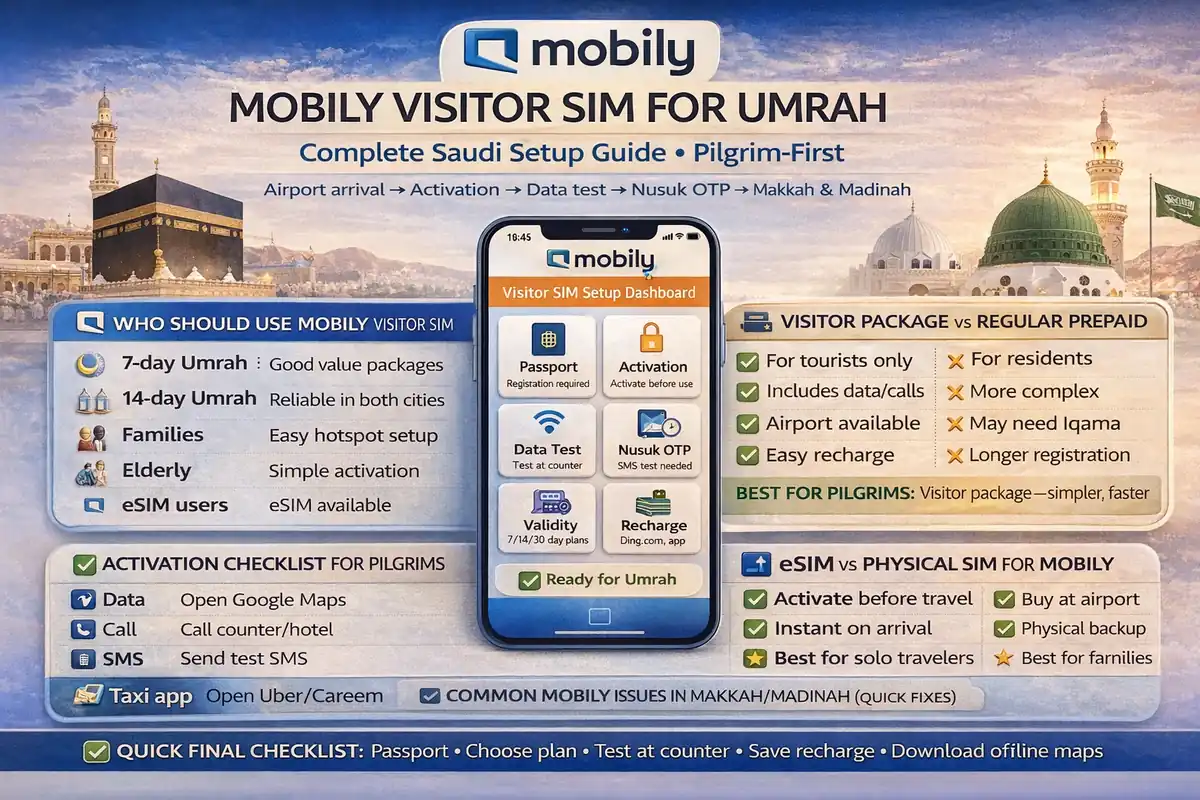
Mobily visitor sim umrah guide saudi: complete setup for pilgrims (simple and safe)
If you land in Saudi tired, hungry, and trying to open the Nusuk app, your phone setup suddenly becomes a big deal.
That’s why this guide exists.
A Mobily line can work very well for Umrah, but most problems happen in the first few hours: wrong SIM selected for data, no SMS test, no OTP, or a package that wasn’t activated the way you thought.
This mobily visitor sim umrah guide saudi is written for real pilgrims and families, not generic telecom browsing. We’ll go step by step so your mobily visitor sim saudi setup is calm, clean, and ready before the busy days in Makkah and Madinah.
✅ TL;DR – mobily visitor sim umrah guide saudi
Mobily Visitor SIM can work well for Umrah pilgrims if you choose the right plan length, complete activation correctly, and test data and SMS before leaving the shop or airport counter. Most issues happen on day one, so a simple setup checklist saves time, stress, and failed app logins later.
who should use mobily visitor sim
Who should use Mobily Visitor SIM: It’s a strong fit for short-stay visitors and pilgrims who want a local Saudi number, local data, and easier local recharge options during Umrah. It’s especially helpful if you’ll use maps, ride apps, hotel calls, and the Nusuk app often.
Think of a local visitor line like buying local water after a long flight. Yes, roaming may work, but a local setup is usually simpler once you’re moving between airport, hotel, and Haram areas.
A mobily umrah sim is usually a good match if you are:
- A visitor staying about 1–3 weeks
- Using a phone that supports Saudi SIMs or eSIM
- Needing regular OTP messages and app logins
- Traveling with family and want one local line for hotspot backup
It can also suit elderly travelers if one family member sets it up well on day one. I’ve seen this many times: the issue is not the network itself, it’s a rushed setup at the counter while everyone is carrying bags.
If your trip is very short and your roaming package is already excellent, roaming may still be enough. But for many pilgrims, a mobily tourist sim saudi line gives more control over validity, local top-ups, and troubleshooting.
And yes, a lot of people search saudi mobily pilgrim sim because they want a pilgrim-friendly answer, not telecom jargon. That’s exactly what this guide is for.
visitor package vs regular prepaid
Visitor package vs regular prepaid: For most pilgrims, a visitor SIM package is the cleaner start because it is made for visitors and short stays. Regular prepaid can still work, but it usually needs more package decisions and can confuse first-time travelers.
This is where many beginners get lost.
They buy a line, add credit, then realize they still need to buy a separate bundle.
Mobily officially offers Visitors Packages for visitors and pilgrims, and the packages are built around short stay periods (for example, the official visitor pages show 14-day, 21-day, and 30-day options on different visitor plans). That makes them easier for Umrah planning than random prepaid mixing.
Use this simple rule:
Visitor package = easier for short trips and less thinking.
Regular prepaid = flexible, but easier to mess up if you’re new.
A common beginner mistake is confusing “line credit” with “internet package.” It’s like putting money in your wallet but not buying the ticket yet. You still need the correct package attached to the line.
If you want help later with top-ups, save this page for your readers too: how to recharge Mobily SIM in Saudi. It fits naturally with a mobily visitor package umrah setup because top-up confusion is very common after day 2 or day 3.
esim vs physical sim
eSIM vs physical SIM: Both can work for Umrah. The better choice depends on your phone and your comfort level. eSIM is cleaner if your device supports it and you want to keep your home SIM active. A physical SIM is simpler if you prefer something familiar and easy to swap.
Here’s a real-life way to think about it.
eSIM is like a built-in digital key. Physical SIM is like a small card key. Both open the same door if set up correctly.
Mobily officially supports eSIM for compatible devices, and the official steps mention getting a new eSIM line through the Mobily app or website and receiving the QR after payment. That can be very useful for pilgrims who want to keep their home line in the phone for WhatsApp while using a Saudi line for data.
Choose eSIM if:
- Your phone supports eSIM
- You want your home SIM to remain active in the other slot/profile
- You are comfortable following app or QR-based setup steps
Choose physical SIM if:
- Your phone does not support eSIM
- You want a very familiar setup
- You prefer a shop agent to help insert and test it
Micro-scenario: a pilgrim buys a Saudi line but forgets to switch mobile data to the new line. The package is active, but the phone still uses the home SIM. It looks like “network problem,” but it’s really a settings problem.
Quirky beginner mistake #1: Buying eSIM without checking phone support first.
Quick fix: Confirm your device supports eSIM before you pay.
activation checklist for pilgrims
Activation checklist for pilgrims: Do not leave the counter or shop until your mobily sim activation visitor setup is fully tested. A rushed activation is the number one reason pilgrims struggle later with OTP, data, and app logins.
This section saves you from the “it worked in the shop but not in the hotel” problem.
For a proper mobily saudi visitor setup, use this order:
- Passport check and line registration – make sure the line is registered correctly to the traveler.
- Package confirmation – confirm which visitor package was added and its validity.
- SIM/eSIM installed – confirm the line appears in phone settings.
- Mobile data ON – and set the Mobily line as the active data line.
- SMS test – send or receive one message if possible.
- Call test – even a short local test helps.
- App login – install/open the Mobily app and sign in if you can.
If you’re using dual SIM, label your lines in the phone settings (for example: “Home” and “Saudi Mobily”). This sounds small, but it prevents a lot of wrong-line mistakes when you are tired.
One more thing people forget: ask the seller to show your package validity period clearly. Not because the network is bad—just because travel days pass quickly, and pilgrims often remember to top up only after the package ends.
If your readers later need a quick way to check their remaining credit, this internal guide fits naturally here: Mobily balance check methods. It helps beginners confirm whether they have balance but no package, or no balance at all.
day-one tests (data, sms, otp)
Day-one tests (data, SMS, OTP): Before you get to the hotel and rest, test three things: data, SMS, and a real OTP login. If these three work on day one, your Umrah phone setup usually stays smooth.
Most people test only internet.
Then they discover the SMS/OTP issue later when they urgently need an app login.
Use this day-one test flow for your mobily internet for umrah setup:
- Test mobile data: Turn off Wi-Fi and open a map or website
- Test SMS: Send/receive a normal SMS if possible
- Test OTP: Try one real app login that sends a code (for example, an app you actually need during travel)
- Test hotspot: If you’re the family “main phone,” test hotspot for one other device
Why this matters: a line can have working data but still give trouble with SMS or OTP. That’s why the full test matters.
Micro-scenario: you reach the hotel, connect to Wi-Fi, and think your SIM is perfect. Next morning outside, hotel Wi-Fi is gone, maps are slow, and your ride app asks for OTP. Now you’re troubleshooting in a crowd. Better to test all three on day one.
If you hit a mobily nusuk otp issue fix situation, keep it simple first:
Check mobile signal, confirm the Saudi line is the active SMS line (if your phone has that setting), turn off Wi-Fi briefly to avoid app confusion, and retry once. If it still fails, verify your line is active and package/service status is normal in the app.
Quirky beginner mistake #2: Testing only on hotel Wi-Fi and assuming SIM data works.
Quick fix: Turn Wi-Fi off and test with mobile data only.
Quirky beginner mistake #3: Family head uses the Saudi line for hotspot but never tests hotspot before leaving the room.
Quick fix: Test one hotspot connection on day one.
best setup for 7-day vs 14-day umrah
Best setup for 7-day vs 14-day Umrah: Pick your mobily visitor package umrah plan by trip length, not by the biggest number on the ad. Most pilgrims do better with a package that matches their stay and a simple backup top-up plan.
Bigger is not always better.
Right-sized is better.
For a mobily visitor package for 7 day umrah trip, the practical goal is enough data for maps, ride apps, messaging, and a little browsing. You usually don’t need a giant package unless you stream videos a lot or share hotspot all day with multiple people.
For a mobily visitor package for 14 day umrah trip, plan for more normal daily use plus “busy day” spikes: navigation, frequent messaging, app logins, and some waiting-time use in hotels or transport.
A simple pilgrim-first setup by trip type:
7-day traveler
Choose a visitor package that covers your whole stay comfortably and test top-up options once. Keep one backup recharge method ready. Avoid overbuying unless you know you stream a lot.
14-day traveler
Choose a visitor package with room for longer use or plan one mid-trip recharge. Save your package validity date in notes or calendar so you’re not surprised.
Family trip
It may be easier to keep one strong line for hotspot and one backup line, instead of trying to manage every person’s phone the same way. But test hotspot early so nobody gets stuck later.
This is where many pilgrims make a quiet mistake: they plan package size, but not recharge backup. A better mobily visitor sim setup for pilgrims includes both.
common mobily issues in makkah/madinah
Common Mobily issues in Makkah/Madinah: The most common problems are not mysterious. They’re usually one of these: package expired, wrong SIM selected for data, weak indoor signal in a specific building, or a top-up/payment issue. Start with simple checks before assuming a major network problem.
Busy places can also feel different hour to hour.
So don’t panic at the first slow moment.
For a mobily sim makkah madinah setup, these are the usual issue patterns:
- Data feels slow in crowded times – check whether it’s temporary congestion or your package is nearly used up
- No internet after top-up – top-up may have added balance but not a data bundle
- Indoor signal is weak – move near a window/lobby and test again before filing a complaint
- OTP not arriving – test SMS, line settings, and signal first
For a mobily data not working in makkah fix case, use this order: check package status → check mobile data line selection → restart data toggle → test outside Wi-Fi → test another location.
One longer story because it happens all the time: a pilgrim told me his mobily sim for pilgrims stopped working in Makkah. He was ready to buy another SIM. We checked his phone and found the package had ended the night before, and the phone had switched back to his home eSIM for data. Two tiny settings problems, not a network disaster. He topped up, selected the right line, and it worked again in minutes.
If the issue is a real service problem and support does not solve it, you can point readers to your complaint guide naturally here: Mobily telecom complaint steps in Saudi (CST/CITC guide). That gives them a clean path instead of random advice from social media.
validity and recharge planning
Validity and recharge planning: Don’t just buy a package and forget it. Track the package validity, keep one backup recharge method, and check your balance every few days. This is the easiest way to avoid “my internet died” surprises during Umrah.
This section looks basic, but it saves headaches.
Mobily officially provides multiple recharge/payment methods (including app-based methods and other channels like IVR and bank/SADAD options on their official recharge information pages), which is good for travelers because one method may fail while another works.
For mobily line validity for visitors, use this easy habit:
- Save the package end date the same day you activate it
- Check balance after any top-up
- Confirm package activation after top-up (not just credit added)
- Keep one backup top-up route (app + another method)
mobily foreign card recharge issue can happen to some travelers. If your foreign card fails in the app, don’t keep tapping. Check whether the charge is pending first, then use one backup method (like another official recharge method or a recharge card) instead of repeating the same failed attempt.
Micro-scenario: a traveler’s package expires on the bus ride to Madinah. He has money in his card, but the app payment fails once due to a temporary issue. Because he already knows a backup recharge method, he fixes it quickly instead of losing half a day.
Quirky beginner mistake #4: Adding credit and assuming the internet package renewed automatically.
Quick fix: Confirm package status after every top-up.
family and elderly traveler setup
Family and elderly traveler setup: Keep the phone setup simple. One person should act as the “phone helper” and set up the line labels, data line, and hotspot rules on day one. This helps avoid panic when an elderly traveler needs maps or messages later.
Family travel is where good setup really shows.
Because one mistake can affect four people at once.
For a mobily family umrah sim setup, use a calm plan:
- Choose one main phone as the backup hotspot phone
- Label lines clearly (Home / Saudi Mobily)
- Save key app logins and test OTP early
- Teach one simple check: “Is Wi-Fi off? Is Saudi line selected for data?”
Elderly travelers usually do best with fewer moving parts. If they don’t need two lines active, a physical SIM can feel easier. If they do need their home number active, then eSIM can be great—but only if a family member sets it up properly and tests it.
I’ll say something small but very human here: write the top-up steps in your notes app in plain words. When people are tired after long worship days, they forget simple steps they knew in the morning.
Quirky beginner mistake #5: Everyone in the family installs the app and changes settings on the same phone.
Quick fix: Let one person handle setup and keep a simple routine.
quick final checklist
Quick final checklist: Before your first full day in Makkah or Madinah, confirm your mobily visitor sim saudi setup is complete: active package, working data, working SMS, one OTP test, and a backup recharge path. Five minutes now can save a stressful hour later.
If you’re in a hurry, use this exact check:
- SIM/eSIM active and visible in phone settings
- Mobily line selected for mobile data
- Package and validity confirmed
- SMS test done
- OTP test done
- Hotspot tested (if family needs it)
- Backup recharge method ready
That’s the real heart of a good mobily visitor sim umrah guide saudi plan: don’t chase perfect package marketing—build a reliable setup.
When your phone works quietly in the background, your trip feels lighter.
And that’s exactly what most pilgrims want.
📊 mobily visitor sim umrah guide saudi: setup choices table
Use this table to choose the right Mobily Visitor SIM setup style for your trip. It keeps the focus on real pilgrim needs: trip length, eSIM support, OTP, and recharge backup.
📱 Show Mobily Pilgrim Setup Table
| Traveler type | Best SIM type | What to focus on | Common mistake |
|---|---|---|---|
| 7-day pilgrim | Visitor package (eSIM or physical) | Day-one tests + backup recharge | Overbuying package and skipping tests |
| 14-day pilgrim | Visitor package with clear validity | Track expiry date + top-up plan | Forgetting package expiry |
| Family organizer | Main line + hotspot-ready phone | Hotspot, OTP, line labels | No hotspot test before busy day |
| Elderly traveler | Simple setup (often physical SIM) | Keep settings simple and stable | Too many people changing settings |
| Dual-SIM user | eSIM (if supported) | Correct data/SMS line selection | Using home SIM for data by mistake |
FAQs
📘 mobily visitor sim umrah guide saudi FAQs
how to buy mobily visitor sim for umrah in saudi?
Show Answer
Buy it from an official Mobily channel/shop or approved seller, complete passport registration, confirm the visitor package and validity, then test data and SMS before leaving.
mobily sim activation for tourists saudi — what should i check first?
Show Answer
Check that the line is active in your phone settings, the correct package is attached, and the Mobily line is selected for mobile data. Then test SMS and one OTP.
mobily esim for umrah visitors or physical sim — which is better?
Show Answer
eSIM is great if your phone supports it and you want to keep your home SIM active. Physical SIM is easier if you prefer a simple, familiar setup.
best mobily plan for umrah visitors — how should i choose?
Show Answer
Choose by trip length and usage style, not the biggest package. Most pilgrims do better with a visitor package that matches the stay plus one backup recharge method.
mobily visitor package for 7 day umrah — what matters most?
Show Answer
Focus on enough data for maps, ride apps, and messaging, plus easy top-up if needed. Day-one testing matters more than buying the largest package.
mobily visitor package for 14 day umrah — what should i add to my plan?
Show Answer
Track package validity and keep one backup recharge method. Longer trips usually fail because people forget expiry dates, not because the initial setup was bad.
mobily nusuk otp issue fix — what should i test?
Show Answer
Test SMS first, confirm signal is stable, and make sure your Saudi line is the active line for the needed service. Also turn off Wi-Fi briefly and retry the OTP once.
mobily data not working in makkah fix — what is the first check?
Show Answer
First check package status and whether the Mobily line is selected for mobile data. Many “network” problems are actually package expiry or wrong-line settings.
mobily line validity for visitors — how do i avoid surprise expiry?
Show Answer
Save the package end date the day you activate it, and check your package status every few days. Don’t rely on memory during a busy Umrah trip.
mobily app english setup for tourists — do i need the app?
Show Answer
The app is very helpful for checking balance, package status, and recharge. Even if you don’t use it for everything, install it early for troubleshooting.
mobily sim at jeddah airport guide — should i test before leaving the counter?
Show Answer
Yes. Test data, SMS, and one real app login/OTP if possible before leaving. Day-one tests prevent most Umrah phone setup problems.
mobily foreign card recharge issue — what is the safest backup?
Show Answer
If your foreign card fails, don’t repeat the payment quickly. Check whether the charge is pending, then use one backup top-up option (app alternative, official recharge route, or recharge card) and confirm package status.
mobily vs other networks for pilgrims — should i switch if one issue happens?
Show Answer
Not immediately. First check package status, line settings, and top-up status. A lot of problems are setup issues, not a reason to buy a second SIM right away.

Farrukh Farooqi has been living in Sharaya, Makkah, Saudi Arabia since 2010. With over 14 years of firsthand experience witnessing the sacred journey of millions of pilgrims, Farrukh specializes in providing practical, insider tips for Hajj and Umrah travelers. His work blends real-world observations, the latest Saudi updates, and essential crowd management strategies — helping pilgrims and worshippers plan smarter, stay safer, and experience a spiritually fulfilling journey across the Holy Cities.


